English
54
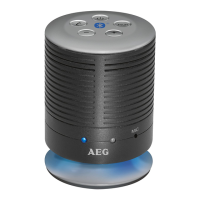
Iftheplaybackdevicewasrecognized,thecontrollight(6)willblinkslowly.Aftersuccessful
registration, the control light (6) will be lit.
NOTE:
• Dependingonthedevicemanufacturer,youneedtoperformtheregistration(PAIR-
ING) again to connect the devices.
• Inthecaseofproblemswiththepairingofaplaybackdevice,deactivatetheWiFi-/
and mobile data function in your playback device.
• TheBluetoothcompatibilitycannotbeensuredfordevices(e.g.mobilephones)get-
ting released in the future.
• Toensureanoptimalconnection,makesurethatthebatteryofyourplayeriscom-
pletely charged.
• Someofthemobilephonebrandshaveanenergy-savingmode.Deactivatethe
energy-saving mode as it can otherwise result in problems during the data transfer
through Bluetooth.
• Tobeabletotransferaudiodata,Bluetoothneedstostayactivatedinyourplayer.
Observe the operation manual of your player.
• Ifamobilephoneonwhichyouareplayingmusicreceivesacall,themusicwillbe
interrupted. Press the
button (10), to accept the call. The sound is replayed by the
loudspeakers. Speak into the microphone on the device or transfer the conversation
to your mobile phone. To do this, observe the overlay in the display of the mobile
phone.Afteryouhaveendedthecall,thedevicesareconnectedtoeachotheragain
and playback continues.
Operation
The device is equipped with multi functional buttons. For different functions press the
respectivebuttonbrieyorpressandhold.
On/Off (1)
• Turnontheloudspeakerbypressingthe
button (1). The control light (6) will start to
blink.
NOTE: Automatic connection
If supported by your player (e.g. mobile phone), the devices will be connected auto-
matically. The prerequisite for this is:
• Thedeviceswerealreadyconnectedwitheachother.
• Bluetoothisactivatedinyourplayer.


 To Next Page