English
48
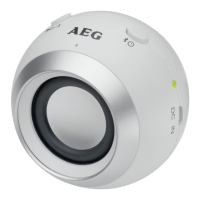
5 Microphone
6 Pause / Accept/end call / calling last number (
/ )
Supplied parts (not shown)
1 Charger cable (Type A USB to Micro-B USB)
Charging the integrated battery
The device is operated via the integrated lithium battery. Charge the battery as follows:
1. Plug the micro B USB plug of the charging cable into the jack (4) of the device.
Connect the USB plug to a powered-on computer. The indicator lamp lights up
red and the battery charges.
2. If the battery is completely charged, the indicator light (2) will turn off.
3. RemovethechargercablefromthespeakerandPC.
CAUTION:
Never leave the unit unattended when it is charging.
NOTE:
• MakesurethattheUSBsocketatthePChasamaximumoutputof5VDC,500
mAonly.ThisalsoapplieswhenusinganexternalUSBpoweradaptor.
• ThebatteryisonlychargedwhilethePCisswitchedon.
• Donotconnecttheplayerforalongperiodoftimetoalaptopcomputerdis-
connected from mains power Otherwise the laptop computer’s battery may be
discharged.
• Thechargingtimevariesaccordingtobatteryuse.
• Shouldyounotusethedeviceforlongerthanhalfayear,chargethebattery
at least every 6 to 12 months. The battery will also constantly discharge when
switched off.
• Ifthebatterychargeisnearingitsend,thechargingindicatorlight(2)willblink
during playback.


 To Next Page