Sensor
Field
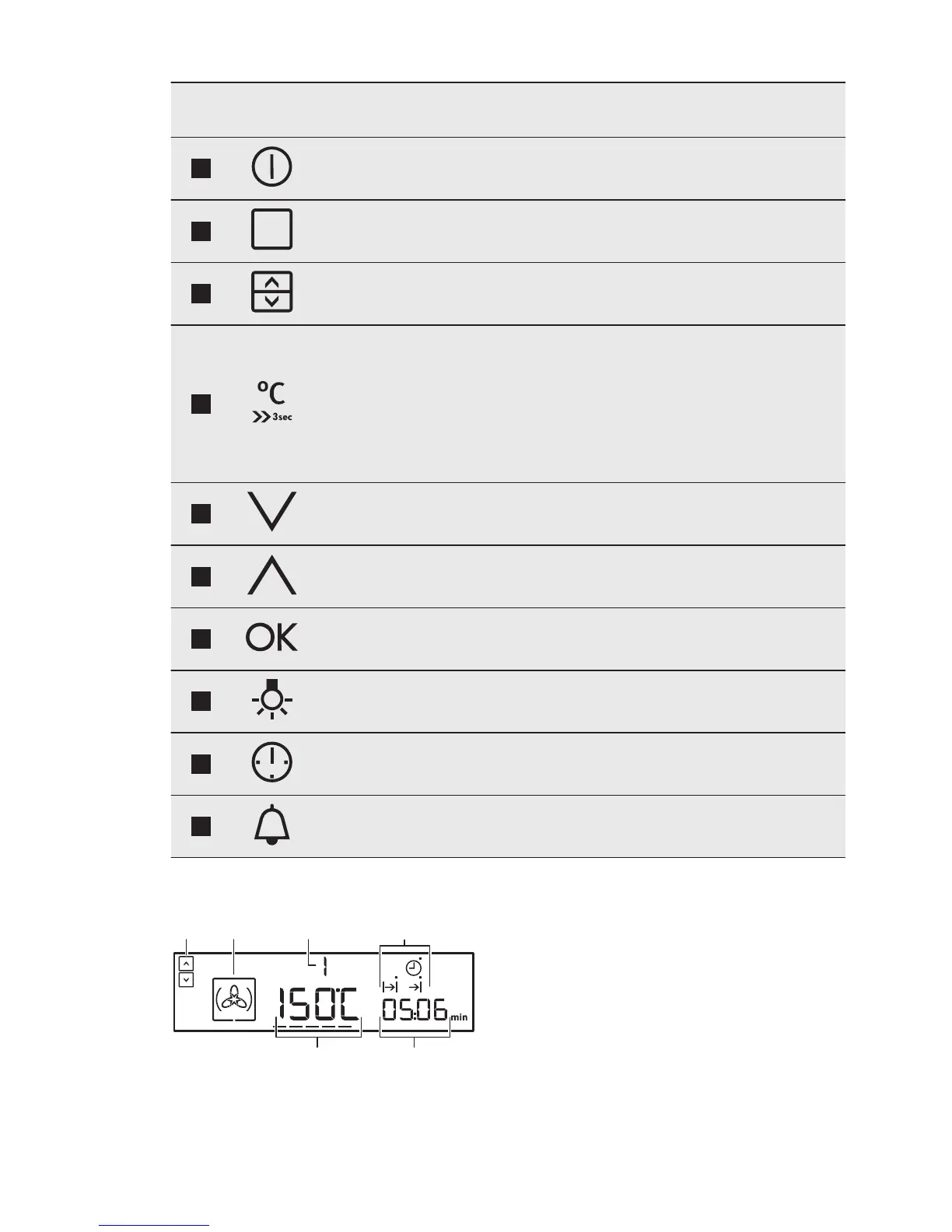
Function Description
2
ON / OFF To activate and deactivate the appliance.
3
OPTIONS To set an oven function or a cleaning function.
4
OVEN SELECTION To switch between top and main oven.
5
TEMPERATURE /
FAST HEAT UP
To set and see the cavity temperature or the
core temperature sensor temperature (if
present). If you press and hold it for three sec-
onds, it turns the Fast heat up function ON or
OFF. Straight access to the temperature setting
of the first oven function when the appliance is
off.
6
DOWN To move down in the menu.
7
UP To move up in the menu.
8
OK To confirm the selection or setting. To move
down in the menu.
9
OVEN LIGHT To activate or deactivate the oven lamp.
10
CLOCK To set the clock functions.
11
MINUTE MINDER To set the Minute Minder.
4.2 Display
A. Top / Main oven indicator
B. Oven function symbol
C. Number of the oven function /
programme
D. Indicators for the clock functions
(refer to the table "Clock functions")
E. Clock / residual heat display
F. Temperature / time of day display
www.aeg.com8


 To Next Page