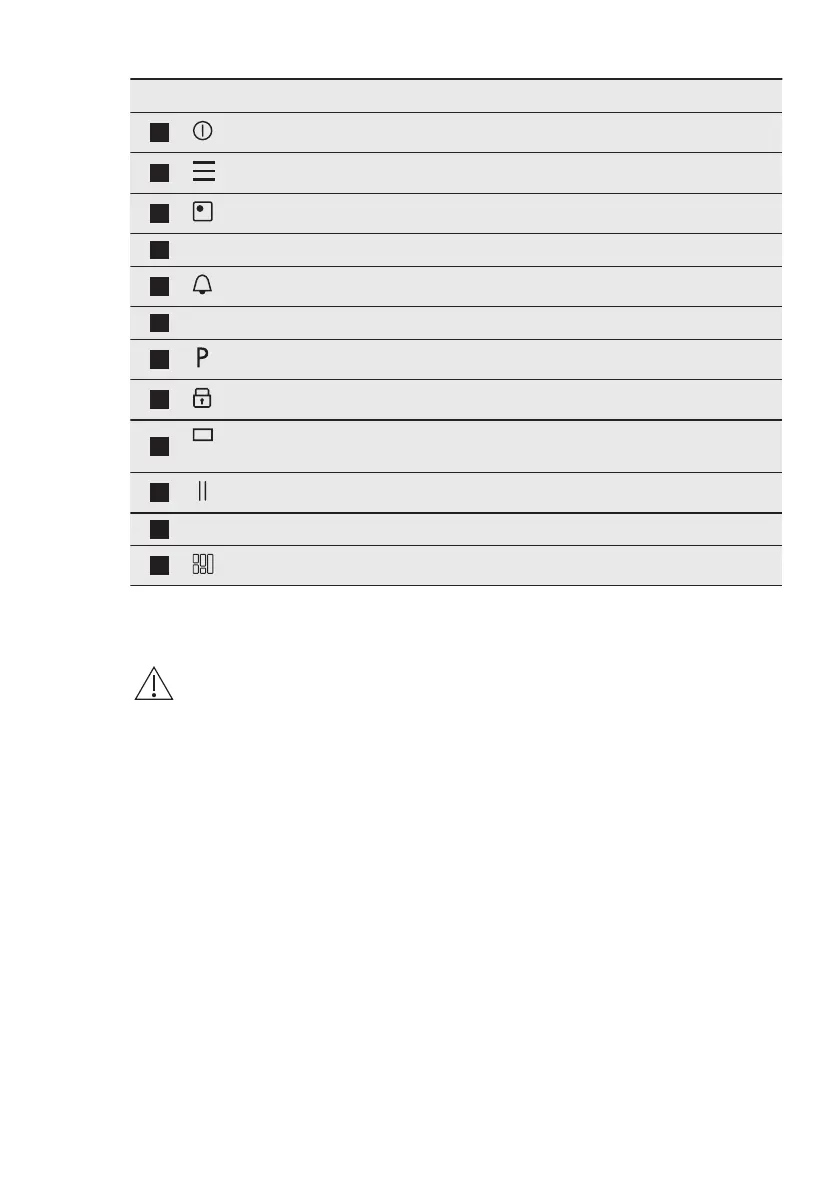
Symbol Comment
1
ON / OFF To activate and deactivate the hob.
2
Menu To open and close the Menu.
3
Zone selection To open the slider for the selected zone.
4
- Zone indicator To show for which zone the slider is active.
5
- To set the timer functions.
6
- Slider To adjust the heat setting.
7
PowerBoost To activate the function.
8
Lock To activate and deactivate the function.
9
- The window of the Hob²Hood infrared signal com-
municator. Do not cover it.
10
Pause To activate and deactivate the function.
11
0 - 9 - To show the current heat setting.
12
FlexiBridge To switch between three modes of the function.
5.3 OptiHeat Control (3 step
Residual heat indicator)
WARNING!
III / II / I There is a risk of
burns from residual heat.
The indicator shows the level
of the residual heat.
The induction cooking zones produce
the heat necessary for the cooking
process directly in the bottom of the
cookware. The glass ceramic is heated by
the heat of the cookware.
6. QUICK GUIDE
6.1 Using the touchscreen
• To activate a given option touch the
relevant symbol on the display.
• The selected function is activated
when you remove the finger from the
display.
• To scroll the available options use a
quick gesture or drag your finger
across the display.
• The speed of the gesture determines
how fast the screen moves.
• The scrolling can stop by itself or you
can stop it immediately if you touch
the display.
• You can change most of the
parameters shown on the display
when you touch the relevant symbols.
• To select the required function or time
you can scroll through the list and/or
touch the option you want to choose.
• When the hob is activated, and some
of the symbols disappear from the
display, touch the display anywhere.
All the symbols come back on.
• For certain functions a pop-up
window with additional information
appears when you start them.
• Only the backlit symbols can be used.
• Select a zone first to activate the timer
functions.
ENGLISH
9



 To Next Page