The power supply cable must be easily
accessible after installing the appliance.
For any electrical work required to install
this appliance, contact our Authorised
Service Centre.
The manufacturer does not accept any
responsibility for damage or injury
through failure to comply with the above
safety precaution.
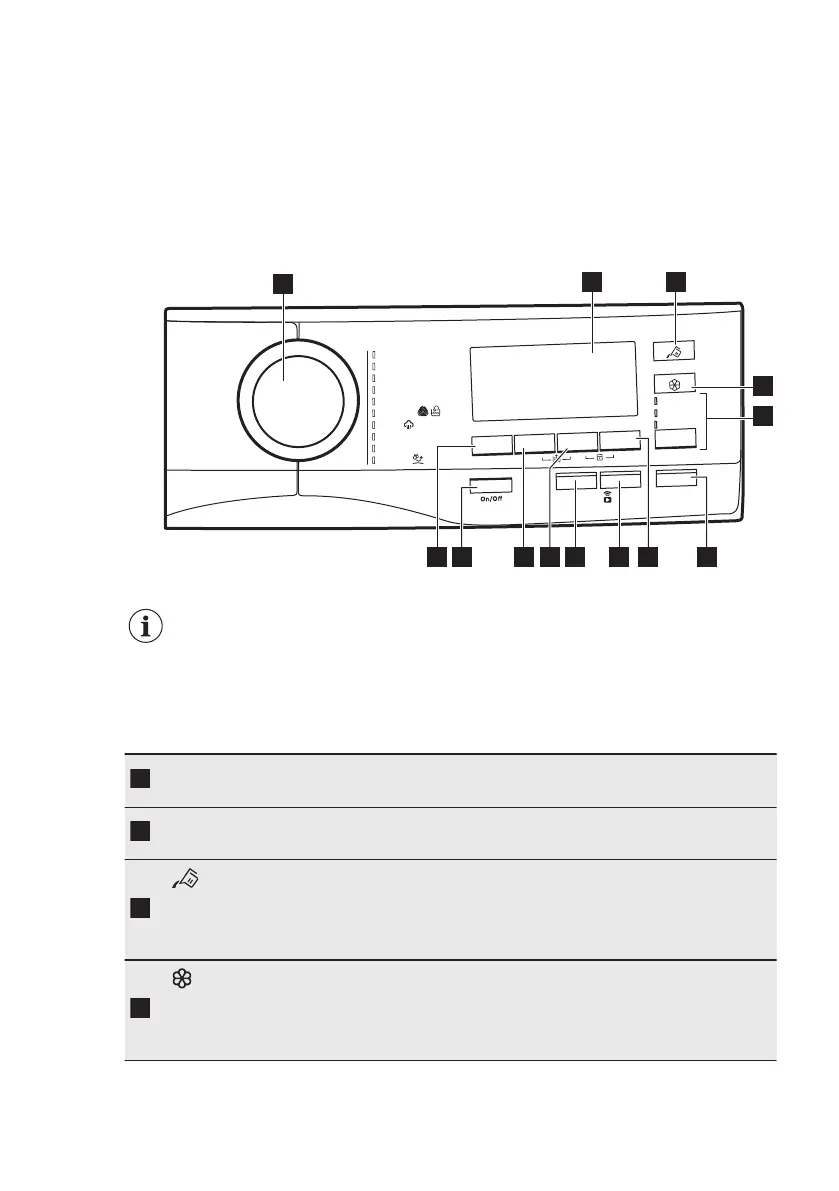
6. CONTROL PANEL
6.1 Control panel description
emmargorP
Eco 40-60
sn
o
ttoC
r
e
w
oP
O
K
O
kliS/looW
m
a
et
S
y
gr
ella-itn
A
roodtuO
gk3 nim02
s
e
t
ac
il
eD
scitehtn
y
S
Plus
S
tea
m
S
t
art / Pa
u
se
Delay
S
t
ar
t
S
p
i
n
/
evisnetnI
Prew
ash
eva
S
emiT
Opti
on
Temp.
ylno ni
a
rD
ylno nipS
R
i
n
se
o
n
l
y
2
3
6
12 11 10 8
1
4
5
7
9
13
The options are not selectable with all washing programmes. Check the
compatibility between options and washing programmes in the "AutoDose
and options compatibility with programmes" paragraph in the
"Programmes" chapter. An option can exclude another one, in this case
the appliance doesn't allow you to set the incompatible options together.
Make sure the screen and touch buttons are always clean and dry.
Programme di‐
al
For selecting the desired washing programme. Refer to "Pro‐
grammes" chapter for more details.
Display
It provides information about the setting programme. Refer to
"Display" paragraph for more details.
AutoDose Liq‐
uid Detergent
touch button
For activating and deactivating the automatic detergent loading.
Refer to "The AutoDose Technology (Autodosing)" chapter for
more details.
AutoDose Fab‐
ric Softener
touch button
For activating and deactivating the automatic fabric softener load‐
ing. Refer to "The AutoDose Technology (Autodosing)" chapter for
more details.
www.aeg.com14


 To Next Page