www.aeg.com4
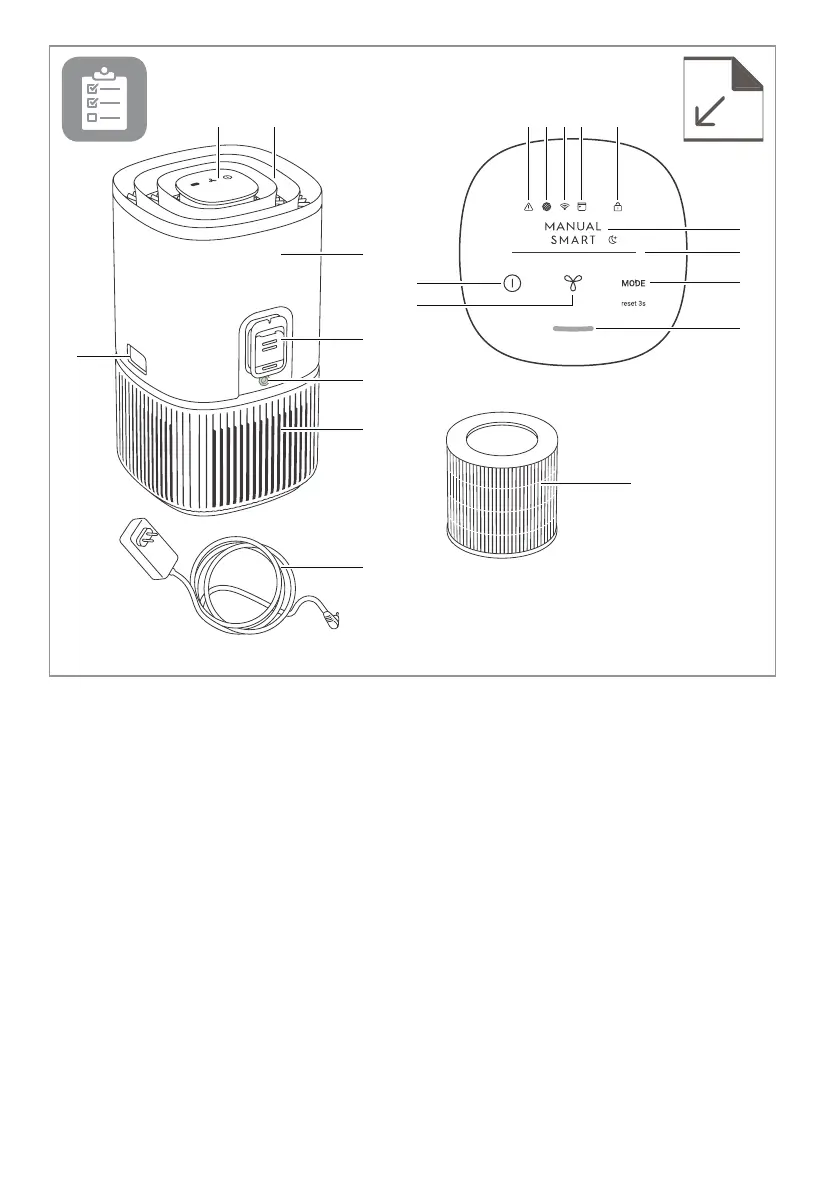
A B M N O P Q
K
J
C
G
H
D
E
L
T
R
S
I
F
Appliance:
A. Control panel display
B. Air flow guide (Air outlet)
C. Release buttons
D. Main body (top)
E. Sensor box
F. Adapter jack
G. Main body (bottom)
H. Power cord
I. Filter (inside)
Control panel:
J. ON/OFF button
K. FAN button
L. MODE button
M. Warning alert icon
N. Filter change icon
O. Wifi icon*
DESCRIPTION OF YOUR AIR PURIFIER
P. Scheduler icon*
Q. Child lock icon
R. MODE indicator
S. FAN SPEED indicator
T. Air quality indicator
NOTE: Your specific model may not have all the components and features listed within this USER MANUAL.
Please check the product packaging OR the product specification page on our website for exact details of your
model. AEG reserves the right to change information contained herein without notice.
* The features only available for Pure 5000 series.



 To Next Page