EasyManua.ls Logo

AEG Pure Multi 7000 - Page 4

AEG Pure Multi 7000
116 pages
Print Icon
To Next Page IconTo Next Page
To Previous Page IconTo Previous Page
Loading...
www.aeg.com4
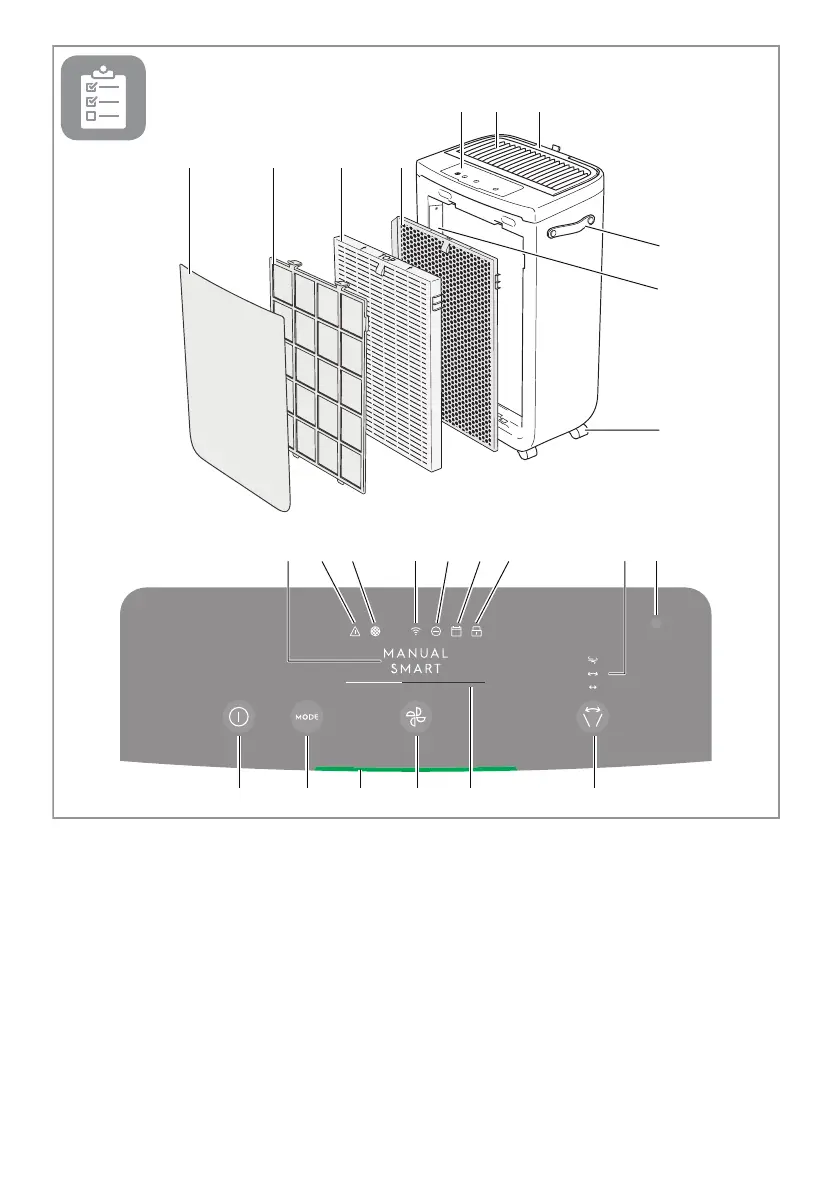
21
3 4
11 12 15 13 17 14
21 2522 23 24201916 18
5 6 7
8
10
9
1. Front Panel
2. Mesh pre-filter
3. Ultrafine particle filter
4. VOC odor filter
5. Control panel display
6. Louvres
7. Hood
DESCRIPTION OF YOUR AIR PURIFIER
8. Handle
9. Sensor box
10. Wheel
11. ON/OFF button
12. MODE button
13. Fan speed
14. Louvre swing
15. Air Quality light
16. MODE display
17. FAN SPEED indicator
18. Swing indicator
19. Warning alert icon
20. Filter change icon
21. Wifi icon
22. Ionizer icon
23. Scheduler icon
24. Child lock icon
25. Light sensor
NOTE: Your specific model may not have all the components and features listed within this USER MANUAL.
Please check the product packaging OR the product specification page on our website for exact details of your
model. AEG reserves the right to change information contained herein without notice.