GB
Replace/clean the filter when filter
indicator lights up in red. Green
light indicates that the filter is ok.
It lights up briefly when you start
the vacuum cleaner.
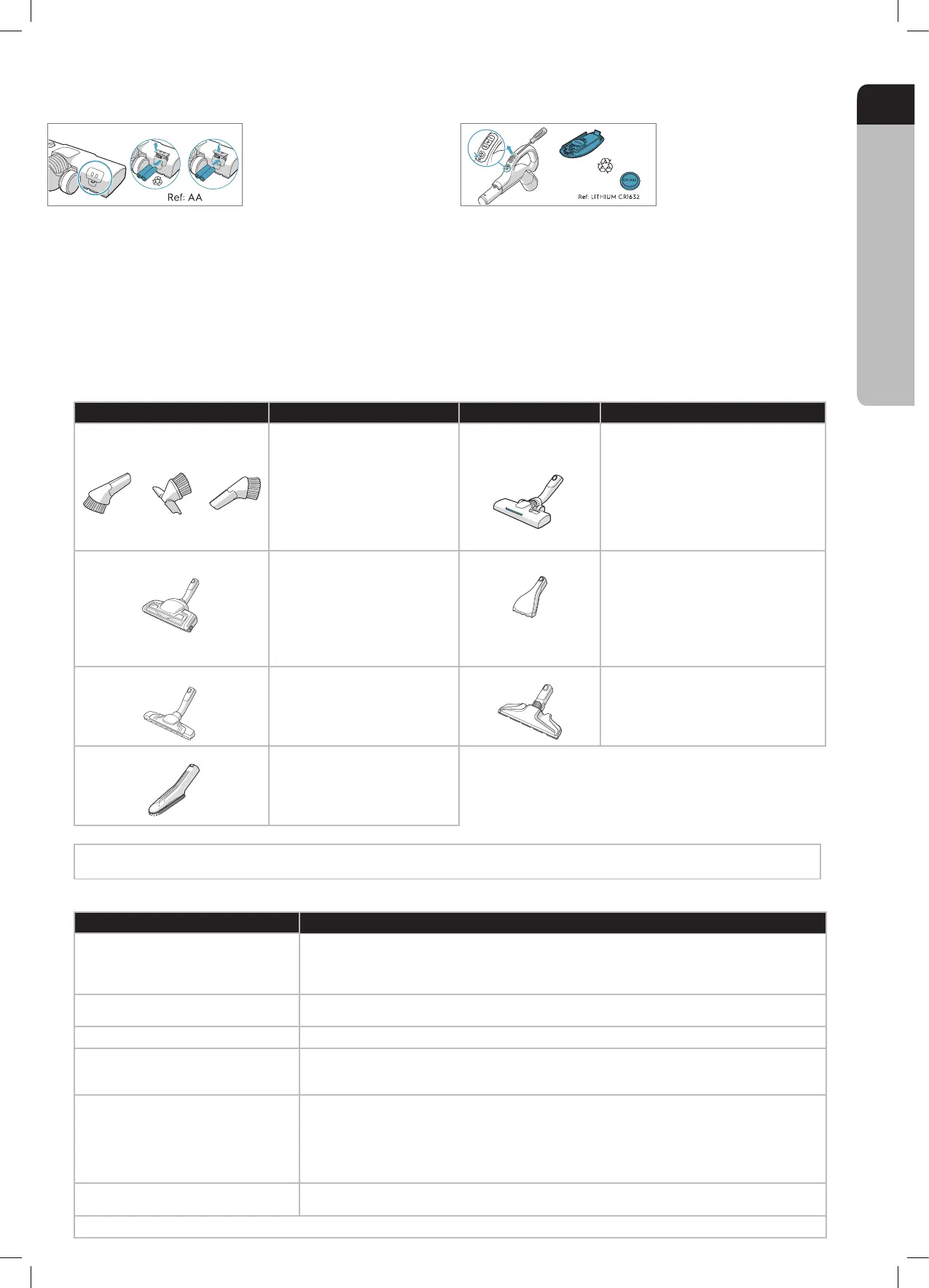
Change batteries when front
lights start blinking fast. Use 2 AA
batteries.
This appliance contains non-rechargeable batteries, these batteries are not to be recharged. • Do not expose the appliance or battery to excessive temperatures. • Be aware of the
risk of terminals of the battery-operated appliance or battery being short-circuited by metal objects. • Different types of batteries or new and used batteries are not to be mixed.
Exhausted batteries are to be removed from the appliance and safely disposed of. • If the appliance is to be stored unused for a long period, the batteries should be removed.
Do not use modified or damaged batteries.
Remove the batteries from the product before scrapping. Follow your country’s rules for collection of batteries and electrical products.
Change battery when light
indicator turns red or is not
responding when pressing any
button. Use only batteries type
LITHIUM CR1632
After replacing the filter, close the
filter lid until it is clicked back into
place. If the filter lid comes off,
position the hinges at the bottom
and push the filter lid until it is
clicked back into place.
Replace the motor filter when dirty
or after every 5th s-bag. Push the
filter holder down and pull it out.
Exchange the filter and close the
lid.
Disconnect the nozzle from the
tube. Clean with the hose handle.
Disconnect the nozzle from the
tube and remove entangled
threads etc by snipping them away
with scissors. Use the hose handle
to clean the nozzle.
Pull the textile tab to take out 3in1
tool. The tool has 3 functions, see
pictures on next page.
After usage, put it back in its place.
Pull the FILTER button to open
the filter lid. Use original s-filters.
Remove the filter and check the
reference on the frame to define
type. Replace with a new filter or
clean it. Rinse the inside (dirty
side) in lukewarm tap water. Tap
the filter frame to remove the
water. Repeat the process four
times.
CHANGING THE BATTERIES
TIPS ON HOW TO GET THE BEST RESULTS
NOZZLE/ACCESSORY USE FOR: NOZZLE/ACCESSORY USE FOR:
3in1 accessory tool
3 tools in 1:
1. Dusting tool for hard surfaces
(bookshelves, skirting boards etc).
2. Upholstery tool for textiles (curtains,
upholstery etc).
3. Crevice tool for narrow spaces (behind
radiators etc).
AllFloor Auto LED nozzle
(with front lights)
Universal nozzle:
- For all oor types, secures excellent dust pick up
both on carpets and hard oors.
- Recommended to use Alloor mode, which
enables going from hard oor to carpet without
adjusting the setting.
- For deep cleaning on carpet, change the nozzle
setting with the slider to Carpet mode.
- Front light helps to detect dust and dirt in dark
spaces (under furniture etc).
1 2 3
Turbo nozzle* Carpet nozzle:
- Brushes and vacuums at the same time
(best pick up of hair, bres etc).
- Brush roller is driven by the airow of
the vacuum cleaner.
- Not suitable for carpets with very deep
piles and long fringes, anti-slip carpets
like door mats or water resistant carpets.
Use universal nozzle instead.
Mini Turbo nozzle*
Upholstery nozzle:
- Brushes and vacuums at the same time (best
pick up of hair, bres etc).
- For textile furniture, car seats, mattresses etc.
- Brush roller is driven by the airow of the
vacuum cleaner.
- Not suitable for carpets with very deep pile and
long fringes as it can get stuck in the rotating
brush roll.
ParkettoPro nozzle*
Hard oor nozzle:
- For gentle cleaning of hard oor
(parquet, wooden oor, tiles etc).
- Best dust pick up on hard oor with
crevice.
FlexProPlus nozzle*
Hardoor nozzle:
- For reach under/between furniture, corners and
other obstacles.
- Can easily turn 180 degrees for direct access to
narrow spaces.
Furniture nozzle*
Delicate Surfaces Tool:
- Removes ne particles and dust from
delicate surfaces in your home
With AUTO-function the cleaner automatically adjust the suction power
in order to give an optimal cleaning performance and comfort on every surface. For manual regulation, follow graphics for optimal performance.
TROUBLESHOOTING
PROBLEM SOLUTION
The vacuum cleaner does not start
• Check that the cable is connected to the mains.
• Check that the plug and cable are not damaged.
• Check for a blown fuse.
• Check if the battery indicator lamp in the remote control handle responds (certain models only).
The s-bag® indicator light is illuminated
• Check if the s-bag® is full or blocked.
• If you have already changed the s-bag®, change the motor lter.
The lter indicator light is illuminated Change, or wash (if washable), the exhaust lter.
The cleaner stops
The cleaner might be overheated: disconnect it from the mains; check if the nozzle, tube, hose or lters
are blocked. Let the cleaner cool down for 30 minutes before plugging it in again.
If the cleaner still does not work, contact an authorized AEG service centre.
Reduction of suction capacity versus
normal
• Check if the s-bag is full or blocked.
• Check if the motor lter is clogged and needs changing.
• Check if nozzle is blocked and needs to be cleared.
• Check if hose is blocked by squeezing it gently. However, be careful in case the obstruction has been
caused by glass or needles caught inside the hose.
Note: The warranty does not cover any damage to the hose caused by cleaning it.
Water has been sucked into the vacuum
cleaner
It will be necessary to replace the motor at an authorized AEG service centre.
Damage to the motor caused by the penetration of water is not covered by the warranty.
For any further problems, contact an authorized AEG service centre.






 To Next Page