The AEGIS SHIELD Personal Fireproof Safe is a security device designed to protect valuable items from theft and fire. This owner's manual covers models PFS-10, PFS-20, and PFS-30, providing comprehensive instructions for operation, maintenance, and installation.
Function Description:
The primary function of the AEGIS SHIELD safe is to provide secure storage for personal belongings, offering both physical security against unauthorized access and fire protection. It features an electronic keypad for primary access and a backup key system for emergency entry. The safe is designed to be mounted to the floor for optimal security, preventing unauthorized removal.
Important Technical Specifications:
- Models: PFS-10, PFS-20, PFS-30
- Locking Mechanism: Electronic keypad with 3-8 digit programmable passcode.
- Backup Access: Mechanical backup key system.
- Power Source: 4 AA batteries for the electronic lock.
- Battery Life Indication: Yellow indicator light for low battery.
- Security Features:
- 3-8 digit user-programmable passcode.
- Automatic lockout feature after multiple invalid code attempts (60 seconds after 3 attempts, 5 minutes after subsequent invalid attempts).
- Bolts for secure door locking.
- Reset button for passcode reprogramming.
- Fire Protection: Designed as a "fireproof safe," although the manual explicitly states that "Electronic media, photographic media and all audio-visual media should not be stored in the safe for fire protection," indicating specific limitations on its fire-resistant capabilities for certain types of media.
- Mounting: Designed for floor mounting to enhance security.
- Hardware Included for Mounting:
- (4) M8×70 mm (2" long) Lag Screws
- (4) Washers
- (4) Plastic Masonry Anchors
- Tools Required for Mounting:
- Drill
- 3/8" Drill Bit
- 3/16" Drill Bit
- 10 mm Socket Wrench
- Flat Head Screwdriver
Usage Features:
- First-Time Opening:
- Remove the Back-up key cover.
- Insert the Back-up key into the keyhole and turn clockwise.
- Simultaneously turn the knob (master key) clockwise to open the door.
- WARNING: Backup keys should never be stored inside the safe.
- Battery Installation and Replacement:
- Pull out the battery compartment cover.
- Lift the battery box and insert 4 AA batteries, following positive (+) and negative (-) guides.
- Replace the battery box and snap the cover back into place.
- A green light flashing indicates successful operation. A yellow light flashing indicates low battery.
- Programming Your Passcode:
- Access the reset button by removing its red cap.
- Press the reset button (one beep, one green light flash).
- Input a 3-8 digit code within 3 seconds (each input results in one beep and one green light flash).
- Press "LOCK" to confirm (two beeps, flashing green light indicates success).
- If the red light flashes twice with beeps, the code failed; repeat the process from step 2.
- The factory default passcode is "1-5-9-LOCK".
- If the code is forgotten, the backup keys can be used to open the safe and reset the code.
- Unlocking the Safe:
- Enter the new 3-8 digit code (each input results in a green light flash and one beep).
- Press "LOCK" to confirm (two beeps, two green light flashes indicates correct operation).
- Turn the knob clockwise to open the door.
- If the red light flashes three times with three beeps, the operation failed; re-enter the code.
- Three consecutive invalid code attempts will lock out the user for 60 seconds. Subsequent invalid attempts will result in a 5-minute lockout. Backup keys can still be used during lockout periods.
- Locking the Safe:
- Simply close the door and turn the knob counterclockwise.
- Keypad Sound Control (Mute System):
- The keypad sound can be toggled on/off by pressing the "CLEAR" button (one green light flash).
- The sound is on by default in factory settings.
- No operation is available during self-locking.
- Important Notices for Usage:
- Do not leave the safe unattended while open.
- Keep children away from the safe.
- Keep the safe closed and locked at all times when not in use.
- Place the safe in a cool and dry location.
- Record the serial number (located on a tag on the back of the safe) for warranty and customer service inquiries.
- Electronic, photographic, and audio-visual media should not be stored in the safe for fire protection.
Maintenance Features:
- Battery Replacement: The manual provides clear instructions for replacing the 4 AA batteries, indicated by a yellow light flash for low battery.
- Passcode Reset: The reset button allows for easy reprogramming of the passcode if forgotten or if a new code is desired.
- Security Maintenance: The manual emphasizes the importance of keeping the safe closed and locked at all times and securing it to the floor to maintain optimal security.
- Customer Service: Contact information (E-mail: service@primetalsafe.com) is provided for customer service needs, including warranty and technical support. Users are reminded to have their serial number ready for inquiries.
- Installation: For optimal security, the safe must be mounted to the floor. The manual provides a list of included hardware and required tools for this process. It also recommends contacting a local Hardware Professional for additional installation recommendations, indicating that proper installation is crucial for the safe's security and warranty.

 Need help?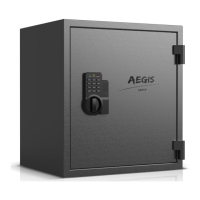

 To Next Page
 General