RevC 07/15/13 Page 19
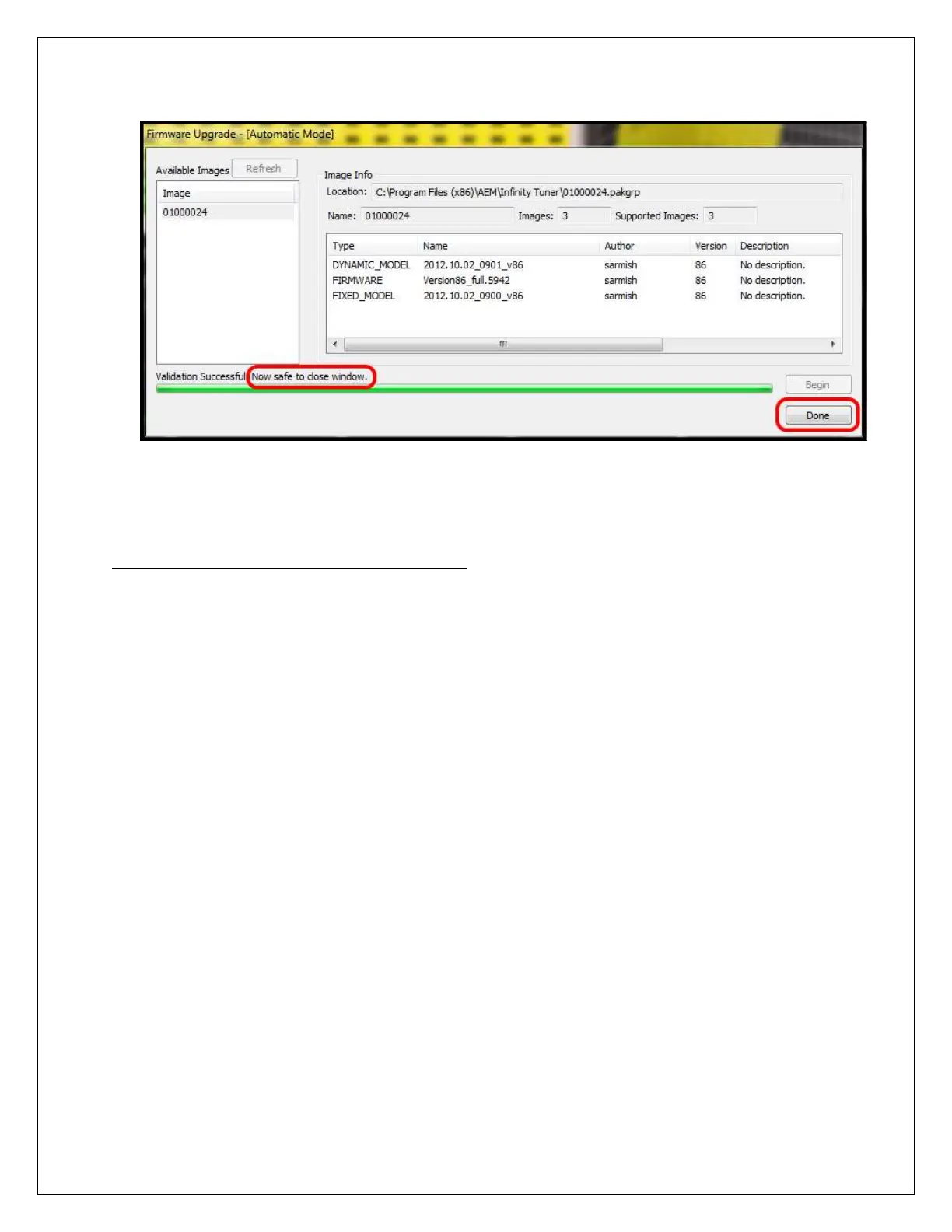
11) When the message at the bottom indicates that it’s safe to close the window,
click the “Done” button.
InfinityTuner: Calibration Data
Connecting and Saving the Session File
The default calibration data provided by AEM should be sufficient to start an engine with
similar displacement, sensor setup, and injectors. Every vehicle must be tuned before
use.
1) With the Ignition in the ON position and InfinityTuner Running, click on the
Connection menu item and select Connect to USB from the dropdown list. A
progress bar will be displayed as the laptop gets the calibration info from the ECU.
2) Open a layout file by clicking on the Layout menu item and select Open. Layout files
have a .itlyt extension and should be saved in the My
Documents\InfinityTuner\Layouts folder.
3) Save the session file by selecting File – Save session. Session files have a .itssn
extension and should be saved in the My Documents\InfinityTuner folder.



 To Next Page