RevC 07/15/13 Page 22
If the Primary (and Secondary, if used) Injector Flow Wizard Selection does not
contain your specific injectors, the Injector Flow Rate table can be modified in the
InfinityTuner main layout after the setup wizard is complete. For now, choose the
injector type that most closely matches your injectors. If using low-impedance
injectors, specify whether the resistor pack is installed or bypassed.
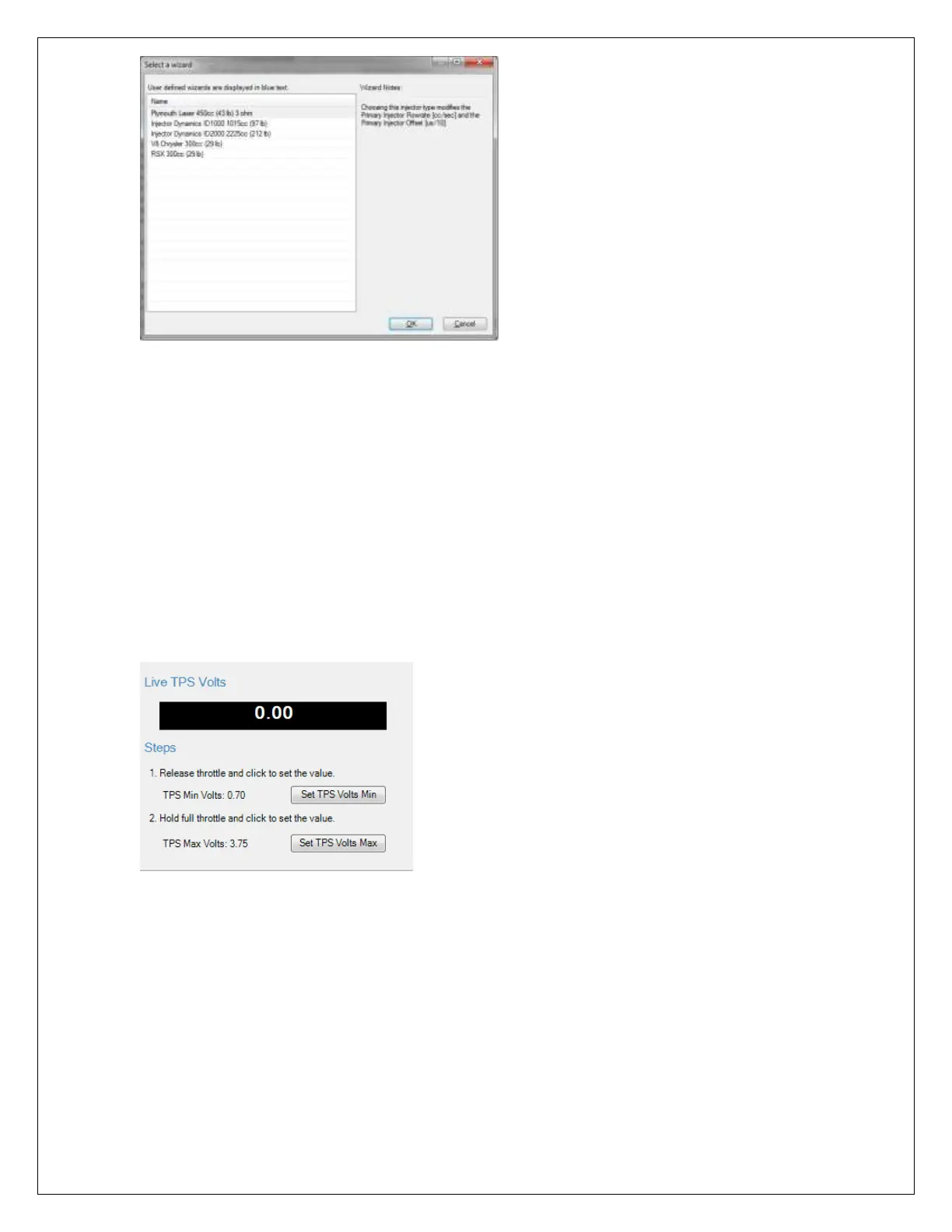
7) Setup: Set Throttle Range
Completing this step properly will calibrate the sensor output for a 0-100% throttle
position range.
a) Release the throttle pedal completely and click “Set TPS Volts Min”.
b) Depress the throttle pedal completely and click “Set TPS Volts Max”.
8) Setup: Mass Airflow / Manifold Pressure
If VE was selected for Airflow Calculation Method in the Basic setup, use the
“Manifold Pressure Wizard Selection:” to choose the appropriate MAP sensor. If your
sensor is not included in the list, click on “Show Details” to input the MAP sensor
calibration using info obtained from the sensor manufacturer.
If using a Mass Airflow sensor for airflow calculations, use the “Sensor Selection:”
and choose the MAF sensor that matches your application. If your sensor is not
included in the list, click on “Show Details” to input the MAF sensor calibration using
info obtained from the sensor manufacturer.


 To Next Page
 Loading...