4
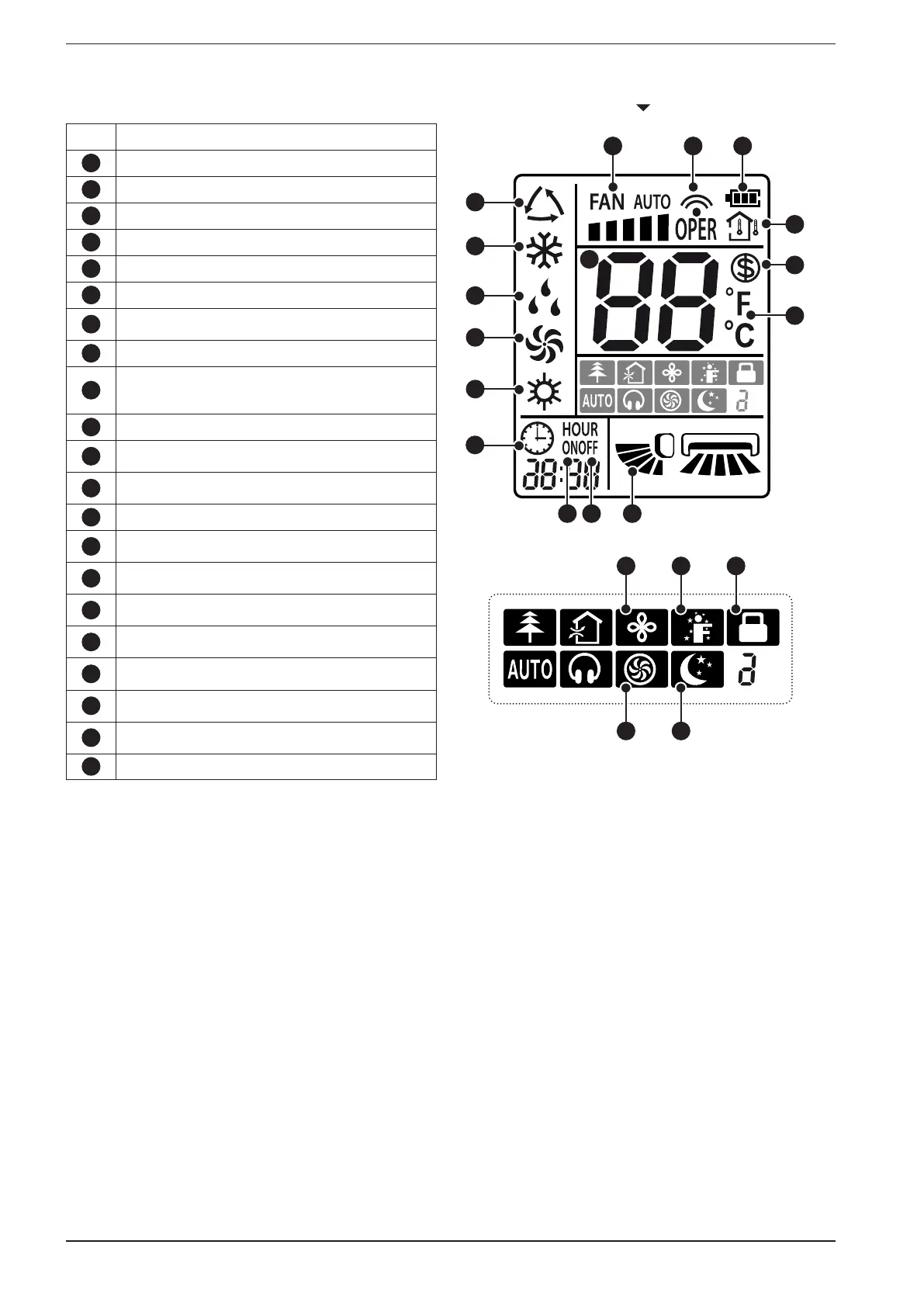
remote control display icons available
Alarm Functions represented by the icons:
1
Indicates the AUTOMATIC mode is active
2
Indicates the COOLING mode is active
3
Indicates the DEHUMIDIFICATION mode is active
4
Indicates the VENTILATION mode is active
5
Indicates the HEATING mode is active
6
Indicates the actual fan speed
7
Indicates the setting has been transmitted to the
receiver located on the indoor unit
8
Indicates that the batteries need to be replaced
9
Indicates which temperature is shown on the
display of the indoor unit (internal temperature or
setpoint temperature)
10
Indicates that function is active antifreeze
11
Indicates the unit of measurement for the tempera-
ture setpoints ( °C or °F)
12
Indicates that the figures displayed next to the icon
represent the current system time
13
Indicates if a timer is set for starting
14
Indicates if a timer is set for switching off
15
Indicates the state of the SWING function
16
Indicates the operating setpoint temperature in the
various modes
17
Indicates the extended ventilation function is active
(only in cooling or dehumidification)
18
Indicates whether the function is active ifeel
19
Indicates that all the buttons of the remote control
are locked
20
Indicates the TURBO function is active (the fan
speed is forced by this function)
21
Indicates the SLEEP function is active
F
A
N
T
U
R
B
O
ON/OFF
MODE
I FEEL
T-ON/T-OFF
TEMP
CLOCK
LIGHT
X-FAN
SLEEP
1
2
3
4
5
6 7
9
8
10
11
12
13 14 15
16
F
A
N
T
U
R
B
O
ON/OFF
MODE
I FEEL
T-ON/T-OFF
TEMP
CLOCK
LIGHT
X-FAN
SLEEP
17 18 19
20 21


 To Next Page
 Loading...

