7
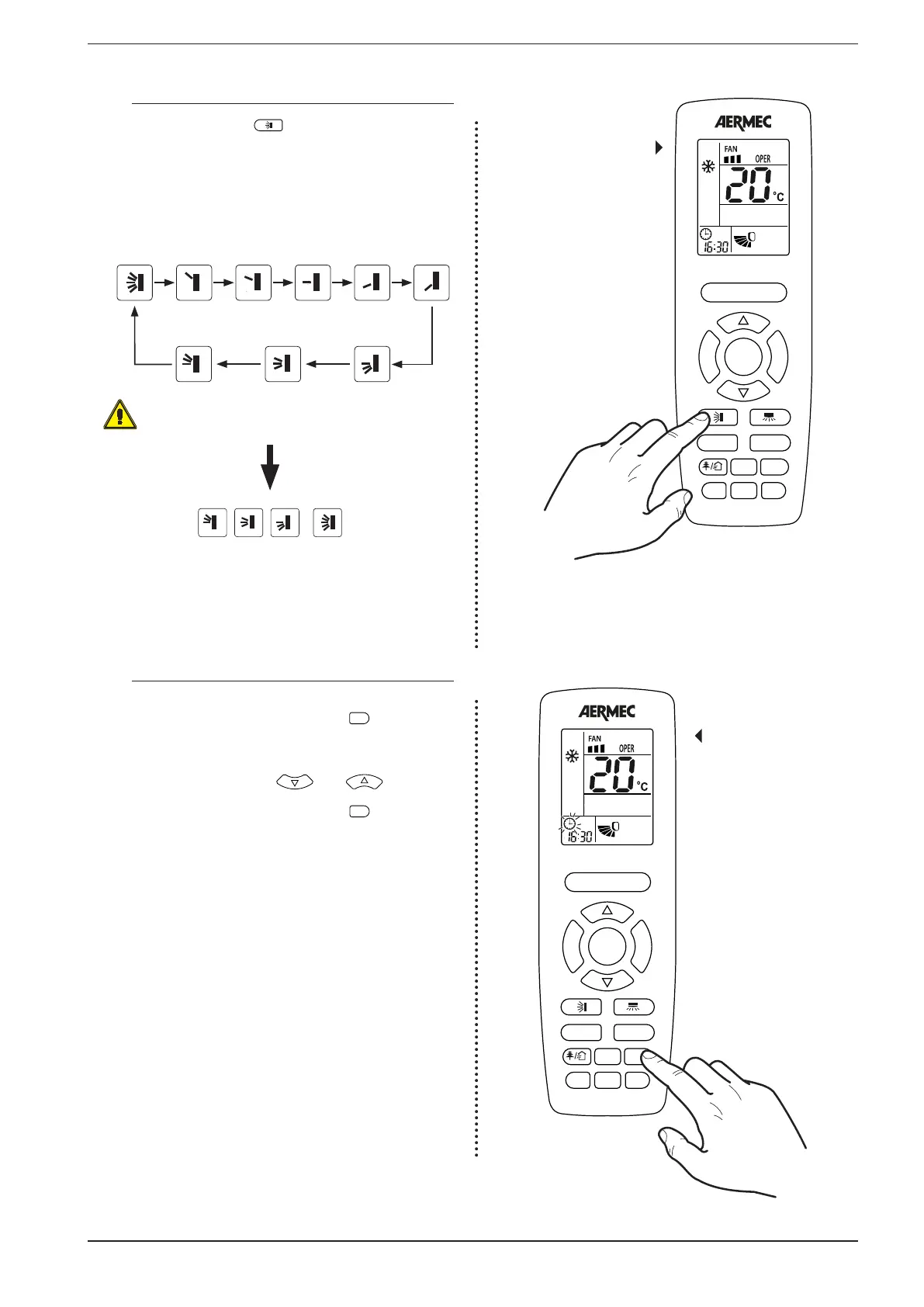
2.5. SETTING THE MOTORISED DISCHARGE FIN (SWING)
If the unit is on, pressing the
F
A
N
T
U
R
B
O
ON/OFF
MODE
I FEEL
T-ON/T-OFF
TEMP
CLOCK
LIGHT
X-FAN
SLEEP
button allows the activation
of the swing function of the motorised discharge fin. This fin
varies the direction of the flow of air into the ambient, on the
basis of the selected position; With the unit on, pressing the
button allows the setting of the following sequenced steps,
one by one:
Motorised discharge
fin setting
Fluctuation
continues (*)
Fixed
(Step 1)
Fixed
(Step 2)
Fixed
(Step 3)
Fixed
(Step 4)
Fixed
(Step 5)
(*) Are present in spite of different icons for continuous oscilla-
tion, all 4 trigger the same mode: oscillazzione continues from
the lowest point to the highest point
Fluctuation
continues (*)
Fluctuation
continues (*)
Fluctuation
continues (*)
, ,
=
2.6. SETTING A SYSTEM TIME
These units are equipped with an internal clock which can
display the current time; by pressing on the
F
A
N
T
U
R
B
O
ON/OFF
MODE
I FEEL
T-ON/T-OFF
TEMP
CLOCK
key the clock
icon will start to flash (this flashing will last 5 seconds, after this if
no key is pressed you automatically exit the time modification
mode); while the clock icon is flashing it is possible to change
the system time using the keys
F
A
N
T
U
R
B
O
ON/OFF
MODE
I FEEL
T-ON/T-OFF
TEMP
CLOCK
LIGHT
X-FAN
SLEEP
and
F
A
N
T
U
R
B
O
ON/OFF
MODE
I FEEL
T-ON/T-OFF
TEMP
CLOCK
LIGHT
X-FAN
SLEEP
to increase
or decrease the displayed time; once the desired value is set
you need to wait 5 seconds or press the
F
A
N
T
U
R
B
O
ON/OFF
MODE
I FEEL
T-ON/T-OFF
TEMP
CLOCK
key again to
confirm the value (once confirmed the clock icon will stop
flashing)
Setting the
system time
F
A
N
T
U
R
B
O
ON/OFF
MODE
I FEEL
T-ON/T-OFF
TEMP
CLOCK
LIGHT
X-FAN
SLEEP
F
A
N
T
U
R
B
O
ON/OFF
MODE
I FEEL
T-ON/T-OFF
TEMP
CLOCK
LIGHT
X-FAN
SLEEP



 To Next Page
 Loading...
