EasyManua.ls Logo

Aerocool H66F - User Manual

Aerocool H66F
3 pages
Print Icon
To Next Page IconTo Next Page
Loading...
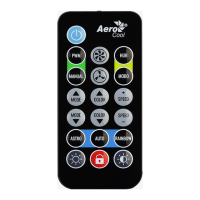
H66F RGB Hub - Remote Control Function Guide
LED On/Off
Turn FAN LED On/Off
Fan Speed Control
Toggle between PWM and Manual control.
PWM
Pass Fan Speed control to Motherboard BIOS/UEFI (requires compatible PWM fan header)
For more information, please see our PWM Compatibility Guide.
MANUAL
Allows HUB to manually speed up/down fan speed (speed up/down buttons below).
Fan Speed UP: Increase fan speed while in Manual mode
Fan Speed DOWN: Decrease fan speed while in Manual mode
Question and Answer IconNeed help?

Do you have a question about the Aerocool H66F and is the answer not in the manual?

Summary

Fan Speed Control

PWM Fan Speed Control

Pass Fan Speed control to Motherboard BIOS/UEFI (requires compatible PWM fan header).

Manual Fan Speed Control

Allows HUB to manually speed up/down fan speed using dedicated buttons.

LED Mode Control

General LED Control

Control LED effects via HUB or pass to motherboard ARGB software.

LED Mode Selection

Cycle through various LED lighting modes.

LED Color Adjustment

Change LED color for modes that support single colors.

LED Speed Adjustment

Change LED pattern display speed.

Special LED Modes

ASTRO LED Mode

Display the specific ASTRO LED lighting mode.

AUTO LED Mode

Automatically cycle through all available LED modes.

RAINBOW LED Mode

Display the Rainbow LED lighting mode.

LED Brightness and Pairing

LED Brightness Control

Increase or decrease the brightness of the LED lighting.

Remote;HUB Pairing

Pair a remote to a HUB by pressing the lock button 5 times.

Aerocool H66F Specifications

General IconGeneral
BrandAerocool
ModelH66F
CategoryRemote Control
LanguageEnglish