Select Time Frame
00:00 08:00 11,0°C
08:00 16:00 19,0°C
16:00 00:00 11,0°C
--:-- --:-- -- °C
--:-- --:-- -- °C
--:-- --:-- -- °C
Select Time Frame
00:00 08:00 11,0°C
08:00 16:00 19,0°C
16:00 00:00 11,0°C
--:-- --:-- -- °C
--:-- --:-- -- °C
--:-- --:-- -- °C
Select Time Frame
00:00 08:00 1e1,0°C
08:00 16:00 19,0°C
16:00 00:00 11,0°C
--:-- --:-- -- °C
--:-- --:-- -- °C
--:-- --:-- -- °C
Select Time Frame
00:00 08:00 11,0°C
08:00 16:00 19,0°C
16:00 00:00 11,0°C
--:-- --:-- -- °C
--:-- --:-- -- °C
--:-- --:-- -- °C
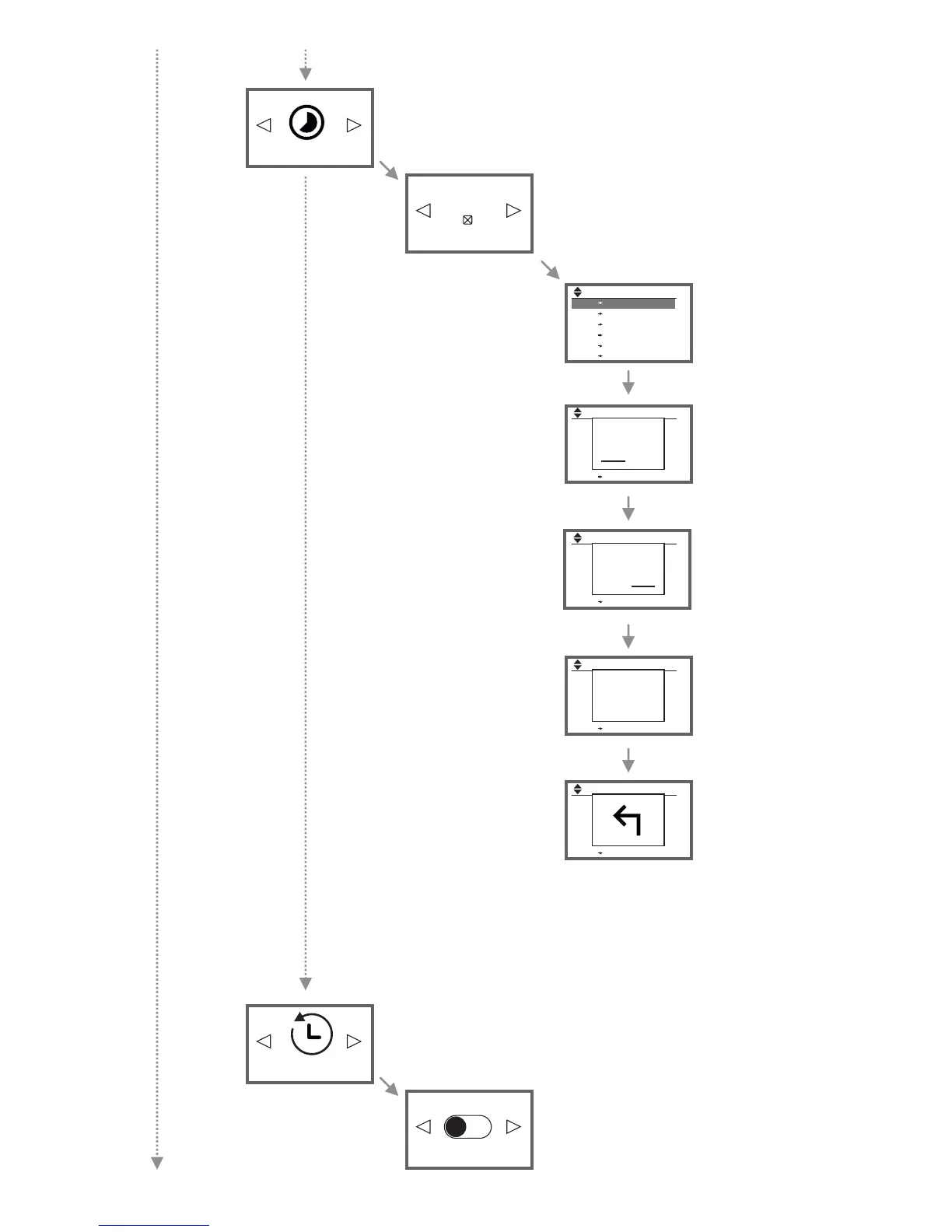
Start time
00:00
End time
05:30
Temperature
11.0°C
Use the arrow buttons to
select the start time for
the respective time
frame. Confirm with OK.
Use the arrow buttons to
select the end time for
the respective time
frame. Confirm with OK.
Use the arrow buttons to
select the temperature
for the respective time
frame. Confirm with OK.
After entering all desired
time frames, the "arrow-
down"-button must be
p r e s s e d aga i n . T h e
"arrow-back"-symbol will
appear on the display.
Press OK to fully exit the
programming mode now.
Set a heating plan according to your preferences.
Choose the day of the week. You can select
multiple, non-consecutive days. Navigate with the
arrow buttons to the desired days and select them
with OK. Navigate with the arrow buttons to „Set
frames“ and press OK.
Use the arrow buttons to
select changes to a time
frame. Confirm with OK.
Select day
Monday
Select Time Frame
00:00 08:00 11,0°C
08:00 16:00 19,0°C
16:00 00:00 11,0°C
--:-- --:-- -- °C
--:-- --:-- -- °C
--:-- --:-- -- °C
Set heating time
Enable or disable Smart Start. When Smart Start is activated, the room will be
heated up at the adjusted start time of the respective time frame.
See also page 11: paragraph "Smart Start (adaptive start control)".
Turn Smart Start ON or OFF.
Smart Start OFF
Smart Start
13


 To Next Page
 Loading...