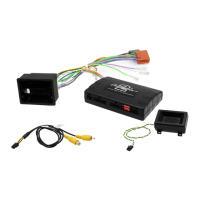
SWC Patch Harness Configuration
Kenwood/JVC: Some Kenwood and JVC radios have 2 steering control inputs.
A 3.5mm socket (Remote IN) and Blue with Yellow trace wire. To send direct
translated codes to your Kenwood/JVC radio, configure the patch lead up as
Kenwood or JVC outlined in the configuration assignments and connect the Brown
patch lead wire (KEY 1) used. If you would like to be able to program your steering
controls configure the patch lead as Self Learn and plug the 3.5mm Jack into the
Remote IN of the Kenwood/JVC, disregard the Brown wire.
Pioneer : Some Pioneer models require the steering controls to be enabled, they
will by default be OFF. These steering control settings are located in the system
settings of the radio can only be accessed whilst the unit is in standby mode and the
park-brake wire is connected (if applicable). Please refer to your Pioneer manual on
exact methods for enabling steering controls. Dip switch position 1 should be ON.
Sony:
Some Sony models require the steering controls to be enabled, they will by default be
OFF. If you are receiving no steering control functions at all please refer to your Sony
manual on how to enable steering controls. Dip switch position 1 should be OFF.
General: Please ensure all connections to your aftermarket head unit (including
patch lead modification) are completed before power is provided to the harness.
Some of our control harnesses work by translating the vehicles CANBUS data and
can only start this process on ignition. If you find that you are not getting any
response from your steering controls on accessory (single key click) please re-test on
ignition.
NOTE: The steering controls must be working in the vehicle previously to work
with our control harnesses. They will not fix previous underlying problems
2-32


 To Previous Page