13
in.k600™
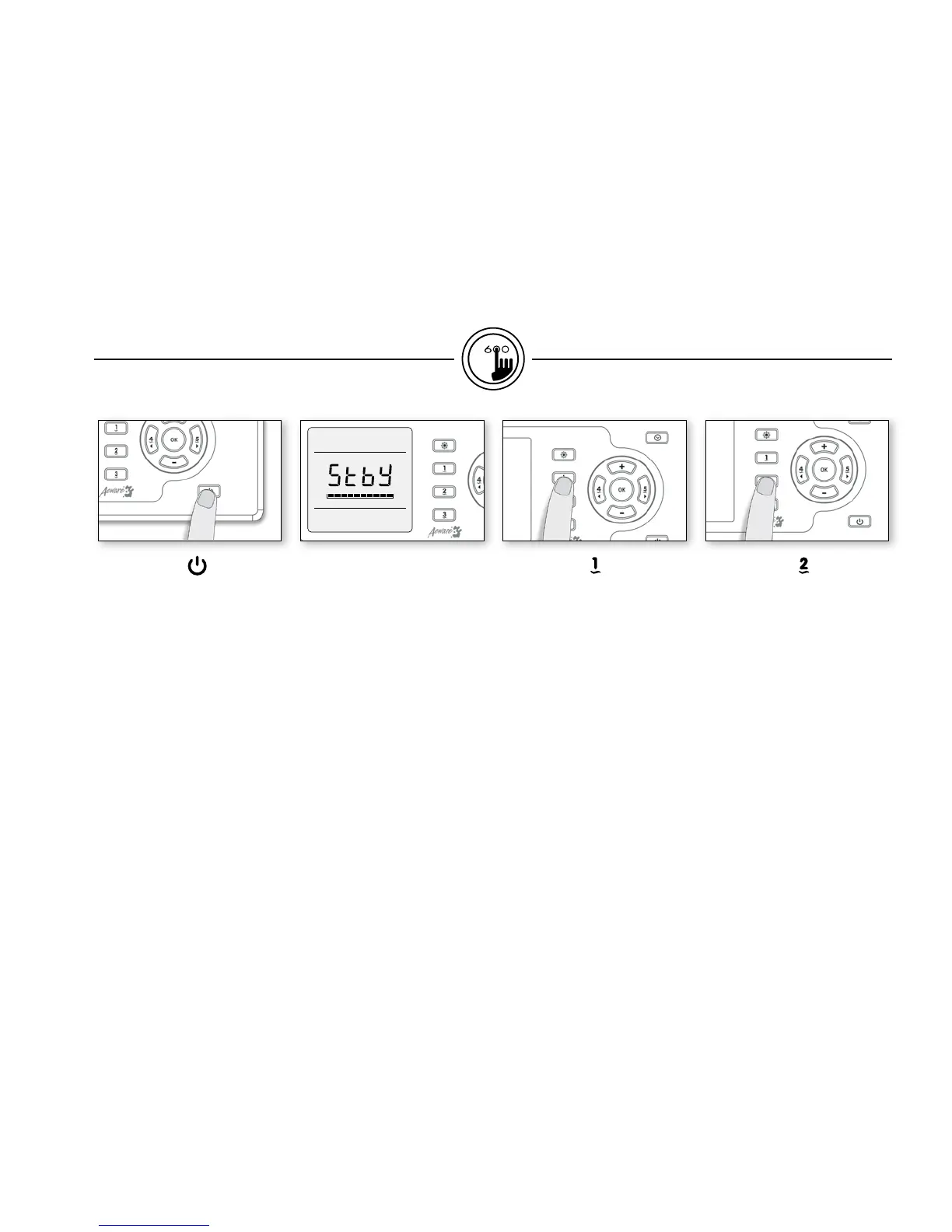
On/Off key
Depending on the spa manufac-
turer, this key may have differ-
ent functions: On/Off, Standby
mode or quick enable of the
Economy mode.
Standby Mode : Use On/Off
key to pause all pumps*.
Progress bar will display the
remaining time before the
system automatically exits
Standby mode (user can also
exit Standby mode at any time
by pressing again on On/Off
key).
In order to warn the user, the
spa light will flash for a few
seconds before the exit of
Standby mode and restart the
pumps. The "Stby" message is
also displayed during Standby
mode.
* Pump will stay turned on if
there is a request for more heat.
Pump 1 key
Press Pump 1 key to turn
Pump 1 on at low speed.
Press a second time to turn
pump to high speed (with a
dual-speed pump).
A third time turns pump off.
A built-in timer automatically
turns pump off after 20 min-
utes, unless pump has been
manually deactivated first.
Pump 2 key
Press Pump 2 key to turn
Pump 2 on at low speed.
Press a second time to turn
pump to high speed (with a
dual-speed pump).
A third time turns pump off.
A built-in timer automatically
turns pump off after 20 min-
utes, unless pump has been
manually deactivated first.
functions


 To Next Page