10
INTRODUCTION
IMPORTANT
PRECAUTIONS
ASSEMBLY
BEFORE
YOU BEGIN
TREADMILL
OPERATION
LIMITED
WARRANTY
TROUBLESHOOTING
& MAINTENANCE
CONDITIONING
GUIDELINES
11
INTRODUCTION
IMPORTANT
PRECAUTIONS
ASSEMBLY
BEFORE
YOU BEGIN
TREADMILL
OPERATION
CONDITIONING
GUIDELINES
TROUBLESHOOTING
& MAINTENANCE
LIMITED
WARRANTY
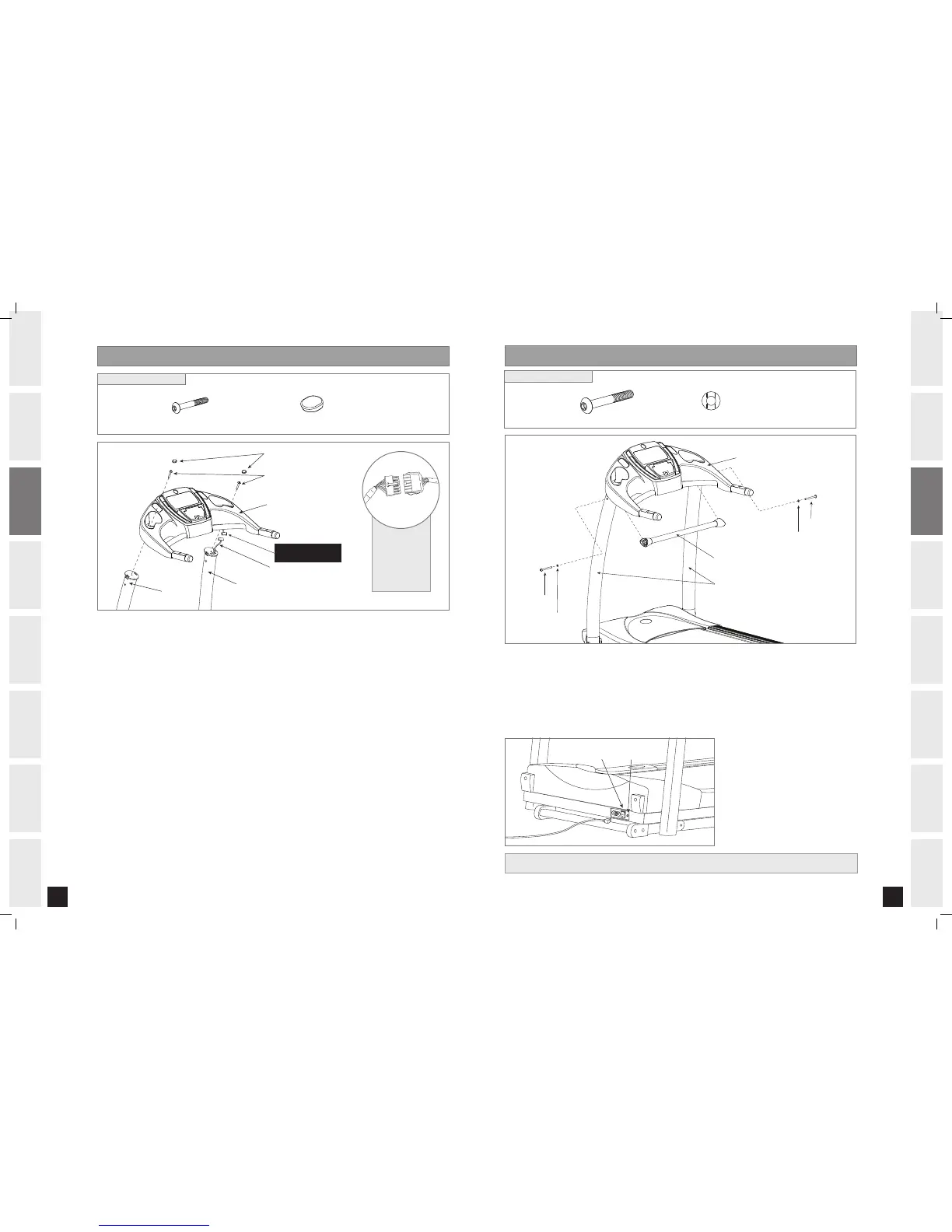
YOU’RE FINISHED!
ASSEMBLY ST E P 4
CONSOLE
SUPPORT BAR
BOLT (I)
ARC WASHER (J)
CONSOLE MASTS
BOLT (I)
ARC WASHER (J)
BOLT (I)
90 mm
Qty: 2
ARC WASHER (J)
17 mm
Qty: 2
HARDWARE BAG 4 CONTENTS :
POWER SWITCH
CIRCUIT BREAKER
Connect power plug to the treadmill
and connect the cord to a power
outlet. The on/off switch is located
next to the power cord. Flip this
switch to the 'ON' position, so that
the switch is lit. You will hear a
beep and the console will light up.
Open HARDWARE BAG 4.
Align SUPPORT BAR with holes in CONSOLE MASTS.
Insert BOLTS (I) and ARC WASHERS (J) into holes of the SUPPORT BAR.
NOTE: Look into holes in the right mast before inserting bolts to avoid pinching cables.
Tighten support bar bolts completely.
A
B
C
D
ASSEMBLY ST E P 3
CONSOLE
CONSOLE CABLE
RIGHT CONSOLE MAST
LEFT CONSOLE MAST
PLUGS (H)
BOLTS (G)
DO NOT ATTACH
THIS SIDE UNTIL STEP 3-D
BOLT (G)
50 mm
Qty: 2
PLUGS (H)
Qty: 2
HARDWARE BAG 3 CONTENTS :
Open HARDWARE BAG 3.
With running deck in lowered position, place CONSOLE on upright masts. Align the
brackets that are underneath the console with the holes of the upright masts.
To assemble the LEFT CONSOLE MAST to the CONSOLE, insert 1 BOLT (G) into the hole in
the LEFT CONSOLE MAST and lightly tighten.
Gently lift RIGHT side of the CONSOLE to connect the CONSOLE CABLE. Carefully tuck wires
in mast to avoid damage. NOTE: Do not pinch console cable wires.
Repeat STEP C above to attach the RIGHT CONSOLE MAST to the CONSOLE.
Tighten console bolts completely.
Fit PLUGS (H) over each BOLT (G) head after tightening.
A
B
C
D
E
F
G
* NOTE: Be
careful not to
pinch any
wires while
attaching the
console.
1.0AT_Rev.1.2.indd 10-11 7/23/07 10:47:14 AM


 To Next Page