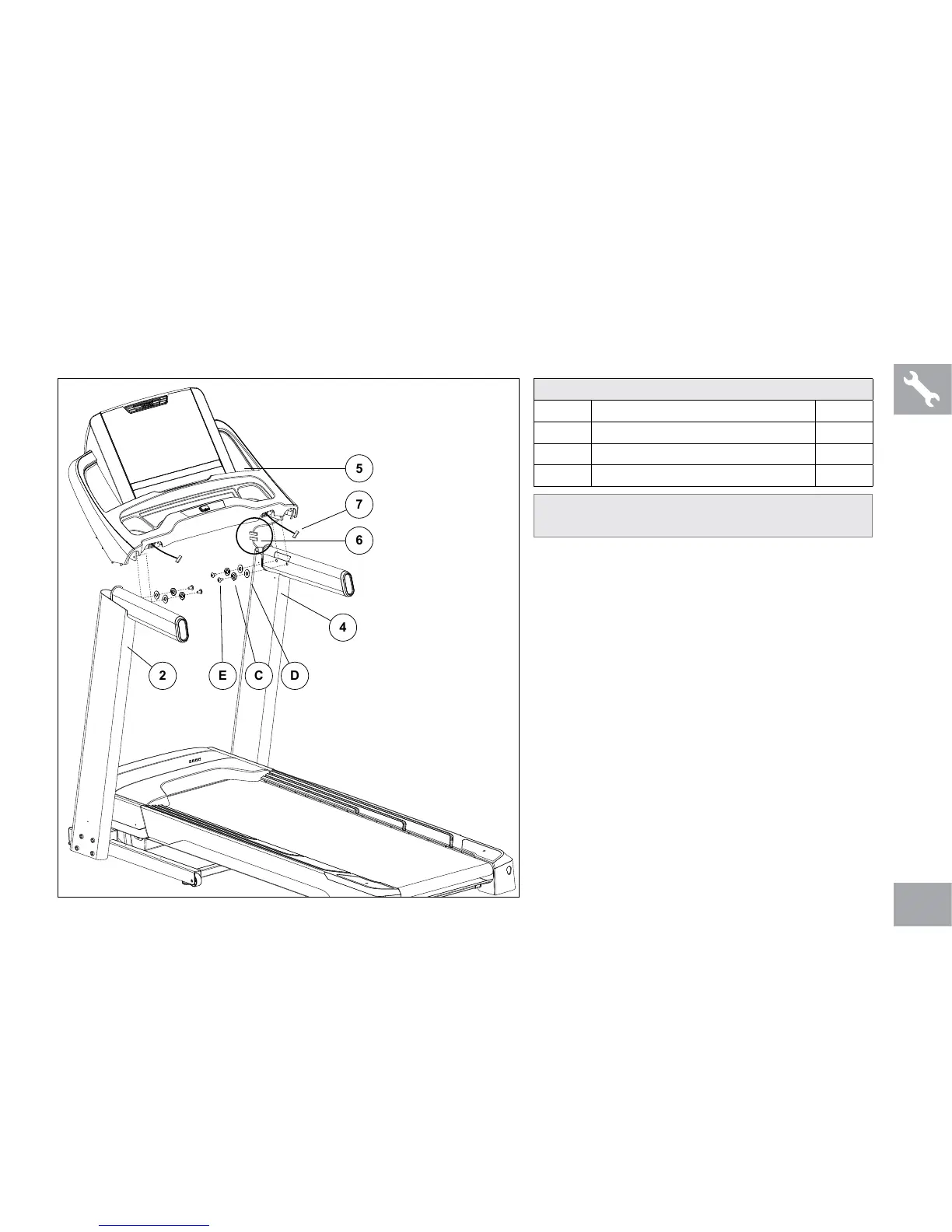
ASSEMBLY STEP 3
A Open HARDWARE FOR STEP 3.
B Gently place CONSOLE (5) on top of
CONSOLE MASTS (2 & 4).
C Connect the CONSOLE CABLES (6) and tuck
them inside the right CONSOLE MAST (4). Do
not connect the HEART RATE CABLES (7)
until STEP 4.
D Connect the CONSOLE (5) to the right
CONSOLE MAST (4) using 2 BOLTS (E),
2 SPRING WASHERS (C) and 2 FLAT
WASHERS (D).
E Repeat STEP D on other side.
HARDWARE FOR STEP 3
PART TYPE QTY
E BUTTON HEAD BOLT 4
C SPRING WASHER 4
D FLAT WASHER 4
NOTE: Be careful not to pinch the console
cables while attaching the console.



 To Next Page