EasyManua.ls Logo

afx light PIXCOLOR - User Manual

Default Icon
23 pages
Print Icon
To Next Page IconTo Next Page
Loading...
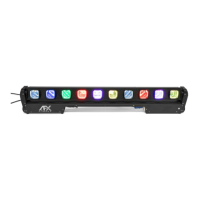
2-IN-1
PIXEL-MAPPING
MATRIX BAR
BLINDER BAR 2-EN-1 AVEC ECLAIRAGE DE FOND EN
COULEUR ET CONTROLE DMX / ARTNET2-IN-1 PIXEL
MAPPING MATRIXLICHTLEISTE2-IN-1 BLINDER BAR MET
VERLICHTE ACHTERGROND & DMX, ARTNET BESTURING
USER MANUAL
MANUEL D'UTILISATION
BEDIENUNGSANLEITUNG
HANDLEIDING
LOTRONIC SA
Avenue Zénobe Gramme 9
1480 Saintes
Belgium
Ref.: PIXCOLOR (16-2709)
Question and Answer IconNeed help?

Do you have a question about the afx light PIXCOLOR and is the answer not in the manual?

Summary

Product Overview and Manual Information

User Manual Languages

Indicates the manual is available in multiple languages, including English, French, German, and Dutch.

Getting Started and Safety

Unpacking Instructions

Guidance on carefully unpacking the fixture, checking contents, and handling shipping damage claims.

Safety Instructions

Essential safety warnings covering electrical hazards, environmental conditions, and proper handling.

Installation, Features, and Specifications

Unit Installation

Instructions for securely mounting the unit, ensuring stability and safety with proper support.

Fuse Replacement

Steps for safely replacing a fuse, including disconnection and using the correct fuse type.

Product Features

Details the key features, including LED types, control modes, and connectivity options.

Technical Specifications

Lists critical technical data such as power supply, LED sources, color temperature, and dimensions.

Product Description and Operational Modes

Product Description and Controls

Identifies the fixture's ports, connectors, and control interface elements.

Electrical Installation

Emphasizes qualified personnel for electrical installation according to safety regulations.

Stand-Alone Operation

Describes modes for standalone shows, including built-in chases and master/slave configurations.

DMX Control and Channel Modes

DMX Mode Installation

Guidelines for connecting multiple units in DMX mode and setting unique start addresses.

DMX Channel Modes

Details the DMX channel configurations available for controlling the fixture's functions.

Summary

Product Overview and Manual Information

User Manual Languages

Indicates the manual is available in multiple languages, including English, French, German, and Dutch.

Getting Started and Safety

Unpacking Instructions

Guidance on carefully unpacking the fixture, checking contents, and handling shipping damage claims.

Safety Instructions

Essential safety warnings covering electrical hazards, environmental conditions, and proper handling.

Installation, Features, and Specifications

Unit Installation

Instructions for securely mounting the unit, ensuring stability and safety with proper support.

Fuse Replacement

Steps for safely replacing a fuse, including disconnection and using the correct fuse type.

Product Features

Details the key features, including LED types, control modes, and connectivity options.

Technical Specifications

Lists critical technical data such as power supply, LED sources, color temperature, and dimensions.

Product Description and Operational Modes

Product Description and Controls

Identifies the fixture's ports, connectors, and control interface elements.

Electrical Installation

Emphasizes qualified personnel for electrical installation according to safety regulations.

Stand-Alone Operation

Describes modes for standalone shows, including built-in chases and master/slave configurations.

DMX Control and Channel Modes

DMX Mode Installation

Guidelines for connecting multiple units in DMX mode and setting unique start addresses.

DMX Channel Modes

Details the DMX channel configurations available for controlling the fixture's functions.

afx light PIXCOLOR Specifications

General IconGeneral
TypeLED Effect Light
Power SupplyAC100-240V, 50/60Hz
ControlDMX, Auto, Sound, Master-Slave
ModesAuto, sound, DMX
LEDs3 x 3W RGB LEDs

Related product manuals