EasyManua.ls Logo

AgfaPhoto DC-8330i - User Manual

AgfaPhoto DC-8330i
65 pages
Print Icon
To Next Page IconTo Next Page
Loading...
i
Thank you for purchasing this AGFAPHOTO digital camera. Please read these operating
instructions carefully in order to use the digital camera correctly. Keep the instructions in a safe
place after reading so that you can refer to them later.
Precautions
Do not aim the camera directly into the sun or other intense light sources which could
damage your eyesight.
Do not try to open the case of the camera or attempt to modify this camera in any way.
High-voltage internal components create the risk of electric shock when exposed.
Maintenance and repairs should be carried out only by authorized service providers.
Do not press the flash too close to the eyes of animals or young children. Eye damage may
result. Please remain at least one meter away from infants when using flash.
Keep the camera away from water and other liquids. Do not use the camera with wet hands.
Never use the camera in the rain or snow. Moisture creates internal danger and may cause
electric shock.
Keep the camera and its accessories out of the reach of children and animals to prevent
accidents or damage to the camera.
If you notice smoke or a strange odor coming from the camera, turn the power off immediately.
Take the camera to the nearest authorized service center for repair. Never attempt to repair
the camera on your own.
Use only the recommended power accessories. Use of power sources not expressly
recommended for this equipment may lead to overheating, distortion of the equipment, fire,
electrical shock or other hazards.
Disclaimer
We assume no responsibility over and above the provisions of the Product Liability Law for
damages suffered by the user or third parties as a result of inappropriate handling of the product
or its accessories, or by their operational failure and by their use. We reserve the right to make
changes to this product and its accessories without prior notice.
Warning!
Never disconnect to open the camera or remove any parts of it. This will invalidate all guarantee
claims.
Using your batteries
For best performance and prolonged battery life, we recommend the use of AA lithium or
rechargeable Ni
MH batteries.
Extending battery life
The following functions use up a great deal of battery power and should therefore only be used
occasionally:

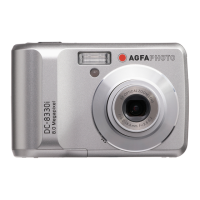
Table of Contents

Questions and Answers

  • G
    Gabriela GrossAug 15, 2025
    What to do if my AgfaPhoto Digital Camera does not take pictures?
    • J
      Joshua AlexanderAug 15, 2025
      If your AgfaPhoto Digital Camera isn't taking pictures, here are a few things to check: First, if the flash is charging, wait for it to finish. Second, if the memory is full, insert a new memory card. Finally, the card may be defective, use a new card.
  • M
    Michelle EricksonAug 18, 2025
    Why is my AgfaPhoto Digital Camera image blurry or out of focus?
    • M
      millersamanthaAug 18, 2025
      If your AgfaPhoto Digital Camera images are blurry or out of focus, it could be due to a couple of reasons. First, make sure to hold the camera steady when taking the picture, as movement can cause blurriness. Second, if the subject is too close or too far, it might be out of the camera's focus range. If the subject is within 15 cm or 50 cm, turn the Macro mode on. Avoid using Macro mode for distant subjects.
  • M
    Matthew HeathAug 21, 2025
    What to do if the image is not recorded when the shutter button is pressed on AgfaPhoto Digital Camera?
    • R
      Randall HughesAug 22, 2025
      If your AgfaPhoto Digital Camera isn't recording images when you press the shutter button, it could be due to these reasons: First, if the flash is charging, wait for it to charge. Second, if the memory is full, insert a new memory card.
  • C
    Cynthia SmithAug 25, 2025
    Why recorded images are not saved in memory on AgfaPhoto Digital Camera?
    • M
      Mary CarpenterAug 26, 2025
      If your AgfaPhoto Digital Camera isn't saving recorded images, it might be because the camera was turned off before the image was fully stored. If the battery low indicator appears on the LCD monitor, replace the battery immediately.
  • M
    Mrs. Lauren Smith DDSAug 29, 2025
    How to fix AgfaPhoto Digital Camera that does not turn on?
    • N
      Nicholas HenryAug 29, 2025
      If your AgfaPhoto Digital Camera isn't powering on, there are a few potential causes. First, ensure the battery is inserted correctly. If it is not, reload the battery in the correct direction. Second, the batteries might be dead, in which case you should replace or recharge them. Finally, check that the battery compartment door is securely closed.
  • Y
    yeseniasmallSep 1, 2025
    How to fix AgfaPhoto Digital Camera flash that does not fire?
    • J
      Johnny CarrollSep 1, 2025
      If the flash on your AgfaPhoto Digital Camera isn't firing, check if the flash is set to OFF. If it is, set the flash to any mode except off.
  • M
    Mrs. Leslie DuncanSep 4, 2025
    Why I cannot transfer images to a computer from AgfaPhoto Digital Camera via USB?
    • T
      Timothy TuckerSep 4, 2025
      If you're unable to transfer images from your AgfaPhoto Digital Camera to a computer via USB, it may be because the USB driver is not installed. Install the USB driver before you connect the camera to a computer / turn the camera on.
  • H
    Heidi GreenSep 7, 2025
    Why is the image not displayed on the LCD monitor of my AgfaPhoto Digital Camera?
    • M
      Matthew BarnesSep 8, 2025
      If the image is not displayed on the LCD monitor of your AgfaPhoto Digital Camera, it is possible that a memory card with non-DCIF images (recorded with other camera) is loaded. This camera cannot display non-DCIF images.
  • N
    nlopezSep 12, 2025
    How to resolve 'Card error' on AgfaPhoto Digital Camera?
    • B
      Brianna GriffithSep 12, 2025
      If you are getting a 'Card error' message on your AgfaPhoto Digital Camera, the memory card format may not be correct. Re-format the memory card to the FAT format using a card reader in Windows.

Summary

Parts of the Camera

Getting Started

Camera Operation Basics

Power and Mode Management

Covers turning the camera on/off, power saving, and switching between recording and playback modes.

Menu Navigation

Guide to accessing and using the REC and Setup menus for configuring camera settings.

Recording Functions

Recording Still Images

Detailed steps for composing, focusing, and capturing high-quality still photographs.

Playback and Editing

Viewing Images and Movies

How to play back still images and movie clips, including navigation and playback controls.

File Management

Deleting and protecting single, multiple, or all files on the camera's memory.

Connectivity and System Information

Troubleshooting Guide

Solutions for common camera problems and error messages to ensure proper functionality.

Camera Specifications

Detailed technical specifications of the camera, covering hardware and software features.

AgfaPhoto DC-8330i Specifications

General IconGeneral
TypeCompact Digital Camera
Sensor TypeCCD
Image Sensor Size1/2.5 inch
Optical Zoom3x
Video Resolution640 x 480 pixels
Storage MediaSD/SDHC card
Battery Type2x AA batteries
Sensor Resolution8.3 MP
Effective Pixels8.0 Megapixels
ISO SensitivityAuto, 100, 200, 400

Related product manuals