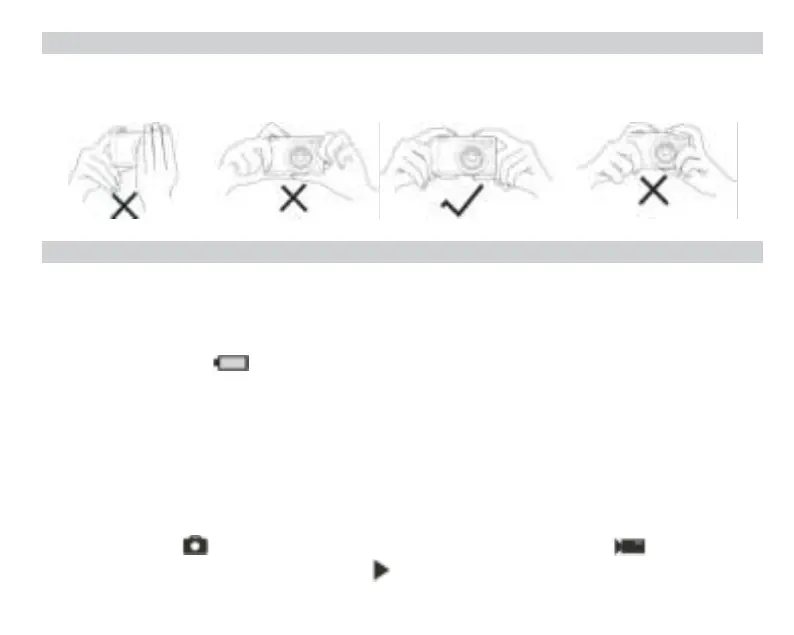
How to correctly hold your camera while taking pictures
First press the Power button to turn on the camera and activate the auto-focus zoom lens for it to open out like a periscope.
Then steadily hold the camera avoiding putting your fingers in front of the lens or the flash as shown on the diagram below.
Note: Do not touch or block the lens when it opens as it may damage the camera.
Start with your digital camera
Power on
Press once the Power button on the top of the camera to turn it on. Then the LCD screen will light up and the auto-focus zoom
lens will open out indicating that your camera is on and ready for use.
Power off
Press once the Power button on the top of the camera to turn it off while it is on. When the battery power is insufficient, the
camera will display a red icon on the LCD screen and automatically turn off after a few seconds.
Mode switching
The digital camera supports 3 modes:
- Photo mode: this mode
is for you to take still photos and adjust photo shooting settings.
- Video mode: this mode is for you to record videos
and adjust video shooting settings.
- Playback mode: this mode is not only for you to preview photos or videos store on the memory card but also delete, protect
and rotate your photos.
In order to select a mode, please follow the below steps:
1. Press the MODE button to toggle between the 3 modes.
2. In photo mode, the icon will show up at the top left of the LCD screen. In video mode, the icon will show up at
the same place and in playback mode, this will be the icon.














 To Next Page