28
5. GET TO KNOW YOUR AgfaPhoto POWERCUBE 100Pro
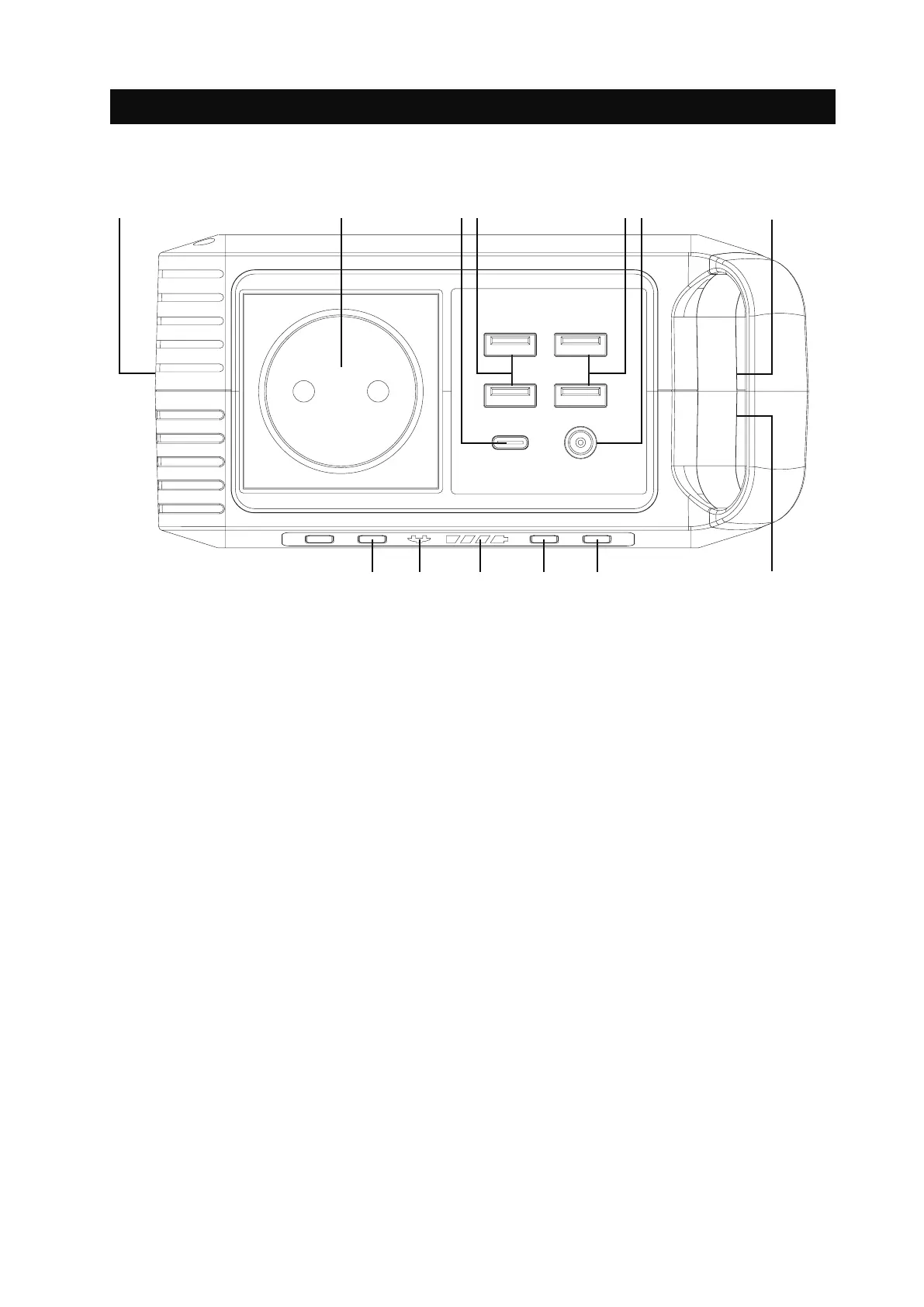
Button and connector explanations
A. AC Output On/Off Button
B. AC Indicator
C. Battery-Indicator
D. Power On/Off Button
E. LED Lightpanel On/Off Button
F. Cooling vents
G. Input: 1x 3.5mm DC35135 Input 15~24 V, 1.2 A max.
H. Output #1: 2x USB 5 V, 2.4 A (Total 4.8 A max.)
I. Output #2:
2x USB 5-12 V, 2 A (Total 5 V, 3.4 A, 18 W max.) | Qualcomm
QuickCharge™ 3.0
J.
Output #3:
1x Type-C 5 V, 3 A / 9 V, 2 A / 12 V, 1,5 A
|
PD 3.0 (18 W max.)
K. Output #4: 1x 5.5mm DC5521 12-16.8 V, 10 A (13 A max.)
L. Output #5: 1x AC 230 V / 50 Hz 80 W (120 W max.)
M. Ultrabright LED Lightpanel
A B C E
KM
F
GI
H
JL
D


 To Next Page