EasyManua.ls Logo

AGM A-19 - Addendum

AGM A-19
17 pages
Print Icon
To Next Page IconTo Next Page
To Previous Page IconTo Previous Page
Loading...
12
Advanced Power
Savin
g
M
ode
1. Background
The
traditional
monitors
have
the
function of
electricity-savin
g
d
ormanc
y
.
Bu
t
t
he
interval
of
dormanc
y
i
s
d
if
ficult
to
decide.
If
the
interval
is
long,
the
purpose
of
saving
electricity
can
not
be
achieved
.
W
hile
if
th
e
i
nterva
l
i
s
s
hort
,
y
our computer
and
LCD
monitor
will
be
dormant
often.
Whe
n
t
he
LC
D
m
onitor
become
s
d
ormant
,
t
he
back
light
s
w
ill
be
turned
of
f
immediately
.
The
frequent
turning-on
and
turning-o
ff
of
lights
will
result
in
th
e
l
ightness
being
uneven
an
d
e
ve
n
,
shortening
the
life
of
the
lights.
2. Our solution to the dilemma – Monitor the Life-Extension function
In
view
of
that,
we
have
designed
the
function of Monitor
Life-Extension.
Once
yo
u
s
elec
t
t
he
option
of
“Advanced
Power
Saving
Mode”
in
the
OSD
menu,
and
then
you
ca
n
n
ot
only
save
electricit
y
,
bu
t
e
xten
d
t
he
life
of
th
e
l
ights.
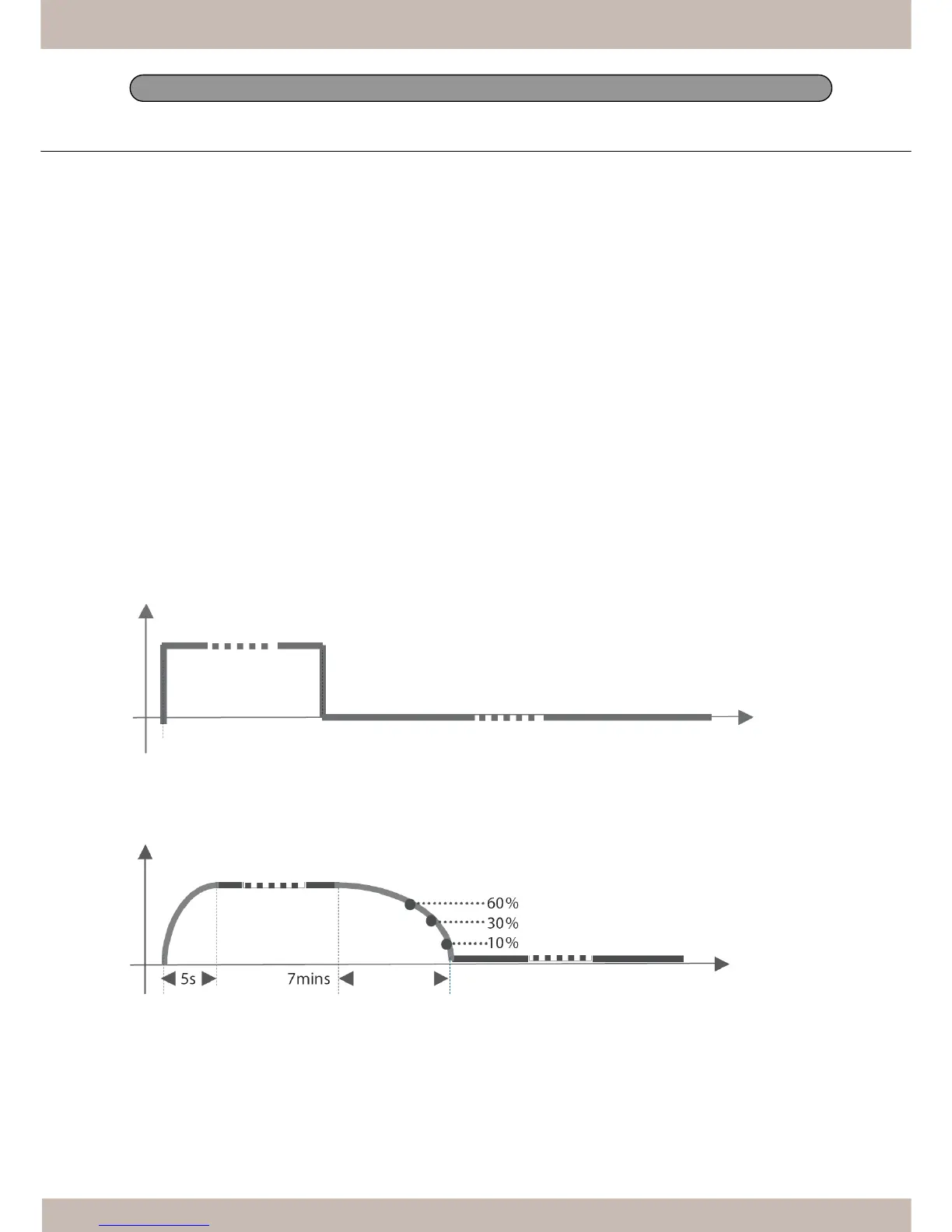
3. Working principle of the Monitor Life-Extension function
T
o
minimize
the
impact
of
frequent
turn-on
and
turn-of
f
o
f
L
CD
monito
r
,
th
e
L
ife-Extensio
n
f
unction
d
ecreases
th
e
electricity
supplied
to
the
back-light
of
LCD
monitor
gradually
,
i
nstead
of
cu
tting
i
t
o
ff
right
a
wa
y
w
he
n the
P
C
e
nter
s
sleeping
or
of
f
mode.
Please
see
the
following
comparison
graphics
for
details
.
*
Standard
Power
Saving
Mode
(withou
t
M
onitor
Life-Extensio
n
f
unction)
Power
*
Advanced
Power
Saving
Mode
(wit
h
M
onito
r
L
ife-Extensio
n
f
unction))
Power
ON
Sleep
Start
Power
Saving
Start
This
“Slow-Start-n-Delay-Of
f”
approach
minimize
s
t
he
transit
of
electricity
and
temperatur
e
c
aused
by the
turning-on
and
turning-of
f
o
f the
LCD
monitor
.
Therefore,
th
e
d
ecay
of
backlight
s
o
f
T
FT
-LCD
ca
n
b
e
controlled
at
the
certain
level
which
is
much
less
than
it
was.
Addendum
ON
Power Saving Start