AGM Global Vision10
2.1.3 CONTROLS AND INDICATION
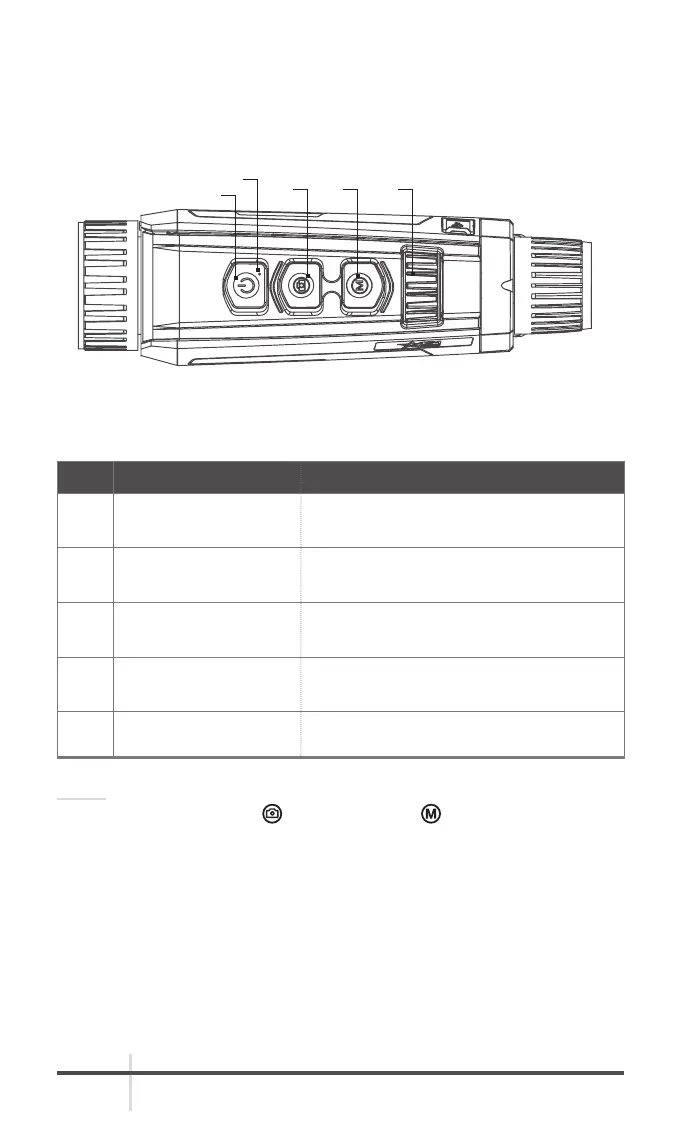
The Fusion controls are shown in Figures 2-2 and are defined in Tables 2-2.
Each button is responsible for some functions selected by short press or long
press (hold) the button. Pushing a button for 2+ second is considered “long
press” (hold).
TABLE 2-1. CONTROLS AND INDICATOR FUNCTIONS
ITEM CONTROLS FUNCTIONS
1 POWER BUTTON
Press: Standby mode/Wake up device.
Hold: Power ON/OFF.
2 CAPTURE BUTTON
Press: Capture image.
Hold: Trigger calibration.
3 MENU BUTTON
Press: Palettes.
Hold: Enter/Exit the menu.
4 OPERATION WHEEL
Adjusts the digital zoom.
Selects the functions in menu mode.
5 POWER INDICATOR Indicate the power ON/OFF.
NOTE:
Press the CAPTURE button
and MENU button at the same time to start
or stop recording.
FIGURE 2-2. CONTROLS AND INDICATION
1
5
2 3 4



 To Next Page