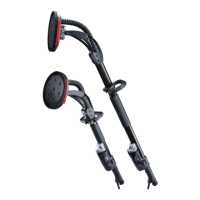
This document is an operation manual for the Intex Giraffe GHOST Drywall Sander, a power tool designed for efficient sanding of drywall or plaster walls and ceilings. It is intended for both new construction and renovation work, and is designed to be used in conjunction with a vacuum cleaner for optimal dust collection and sanding results.
Function Description
The Intex Giraffe GHOST Drywall Sander is a mains-operated (corded) power tool. Its primary function is sanding, and it is not recommended for operations such as grinding, wire brushing, polishing, or cut-off. The tool features a pivoting sanding head that allows for excellent results with minimal time and effort. The sanding plate cover is equipped with an open half-moon door, enabling the operator to sand right up to the edge or into a corner. The edge of the brush skirt is rotatable to position the opening to any desired angle.
Important Technical Specifications
- Code: AGHOST
- Voltage: 110-120V or 220-240V - 50-60Hz
- Power Input: 430W
- No-Load-Speed: 1000-1600 min⁻¹
- Sanding Head Diameter: Ø215mm
- Sanding Disc Diameter: Ø225mm
- Unit Weight: 2.8kg (6.17lbs)
- Unit Dimensions: 1430 x 254 x 157mm
The package includes the GHOST Drywall Sander, a heavy-duty vacuum hose (4.3m), a Velcro interface pad, a 6mm L-Hex Key, a heavy-duty cushioned carry bag, and the operation manual.
Usage Features
The tool is operated using a Power Button, Motor On/Off Button, and Speed Selector Buttons, with an Indicator Screen displaying the selected settings.
- Starting and Stopping: To switch on, the Power Button is pressed to energize the tool, followed by the Motor On/Off button to start. To switch off, the Power Button is pressed. The sanding disc will continue to rotate for a short time after shutdown.
- Speed Adjustment: The rotation speed is variable, adjustable from 1000 to 1600 min⁻¹ in steps using the "Up" and "Down" Speed Selector Buttons. Higher speeds are recommended for fast stock removal, while lower speeds are for more precise control and fine finish sanding.
- SuperPad Installation: The sandpaper disc is centered and pressed onto the hook and loop backing of the sponge pad. The sponge pad has two hook profile types (finer black, coarser white) to ensure optimal adhesion.
- Cushioned Interface Pad Replacement: The sponge pad must be perfectly flat for good sanding results. It is hook and loop on both sides, and replacement involves peeling it away from the Sanding Plate Base and affixing a new one, ensuring proper centering and alignment of holes with the slots to prevent excessive vibration. Only original sponge pads should be used.
- Brush Bristles Replacement: The brush bristles on the edge of the Sanding Plate Cover align the sanding disc, prevent gouging, and aid dust collection. They should be replaced when worn to maintain effective dust collection and sanding head stabilization.
- Vacuum Cleaner Connection: The tool is designed to work with a vacuum cleaner. Users must ensure a dust bag approved and rated for drywall dust is installed in the vacuum cleaner to minimize airborne dust.
- Sanding Technique: The tool requires two-handed operation for maximum safety and control, with one hand on the main handle and the other on the column. Stable footing is essential. Sanding should begin with light contact with the work surface, keeping the sanding head flat and in constant motion using overlapping sweeps to avoid swirl marks. The joints in the sanding head allow it to follow the contours of the work surface.
- Half-Moon Door: To open, turn off and de-energize the machine, then press the door straight down until it clicks. It will then flip up under its spring tension. Closing is the reverse. Dust collection is not ideal when the half-moon door is open.
- Hour Tracker: The tool includes a resettable Job Hours Counter and a non-resettable Total Hours Counter, which can be accessed via specific button press sequences involving the Power Button and Speed Selector Buttons.
Maintenance Features
- Cleaning: The motor should be blown with compressed air as often as necessary to clean out accumulated dust. All air passages should be periodically blown out with dry compressed air. Plastic parts should be cleaned with a soft damp cloth, avoiding solvents. The vacuum swivel connector should be cleaned regularly to ensure free turning.
- Overload and Thermal Protection: The tool indicates when the maximum recommended load is reached by slowing its rotation speed. If the operator continues to push, the machine will stop. If the tool overheats, it will also automatically stop. In case of overload or overheating, the tool should be run at no load for a few minutes to cool down.
- Error Codes: The indicator screen displays error codes (E-1 for current overload, E-2 for overheat, E-3 for low voltage, E-4 for high voltage, E-2-5 for motor blocked, E-2-6 for motor cannot restart after 4 tries, E-9-1 for loss of communication). Most errors can be cleared by pressing the Motor Switch. Persistent problems require service from an Authorized Service Centre.
- Cord Replacement: If the power supply cord needs replacement, it must be done by Intex or an authorized service agent to avoid safety hazards.
- General Maintenance: Power tools should be maintained by checking for misalignment, binding of moving parts, breakage, and other conditions affecting operation. Cutting tools should be kept sharp and clean. Handles must be kept dry, clean, and free of oil and grease. Air vents should be regularly cleaned to prevent electrical hazards from powdered metal accumulation. The tool should not be operated near flammable materials or with liquid coolants.
- Service: All repairs must be entrusted to a qualified repair person using only identical replacement parts to ensure safety. Only original parts should be used for repair and maintenance.
Safety Instructions
Users must read and understand all safety warnings and instructions to reduce the risk of injury, electric shock, fire, or serious injury. Key safety points include:
- Work Area Safety: Keep the work area clean, well-lit, and free of children and bystanders.
- Electrical Safety: Ensure power tool plugs match the outlet, avoid body contact with earthed surfaces, do not expose power tools to rain or wet conditions, and use appropriate extension cords for outdoor use.
- Personal Safety: Stay alert, wear personal protective equipment (eye protection, dust mask, non-skid safety shoes, hard hat, hearing protection), prevent unintentional starting, and maintain proper footing and balance.
- Power Tool Use & Care: Do not force the power tool, use the correct tool for the application, and ensure the power tool can be turned on and off. Disconnect the plug before making adjustments or changing accessories. Store idle power tools out of reach of children.
- Kickback & Related Warnings: Maintain a firm grip, use auxiliary handles if provided, and avoid placing hands near rotating accessories. Do not position the body in the path of potential kickback. Use special care when working corners and avoid attaching saw chain woodcarving blades.
- Sanding Specific Safety: Do not use excessively oversized sanding disc paper. Ensure the work surface is fully dried before sanding to avoid motor overload. Avoid pointed projections and nails that could damage the sandpaper and sponge pad.

 Need help?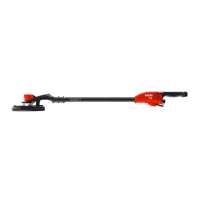

 To Next Page
 General