EasyManua.ls Logo

AGPtek A22 - Buttons & Controls; Charge the Player

AGPtek A22
42 pages
Print Icon
To Next Page IconTo Next Page
To Previous Page IconTo Previous Page
Loading...
Thank you for purchasing AGPTEK MP3 Player. Please read
the manual carefully before using the product.
Specifications are subject to change without prior notice.
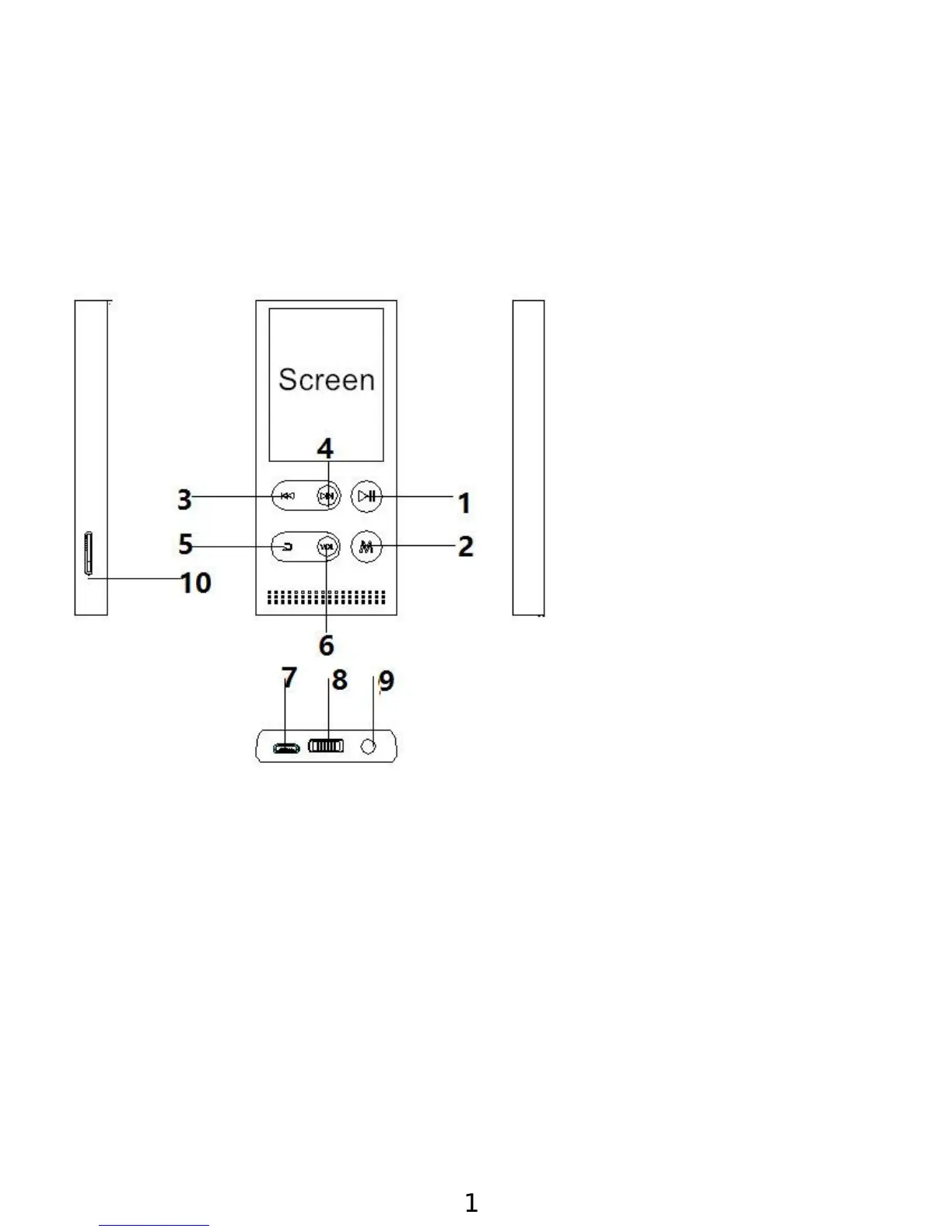
Buttons & Controls
Charge the Player
1. Charge by solar energy
With the built-in solar charging battery, this player allows
to charge by the solar power with the solar panel on the
back of the player. If the sun light is strong enough, you
can charge it by placing the back side of player under the
sunlight. The charging time depends on the sunlight
intensity.
2.By connecting to a computer or charger(Not included)
1. Play/Pause/Enter/Po-
wer on/off
2. Menu
button/Screen
Lock/unlock
3. Previous/Rewind/Scr
oll up/Volume -
4. Next/Fast
forward/Scroll
down/Volume +
5. Back button
6. Volume button
7. USB port
8. Power slider
9. Earphone jack
10.Card slot
1

Related product manuals