Charge the Receiver
The Bluetooth receiver must be fully charged for first
use.
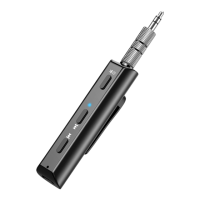
1. Connect the charger to the Micro USB port.
2. During charging, the LED indicator turns red and
will turn off once fully charged.
Power On/Off
1. Power On: Press and hold the multi-function
button(MFB) for 3s until LED indicator turns blue for 1s.
Meanwhile, a voice prompt "Power on" will be heard.
Then, red LED indicator and blue LED indicator start
flashing alternatively, which means that the receiver
enter into pairing mode.
2. Power Off: After pressing and holding MFB for 3s,
red LED indicator start flashing, followed by a voice
prompt "Power off". At this moment, the receiver is
power off.
Pairing & Connecting
1. Turn on the receiver until the receiver enters into
pairing mode.
2. Turn on Bluetooth of device and search for
Bluetooth receiver(G29).
3. Select G29 to pair. At this time, a voice prompt
"Connected" can be heard.
4. If it fails to pair, operate it once again.


 To Next Page