05-12
Operation
CLEAR CALIBRATION – SIMPLE OPTION
1. Select grain to clear.
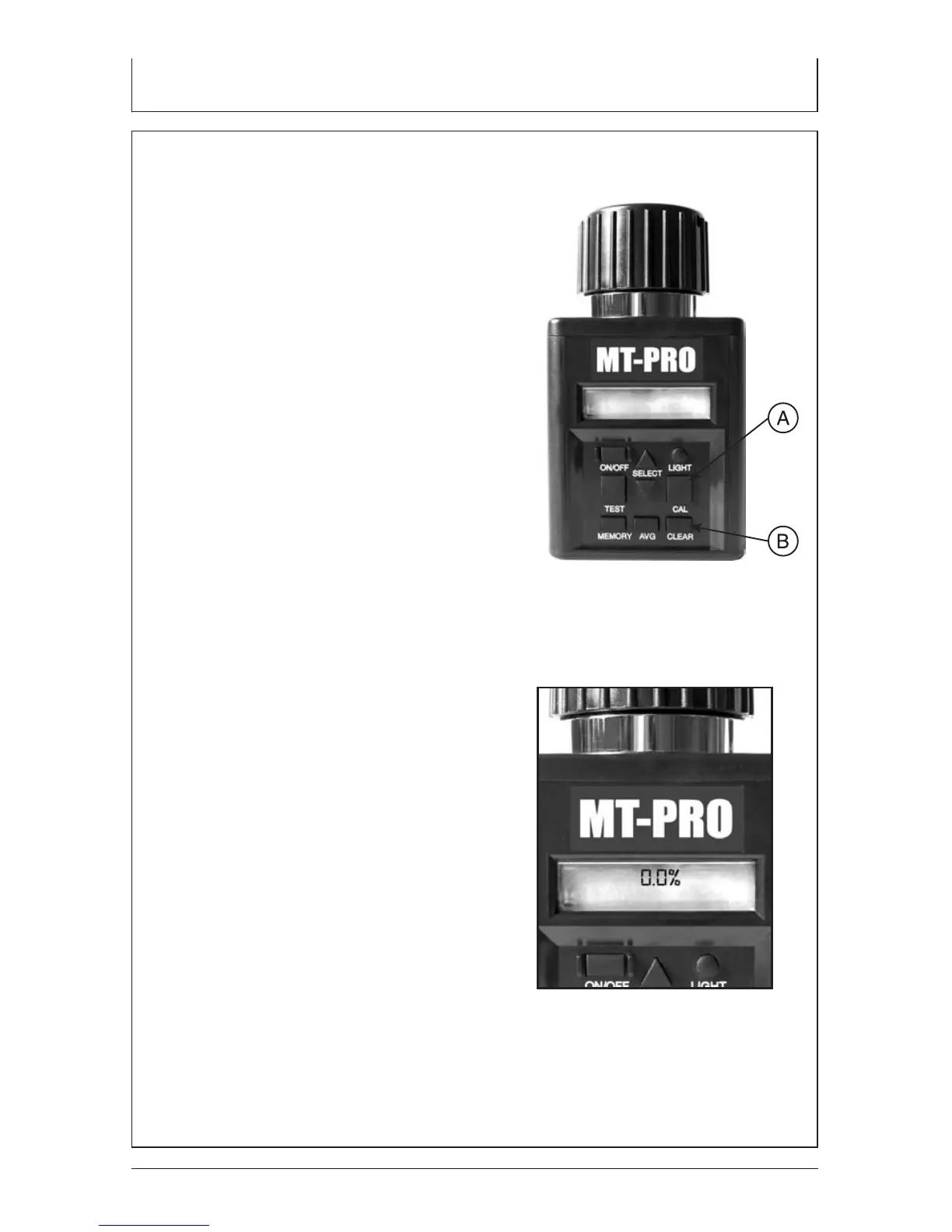
2. Press CAL button (A), tester will then
display last calibration that was made.
3. Press CLEAR button (B).
4. Tester will then display 0.0% for
both lines if the calibration has
been cleared.
NOTE: If you press the CAL button
and tester displays 0.0% on both
lines, then no calibration has been
made for this grain.
CLEAR CALIBRATION –
ADVANCED OPTION
1. Select grain to clear.
2. Press CAL Button (A), tester will
then display last calibration that
was made.
3. Press CLEAR Button (B).
4. Tester will then display 0.0%
for both lines if the calibration
has been cleared.
NOTE: If you hit the CAL
Button and tester displays
0.0% on both lines, then no
calibration has been made
for this grain.


 To Next Page