7
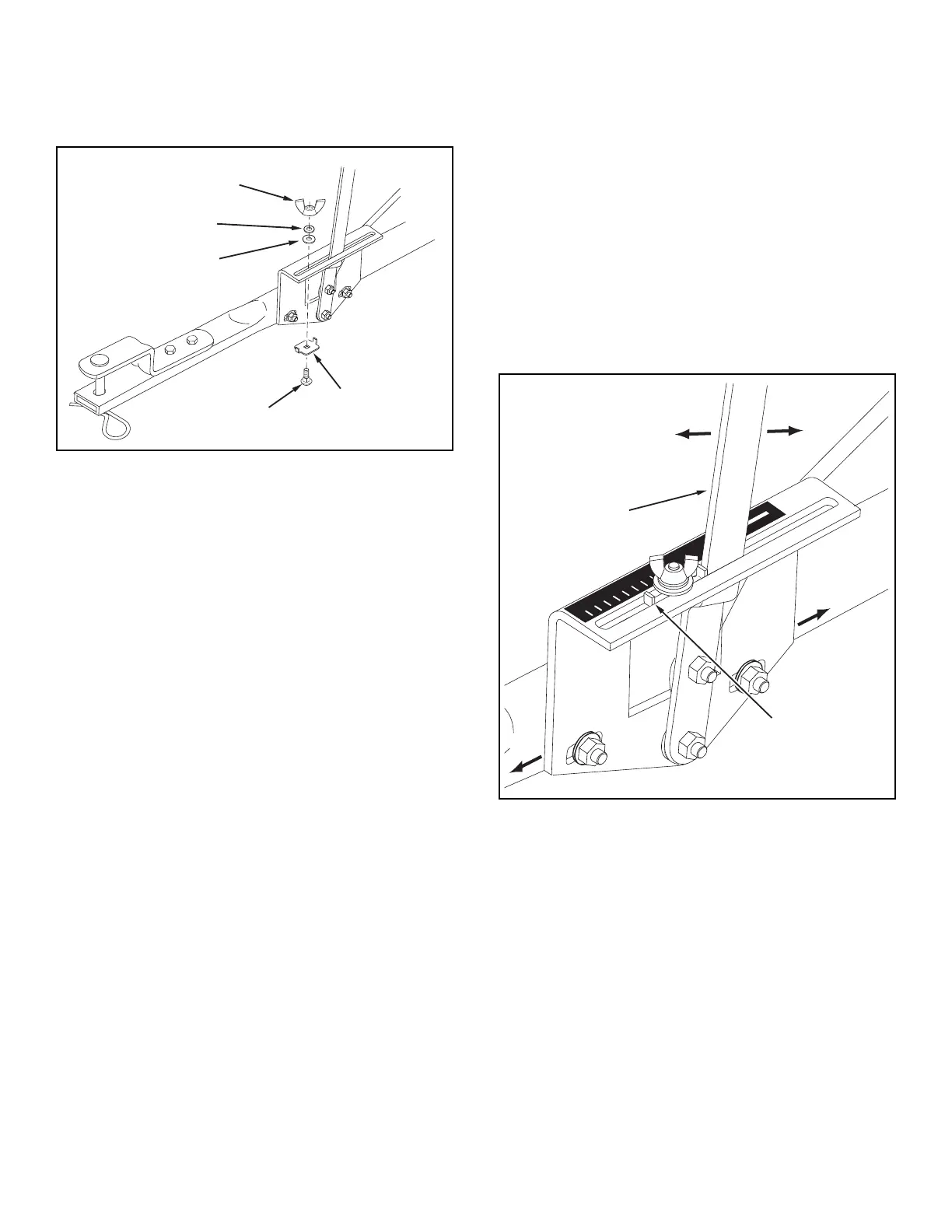
21. Placetheadjustablestopintothe"ON"endoftheslot
inthetopoftheowcontrolmountingbracket.Secure
withthe1/4"x3/4"carriagebolt,anylonwasher,a5/16"
atwasherandthenylonwingnut.Seegure12.
FIGURE 12
22. Positiontheowcontrolmountingbracket.
(Figure13).
a. Push on ow control arm until it locks in "OFF"
position.
b. Slideowcontrolmountingbracketalongtubeuntil
closureplateinbottomofhopperjustcloses.
c. Snugthe1/4"locknutsjustenoughtoholdow
controlmountingbracketinplace.
d. Set adjustable stop at "5". Pull ow control arm
againststop.Verifythatclosureplatehasopened
abouthalfway.
e. Ifclosureplatedoesnotopenhalfway,itmaybe
closedtoofarat"OFF".Adjustpositionofowcontrol
mountingbracketuntilclosureplatewillopenabout
halfwayat"5"andstillclosewhenarmislocked
in"OFF".Tighten1/4"locknuts.
FIGURE 13
5/16" FLAT
WASHER
NYLON
WASHER
1/4" x 3/4"
CARRIAGE BOLT
NYLON
WING NUT
ADJUSTABLE
STOP
OFF
ON
1
2
3
4
6
7
8
9
10
5
FLOW
CONTROL
ARM
ON
OFF
AJDUSTABLE
STOP
SETTING "5"


 To Next Page