EasyManua.ls Logo

Ai-Thinker Technology Ai-WB2 Series - User Manual

Ai-Thinker Technology Ai-WB2 Series
7 pages
Print Icon
To Next Page IconTo Next Page
Loading...
Ai-WB2 series firmware programming guide
Content
1. Preparation of hardware and software
2. The original hardware wiring
3. Use of burning software
4. ISP download instructions
1. Preparation of hardware and software
1. Ai-WB2 series module or development board
2. Ai-WB2 Burning software, download link:
https://drive.google.com/file/d/1p0ld8RKDPL8qw9Z4Y9u1jSumkX5QPAu5/
view?usp=sharing
3. USB to TTL serial board
2. Original hardware wiring
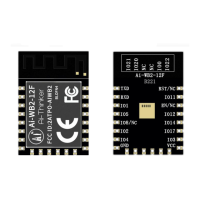
1. Take the Ai-WB2-12F module as an example, connect the wiring according to the
following table
USB to TTL
Ai-WB2-12F
VCC
3.3V
GND
GND
TXD
RXD
RXD
TXD
RTS
EN(reset function)
DTR
Backside solder joints (burning points)
3. Use of burning software
1. Double-click the BLDevCube.exe software, as shown below
Question and Answer IconNeed help?

Do you have a question about the Ai-Thinker Technology Ai-WB2 Series and is the answer not in the manual?

Summary

Preparation of Hardware and Software

Ai-WB2 Burning Software Download

Obtaining the necessary firmware burning application and its download link.

USB to TTL Serial Board Requirement

Specification of the serial communication hardware needed for programming.

Original Hardware Wiring

Ai-WB2-12 F Module Wiring Diagram

Connecting the Ai-WB2-12F module to a USB to TTL interface.

Use of Burning Software

Launching the BLDevCube Software

Initial step to open the firmware programming application.

Chip Selection in BLDevCube

Identifying and selecting the target chip model within the software.

Configuring Download Method

Setting up the connection and download parameters for the target device.

Burning Software Parameter Details

In-depth explanation of the software's configuration options for burning.

Firmware Burning Example: helloworld

A practical demonstration of the burning process using a sample application.

Verifying Burning Success

Confirming the firmware programming was successful by observing serial port output.

ISP Download Instructions

Modifying eflash_loader_cfg for ISP

Configuring the eflash_loader_cfg file for In-System Programming.

Overview

The Ai-WB2 series firmware programming guide outlines the process for flashing firmware onto Ai-WB2 series modules or development boards, primarily using the BLDevCube software. This guide serves as a comprehensive resource for developers and users looking to program their Ai-WB2 devices, covering everything from initial setup to troubleshooting common burning issues.

Function Description

The core function of this guide is to enable users to program firmware onto Ai-WB2 series modules. This involves several key steps: preparing the necessary hardware and software, correctly wiring the module to a USB to TTL serial board, utilizing the BLDevCube burning software, and understanding the ISP (In-System Programming) download instructions. The guide facilitates the transfer of compiled firmware binaries, such as those generated from an SDK (Software Development Kit), onto the device's flash memory. This process is essential for deploying custom applications, updating device functionality, or restoring factory settings. The burning software, BLDevCube, acts as the primary interface for managing this process, allowing users to select the target chip model (e.g., BL602/604), configure communication parameters, and initiate the download. The guide also touches upon the ability to modify configuration files to streamline the burning process, such as enabling ISP download without additional physical connections to burning points.

Usage Features

The guide emphasizes a user-friendly approach to firmware programming.

  • Hardware Preparation: It clearly lists the required hardware: an Ai-WB2 series module/development board, the BLDevCube burning software, and a USB to TTL serial board. This ensures users have all necessary components before starting.
  • Wiring Instructions: For the Ai-WB2-12F module, detailed wiring instructions are provided, mapping USB to TTL pins (VCC, GND, RXD, TXD, RTS, DTR) to the corresponding module pins (3.3V, GND, TXD, RXD, EN, and backside solder joints for burning). This explicit mapping helps prevent incorrect connections that could damage the device or hinder the programming process.
  • Software Interface Navigation: The guide walks users through the BLDevCube software interface. It instructs on how to locate and launch the BLDevCube.exe application, select the correct chip model (BL602/604), and choose the IOT SDK download method.
  • Parameter Configuration: A crucial aspect of usage is understanding and configuring the burning software parameters. The guide provides a brief description of key parameters within the BLDevCube's "Simple Flasher" section.
    • Interface: Users can select between Jlink or UART for communication; UART is the default.
    • COM Port: When using UART, users must select the correct COM port connected to the chip. A "Refresh" button is available to update the list of available COM ports.
    • Uart Rate (Baud Rate): The recommended download frequency is 921600.
    • Board: This parameter allows selection of the board model and crystal oscillator type, which dictates the DTS file and hardware configuration.
    • Chip Erase: This setting determines whether the entire flash memory is erased before burning. The default is False, meaning only the content at the burning address is erased. Setting it to True erases the entire flash.
    • Xtal: Used to select the crystal oscillator type, typically 40M.
  • Firmware File Placement: The guide demonstrates how to place the relevant burning files, such as the partition file, RF parameter file, boot file, and user-compiled APP files (e.g., helloworld.bin), into the appropriate fields within the BLDevCube software. This ensures all necessary components of the firmware are included in the burning process.
  • Burning Process Initiation and Feedback: Users initiate the burning process by clicking the "Create & Download" button. The software provides real-time feedback in the log window, indicating the progress of the burning operation, including "erase pending," "Start burning," and "Finish burning" messages.
  • Troubleshooting: The guide addresses common issues, such as "could not open port 'COM28': PermissionError(13)," which indicates the serial port is occupied by other software. It advises closing any conflicting applications.
  • Verification: After successful burning, the guide instructs users to power on the module and check the serial port output for a specific log (e.g., [helloworld] start, [helloworld] helloworld_aithinker, [helloworld] end), confirming that the firmware has been successfully written and is functioning.
  • ISP Download without Solder Joints: A significant usage feature is the ability to perform ISP download without needing to solder to backside burning points. This is achieved by modifying the eflash_loader_cfg configuration file, specifically changing boot2_isp_mode=0 to boot2_isp_mode=1. This modification simplifies the burning process for users who may not have the tools or expertise for fine soldering.

Maintenance Features

While the guide primarily focuses on the programming process, it implicitly includes elements that contribute to device maintenance and reliability.

  • Configuration File Modification: The ability to modify the eflash_loader_cfg file for ISP download without physical burning points can be considered a maintenance feature. It simplifies future firmware updates or re-flashing operations, reducing the risk of physical damage from repeated soldering. This allows for more convenient and less intrusive maintenance of the device's software.
  • Troubleshooting Guidance: The explicit mention of common errors and their solutions (e.g., serial port occupation) helps users diagnose and resolve issues independently, reducing the need for external support and facilitating smoother maintenance operations.
  • Firmware Update Mechanism: The entire process described in the guide is, in essence, a robust mechanism for firmware updates. By providing clear steps for flashing new firmware, the guide ensures that devices can be kept up-to-date with the latest features, bug fixes, and security patches, which is a critical aspect of long-term device maintenance.
  • Clear Documentation: The detailed instructions and explanations within the guide serve as a valuable reference for anyone performing maintenance tasks. Well-documented procedures reduce ambiguity and ensure consistency in programming, minimizing errors during critical updates.
  • Verification Steps: The post-burning verification by checking serial port logs ensures that the firmware has been correctly installed and is operational. This immediate feedback loop is crucial for confirming successful maintenance and preventing deployment of non-functional devices.

In summary, the Ai-WB2 series firmware programming guide provides a structured and detailed approach to programming Ai-WB2 modules, offering clear instructions for hardware setup, software usage, parameter configuration, and troubleshooting. Its features are designed to make the firmware burning process accessible and efficient for users, while also supporting the long-term maintenance and updating of the devices.

Ai-Thinker Technology Ai-WB2 Series Specifications

General IconGeneral
SeriesAi-WB2 Series
CategoryControl Unit
Wi-Fi802.11 b/g/n
PWMYes
CPU32-bit RISC-V
Operating Temperature-40°C ~ 85°C

Related product manuals