5
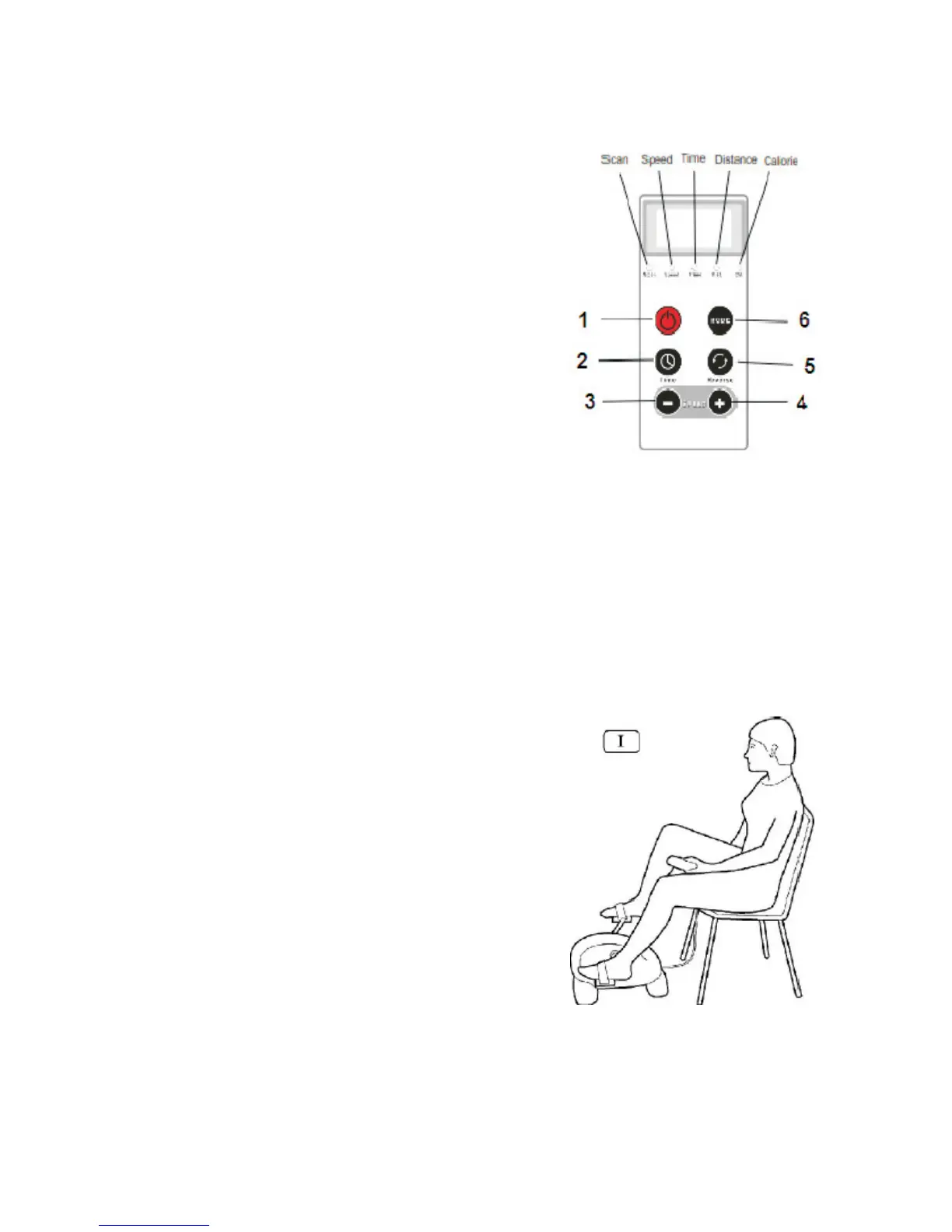
REMOTE CONTROL
Display Indicator
Speed, Time, Distance (Distance travelled km), Calories, Scan (random display).
1 Power On/Off
2 Time (Time selection button; 1-15 min)
3 Decrease Speed (12 settings)
4 Increase Speed (12 settings)
5 Forward/Reverse (Pedal direction)
6 Mode (Press to display speed, time,
distance or calories)
NB. For faster adjustment of Time or Speed press
and hold the relevant button.
SWITCHING ON/OFF
1. Plug the socket into the wall. Switch the red button below the remote control
s
upport to position I. To switch the machine on press (1) on the remote control.
2. To switch the machine off press (1) on the remote control. Switch the red button
below the remote control support to position 0 and then unplug the unit from the
wall.
EXERCISES
Position 1: Seated (Lower Body)
• Use a stable, sturdy chair.
• Place the unit at a comfortable distance from
the chair to avoid overstretching your legs.
• Make sure that your lowe back is supported;
we recommend that you place a small cushion
at the base of your back.
• Sit on the chair and place your feet on the
pedals.
• Remove the Remote Control from the
surround on the unit. Follow the instructions
for switching the unit on/off and use of the
Remote Control.
Ver.12/201
6
(2532)


 To Next Page