Task3:AddDeviceinSymphony
AimetisSymphony™AXISAccessControlInt egrationGuide 3
©2015AimetisCorp.(3‐2015)Rev .01
Task3:AddDeviceinSymphony
Important:InanyinstallationofSymphony,youareallowedonlyonetypeofaccesscontrol.YoucannotuseAxisifanoth er
accesscontroldeviceisalreadyinuse.
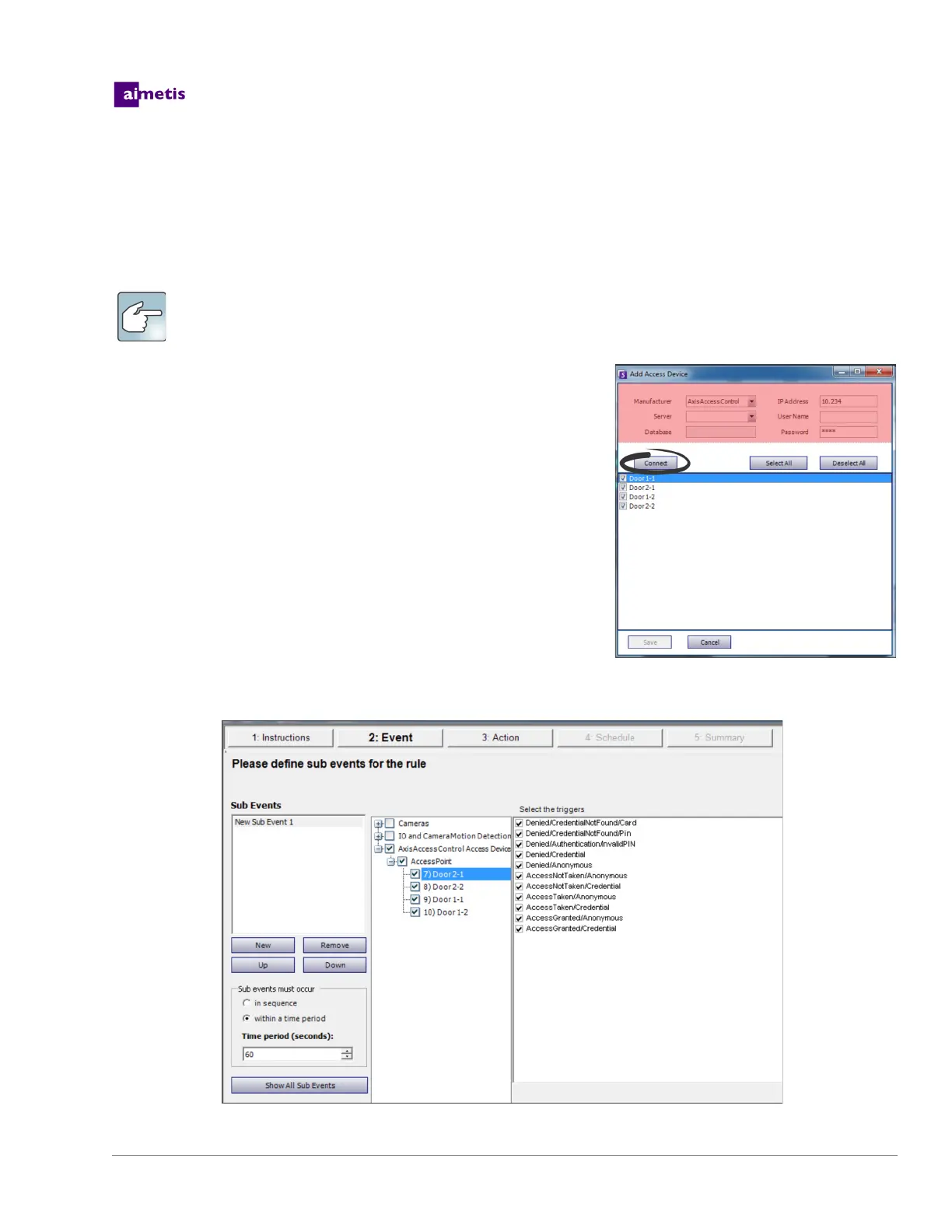
1. FromtheServermenu,selectAddAccessDevicetoopentheAddAccess
Devicedialogbox.
2. FromtheManufacturerfield,selectAxis.
3. Inthe
IPAddressfield,entertheIPaddressoftheAxisserver.Selectany
controllerIPinnon‐standardmode.
4. EnteraUsernameandPassworddefinedonco ntroller.
5. ClickConnect.
6. SelectthedevicesandclickSave.
7. Createanewrulebyselectingdesireddevicescorrespondingtriggersand
thetrackeryouwant
toforwardtheAxisevents.
NOTE:Ifthenameonthecontrollerwaschangedyoumustreconnectwith
Symphony .
8. Forinstructions inusingtheRuleWizard,seetheSymphony
webhelp.
TheSymphonyProlicenseisrequiredtocompletethefollowingsteps.


 To Next Page