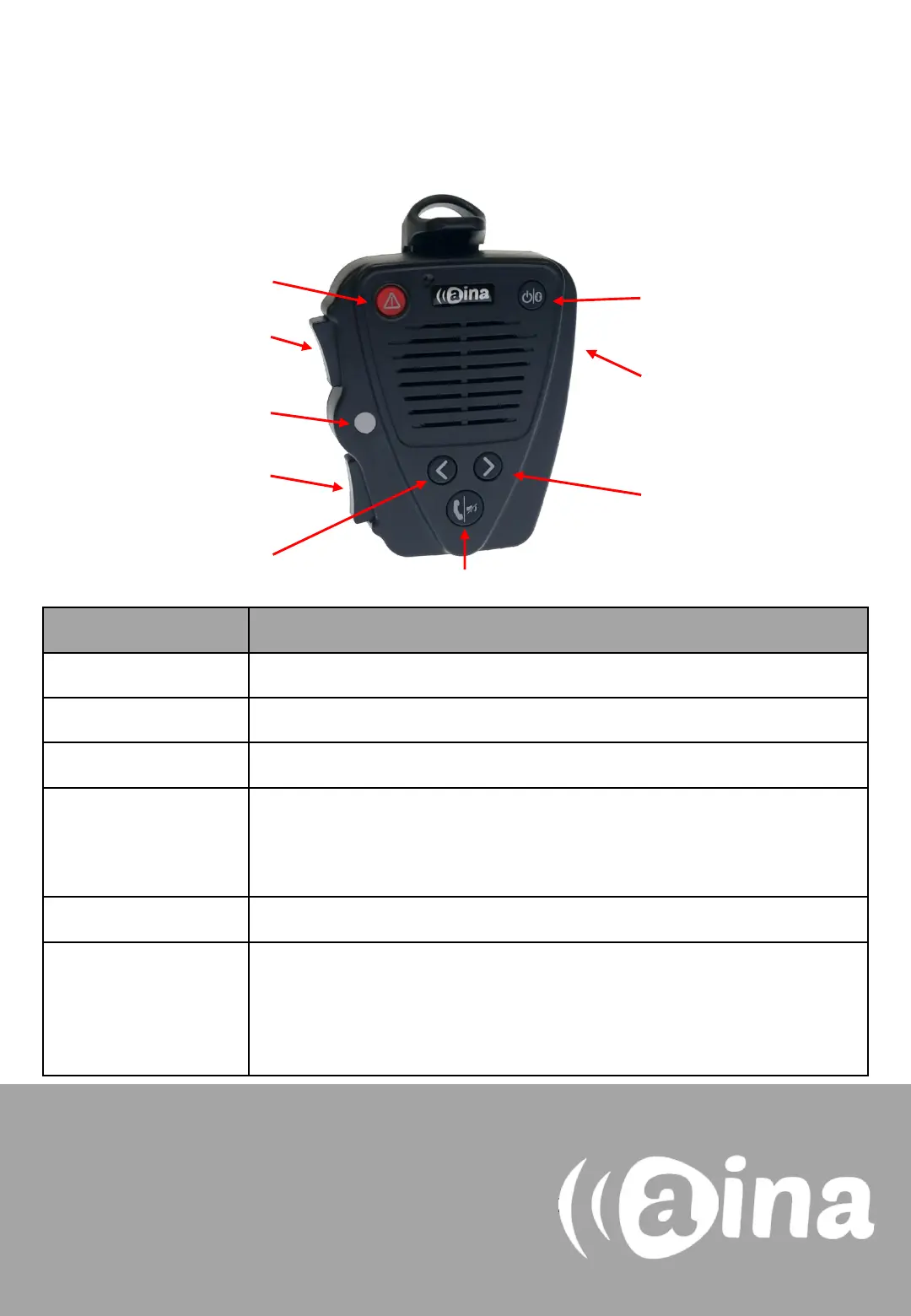
AINA PTT Voice Responder’s main button
functions when connected to Zello
Power
ON/ OFF
Primary
PTT
Volume
buttons
Soft button
(left)
Soft button
(right)
Answer/ end call
Secondary
PTT
LED
Button Function
Power ON/ OFF Press for more than 3 seconds to turn the device on/off.
Emergency Press to send a call alert to a Zello contact.
Primary PTT Press and hold to speak. Release when you are done.
Secondary PTT Press to communicate with a pre-assigned contact/ channel. Assign the
the primary PTT button and then hold down the secondary PTT button
for a few seconds. Finally, release both buttons.
Volume buttons Press and hold to increase/ decrease the speaker’s volume.
Soft buttons • Press either soft button to change contact/ channel.
• Press and hold the left soft button to (de)activate the LED.
• Press and hold both soft buttons to (de)activate Covert Mode in
which LED indications are suppressed and audio annunciations are
only delivered through a headset.
Visit www.aina-wireless.com to find additional
accessories, an extended user manual of the
AINA PTT Voice Responder and more user
guides. If you have any further questions, you
can also email us at:
info@aina-wireless.com
Emergency


 To Previous Page
 Loading...