4. CHOOSE AN IDEAL FLIGHT ENVIRONMENT
Choose the place which meets the following conditions:
1. Indoor environment with calm air-conditioning. Beware of the air circulation from the air-conditioner.
2. Space area: It is recommended to fly in areas over 10 ft (W) x 16.5 ft (L) x 8 ft (H).
3. Safety area: It is highly recommended that the area be free of as many obstacles as possible when flying.
- If you crash your helicopter you may need to switch the ON/OFF button to “ON” again to restart.
- Don’t operate the helicopter in direct bright light as it may affect the control system of your helicopter.
- Don’t cover the IR Diode of the controller/charger as it will block the IR signal.
- Point the controller toward the helicopter when flying.
Tip! OPERATION
Tip! CONTROLLING
- Practice hovering your helicopter first, before using the directional controls. Make sure that you are able to maintain a steady hover at
approximately 3 ft off of the ground before trying to steer the helicopter. Once you master this, it is recommended that you get comfortable turning
the helicopter left and right, prior to attempting to control it forward/backward.
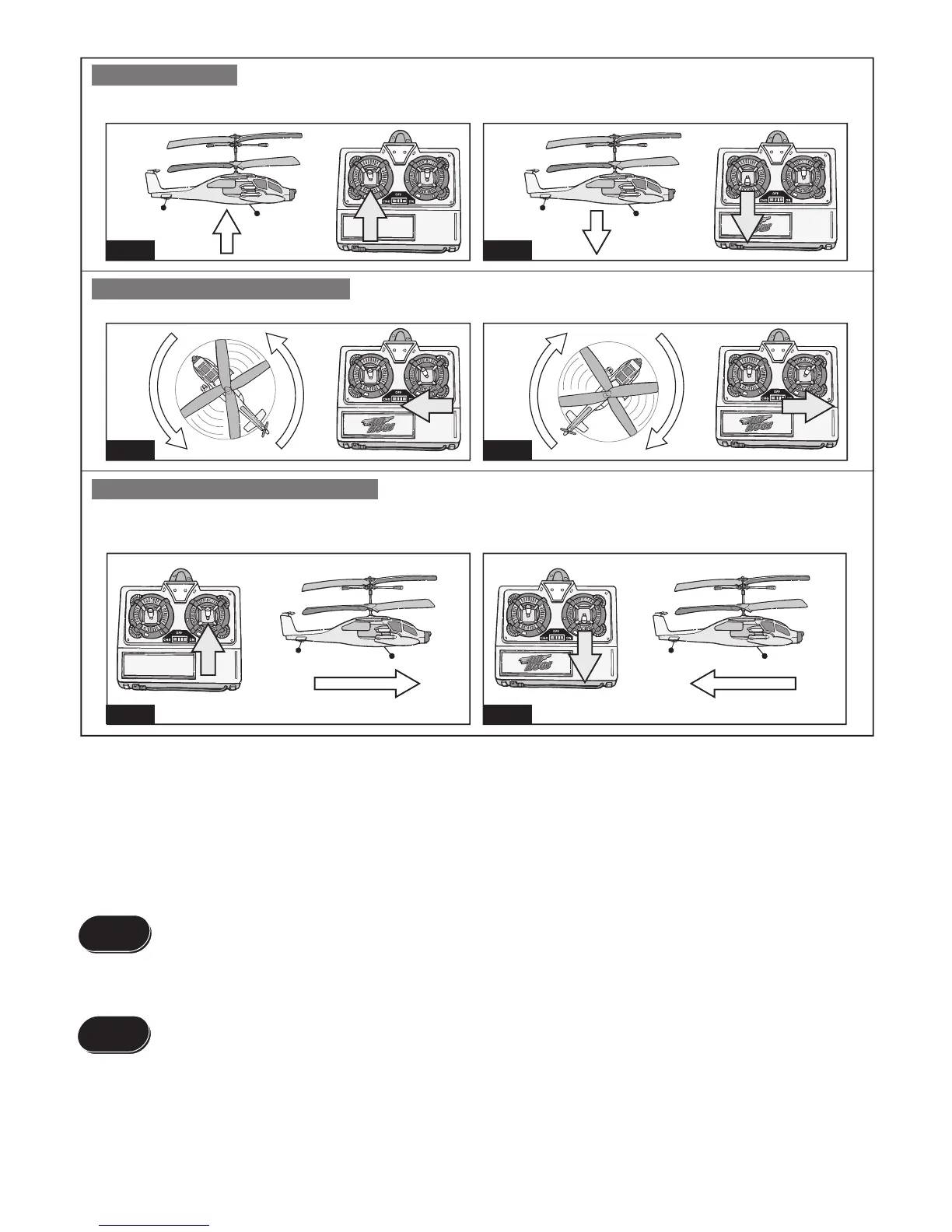
To hover up or down:
When the helicopter flies steadily, you can slowly push the throttle stick up to make the helicopter fly higher, or release the stick a bit to make the helicopter
fly lower. Only small amounts of stick position change are required for smooth flying. (Pic.15 & Pic.16)
2. FLIGHT CONTROL:
To set the Directional Trim (left or right):
Gently push the rudder stick toward left to turn left (pic.17), or right to turn right. (pic.18)
To set the Hover Trim (forward or backward):
Ensure that the Hover trim is set to a neutral position. Turn the power on both the helicopter and the remote controller. Hold the helicopter, keeping
hands away from all propellers. Apply moderate throttle until the main rotors begin to spin. Check if the REAR propeller is spinning. If it is, turn the Hover
(forward/backward) trim knob on the remote controller until rear propeller stops spinning.
pic.15
Hover up
pic.17 pic.18
pic.16
Hover down
pic.19 pic.20
3. FLIGHT CONTROL TIPS
- Launch the helicopter on a smooth surface. Uneven surfaces will affect its ability to lift off.
- Slowly increase the throttle.
- DO NOT look at the controller/charger but focus on the helicopter.
- As soon as the helicopter leaves the ground, reduce the throttle slightly.
- Make slow gentle adjustments when reducing or increasing throttle.



 To Next Page