11
Replacement sensors are shipped with a metal spring installed between the electrodes. Do not remove the clip until the
sensor is to be installed into the monitor.
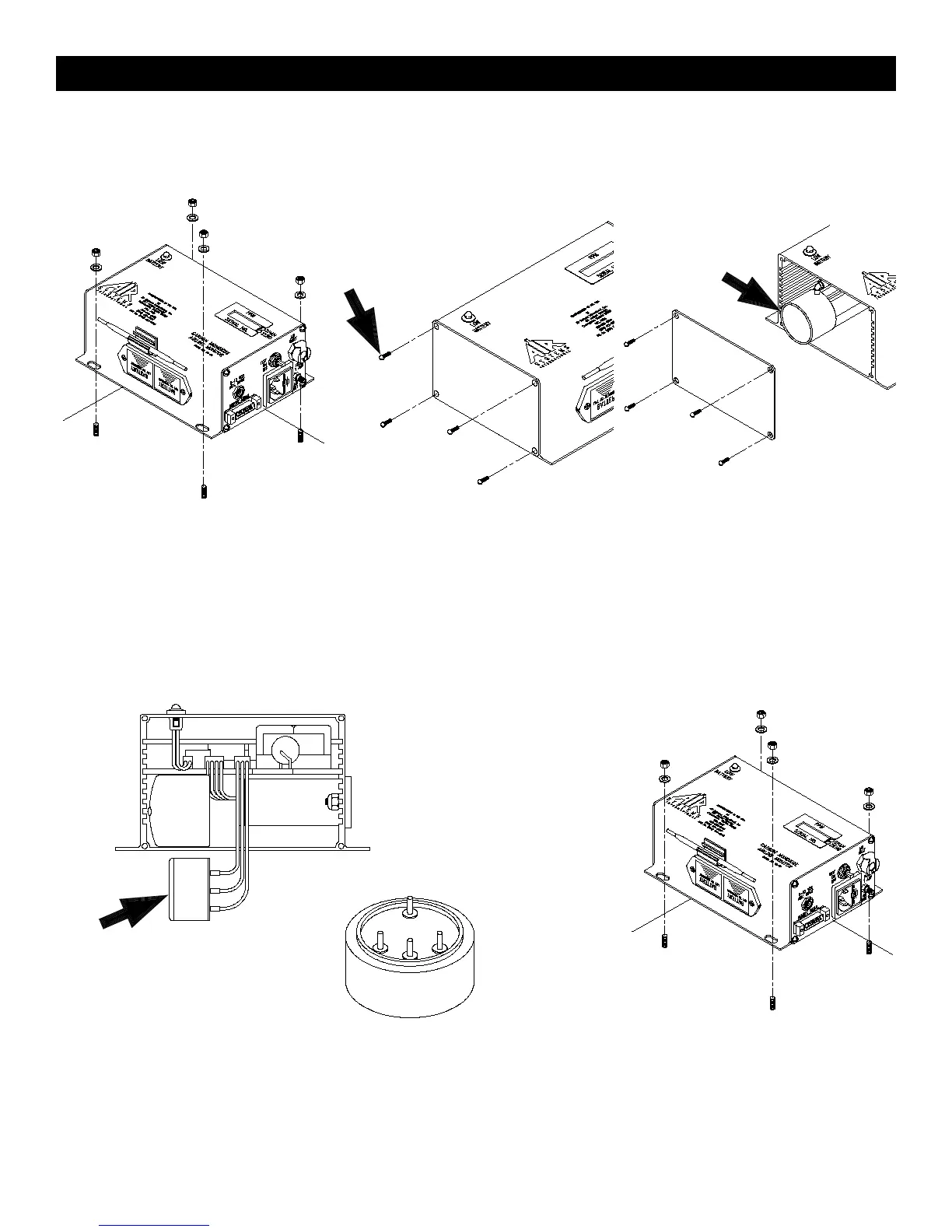
Step 1)
Disconnect all external connections.
Remove CO monitor from the unit.
Step 2)
Remove the four screws from the moni-
tor’s left endplate.
Step 3)
Remove endplate to gain access to the
sensor cup.
Step 4)
Remove sensor from sensor cup and remove leads. Take the new
sensor and remove the metal spring. Reattach leads to the proper
colored terminals on the new sensor. Install new sensor into sensor
cup.
Step 5)
Reassemble monitor and reinstall in unit.
Connect all cables and air sample hose.
Allow monitor to stabilize 30 minutes to 1
hour and recalibrate.
SENSING
(RED)
REFER-
ENCE
UNUSED
CONTROL
(BLACK)
Sensor Replacement



 To Next Page