GETTING STARTED
1. Read the instructions carefully and keep them for future references.!
2. Remove all packaging and clean all removable parts with soft dry cloth.!
3. Place the product on a leveled and dry surface. Make sure it is at least 10 inches away from
any objects!
OPERATIONAL INSTRUCTIONS
Connect the product to the power outlet.!
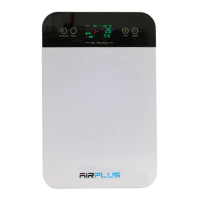
1. On/off button: to start and turn off the purifier(
System runs on medium speed by default every time it starts. To Turn off the system, gently
press on the on/off button again. !
2. Timer: (
allows you to pre-set the time you want the system to run, changing between 1H to 8H!
3. Mode: allows to select on which set up you want your system to run(
Sleep: quiet mode(
Auto: select the recommended pre-setting for your area(
Manual: Gives you the option to choose the setting you prefer!
4. Fan Speed: (
Allows you to select desirable speed. It’s recommended to leave the fan on medium speed,
unless you are running the system on quiet mode, then the speed should be on low. When
the pollution is high, it’s better to run the fan on high mode!
5. Negative ion switch, controls Ultraviolet lights.(
There will be a silent “Zzz” noise when using the negative ion mode. This shows that the
negative ion generator is working and releasing a large number of negative ions.!


 To Next Page