EasyManua.ls Logo

AIRPULSE A300 Pro - Page 8

AIRPULSE A300 Pro
24 pages
Print Icon
To Next Page IconTo Next Page
To Previous Page IconTo Previous Page
Loading...
ysisu3
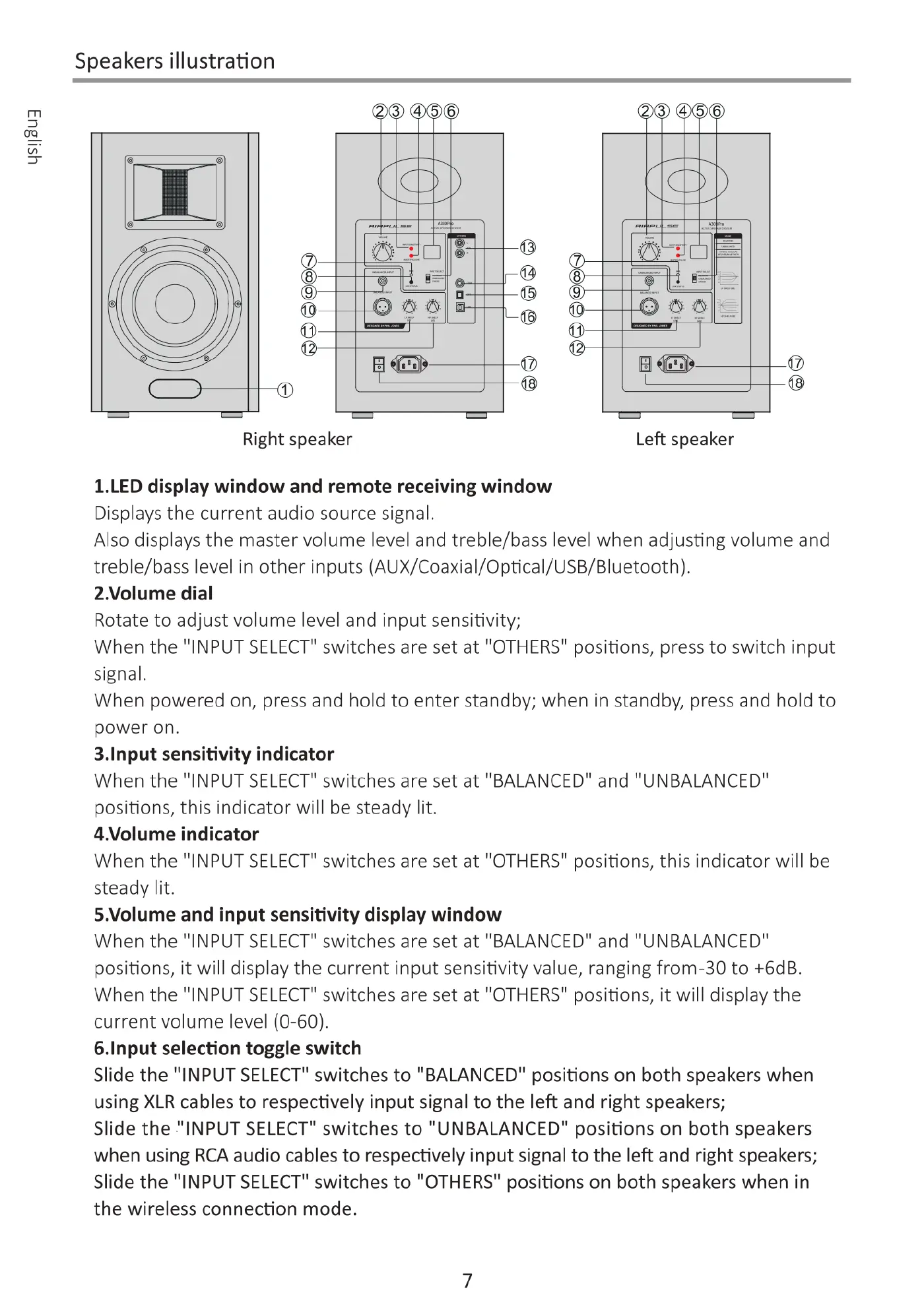
Speakers
illustration
(E}
-9
%
:
s
L
g
.
@
B
@
0
Right
speaker
Left
speaker
1.LED
display
window
and
remote
receiving
window
Displays
the
current
audio
source
signal.
Also
displays
the
master
volume
level
and
treble/bass
level
when
adjusting
volume
and
treble/bass
level
in
other
inputs
(AUX/Coaxial/Optical/USB/Bluetooth).
2.Volume
dial
Rotate
to
adjust
volume
level
and
input
sensitivity;
When
the
"INPUT
SELECT"
switches
are
set
at
"OTHERS"
positions,
press
to
switch
input
signal.
When
powered
on,
press
and
hold
to
enter
standby;
when
in
standby,
press
and
hold
to
power
on.
3.Input
sensitivity
indicator
When
the
"INPUT
SELECT"
switches
are
set
at
"BALANCED"
and
"UNBALANCED"
positions,
this
indicator
will
be
steady
lit.
4.Volume
indicator
When
the
"INPUT
SELECT"
switches
are
set
at
"OTHERS"
positions,
this
indicator
will
be
steady
lit.
5.Volume
and
input
sensitivity
display
window
When
the
"INPUT
SELECT"
switches
are
set
at
"BALANCED"
and
"UNBALANCED"
positions,
it
will
display
the
current
input
sensitivity
value,
ranging
from-30
to
+6dB.
When
the
"INPUT
SELECT"
switches
are
set
at
"OTHERS"
positions,
it
will
display
the
current
volume
level
(0-60).
6.Input
selection
toggle
switch
Slide
the
"INPUT
SELECT"
switches
to
"BALANCED"
positions
on
both
speakers
when
using
XLR
cables
to
respectively
input
signal
to
the
left
and
right
speakers;
Slide
the
"INPUT
SELECT"
switches
to
"UNBALANCED"
positions
on
both
speakers
when
using
RCA
audio
cables
to
respectively
input
signal
to
the
left
and
right
speakers;
Slide
the
"INPUT
SELECT"
switches
to
"OTHERS"
positions
on
both
speakers
when
in
the
wireless
connection
mode.

Related product manuals