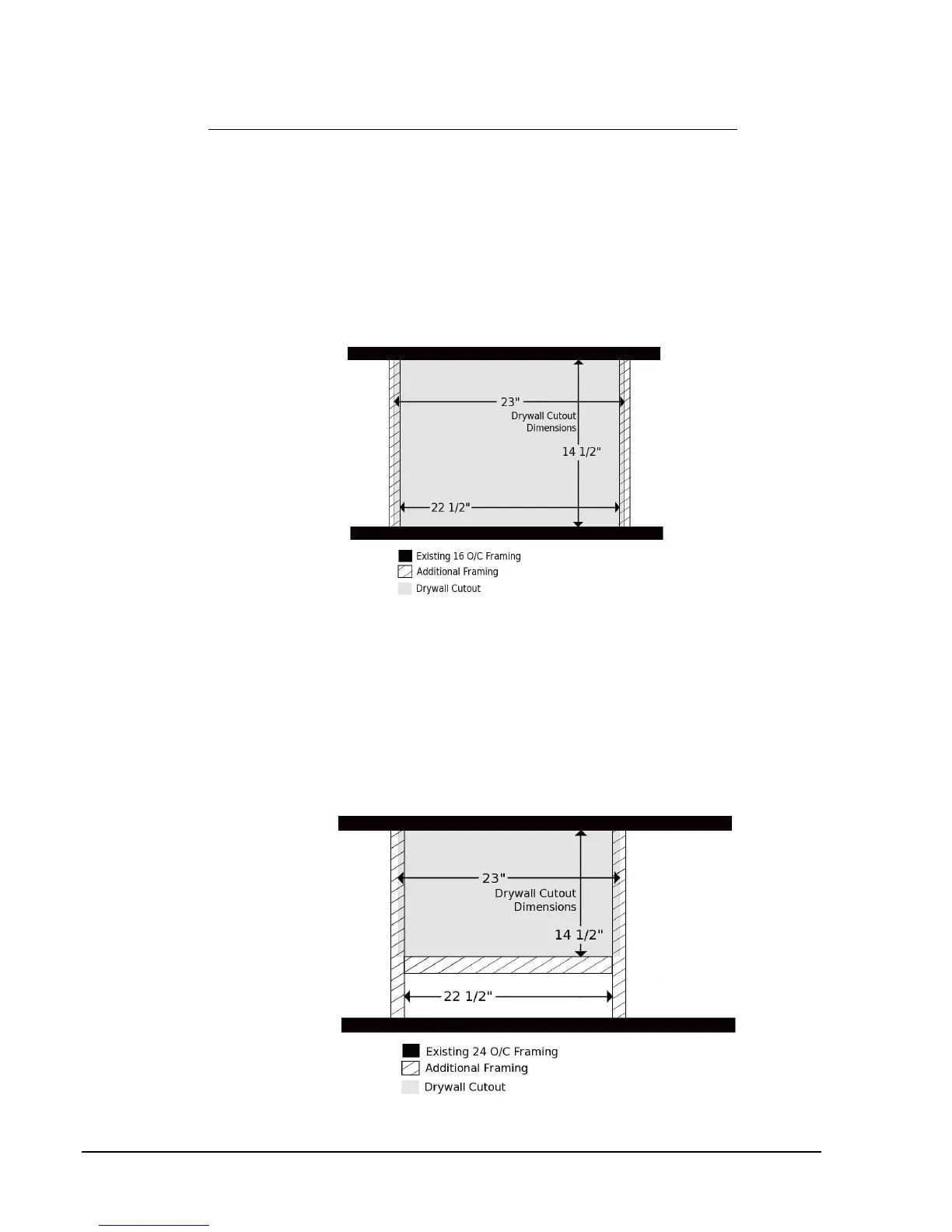
The 2.5/2.5e fan needs to fit through the hole that is framed for it:
16” O/C Framing
Step 1: Cut out the dry wall between the joists to create a 23” x 14½" rough opening.
Step 2: Fit the 2.5/2.5e fan through the rough opening and into the attic.
Step 3: Install two 14½" cross pieces creating a box with inside dimensions of 14½" x 22½".
Make sure each cross piece partially covers the drywall cut out.
Approximately ¼” of each cross piece should be visible from below (Figure 4).
FIGURE 4 – 16” O/C Framing
24” O/C Framing
Step 1: Cut a 23” x 14½" opening in the dry wall, use an existing joist as the 23” long side.
Step 2: Fit the 2.5/2.5e fan through the rough opening and into the attic.
Step 3: Install cross pieces creating a box with inside dimensions of 14½" x 22½".
Make sure each cross piece partially covers the drywall cut out.
Approximately ¼” of each cross piece should be visible from below (Figure 5).
FIGURE 5 – 24” O/C Framing
AirScape 2.5/2.5e WHF Installation Manual 02-11 Page 6


 To Next Page