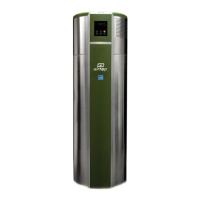
13
OPERATING INSTRUCTIONS
CONSUMER
SUPPORT
MAINTENANCE
OPERATING
INSTRUCTIONS
INSTALLATION
INSTRUCTIONS
SAFETY
INFORMATION
A. GETTING STARTED
How do I turn on the unit?
IMPORTANT: Before aempng to turn on the unit, please ensure the following:
1. Unit is connected to a dedicated 240V/60Hz single phase power outlet rated for at least 30 amperes. Conrm that
this power outlet is not being shared with another appliance. Conrm that the unit is grounded.
2. Condensate drains (primary and overow) are piped correctly to drain condensate.
3. Unit is COMPLETELY lled with water and there are NO LEAKAGES from any connecng port/valve. To check if the
tank is full:
a. Ensure drain valve is shut ghtly
b. Open cold water inlet valve to ll the tank
c. Open hot water faucets slowly to allow air in the tank and piping to vent out
d. Smooth, undisrupted ow of water from the faucets indicates that the tank is full.
You are now ready to turn the unit on by pressing the ‘ON’ buon in the Control Panel.
When the unit is o, the ‘OFF’ indicator in the control panel will be lighted. Please ensure the unit remains o unl the
tank is full with water.
Turning the unit on when the tank is not completely full with water will cause water temperature to rise quickly and
trigger an alarm. If the alarm is triggered, turn the unit o and re-check that the tank is completely lled with water.
B. OPERATING MODES
Which mode is right for me? How can I change the current mode?
The unit is preset to Auto mode. You may choose any of the following three modes depending on your hot water usage
and operang environment:
AUTO MODE (recommended): Auto mode runs the unit as a ‘hybrid’ to combine the eciency of a heat pump with the
high hot water delivery rate of an electric water heater. Average household hot water demand can be met by the heat
pump alone. However, if hot water demand were to rise above normal levels, the electric element is triggered to
supplement the heang provided by the heat pump.
ECON MODE: Econ mode is the most energy ecient mode in the unit. In this mode, electric element is deacvated
and water is heated exclusively by the heat pump to maximize energy eciency. While the Econ mode is factory set to
run anyme during the day to meet hot water demand, users have the opon to congure the mer feature to allow
the unit to run during chosen me periods only (users may select up to 3 operang me periods in a 24 hour cycle).
This mode allows users to take advantage of o-peak power tari rates.
HEATER MODE: In the Heater mode, heat pump is de-acvated and water is heated by electric element only. Please
note that Heater mode will automacally revert to Auto mode within 48 hours of the Heater mode being acvated (48
hours is the default seng – users may choose any duraon from 12 to 999 hours). Users may select Heater mode to
temporarily deacvate the heat pump and stop cold air exhaust and/or operate the unit at a lower noise level.
Press MODE buon to select or switch between any of the three modes.


 To Next Page
 Loading...