16
OPERATING INSTRUCTIONS
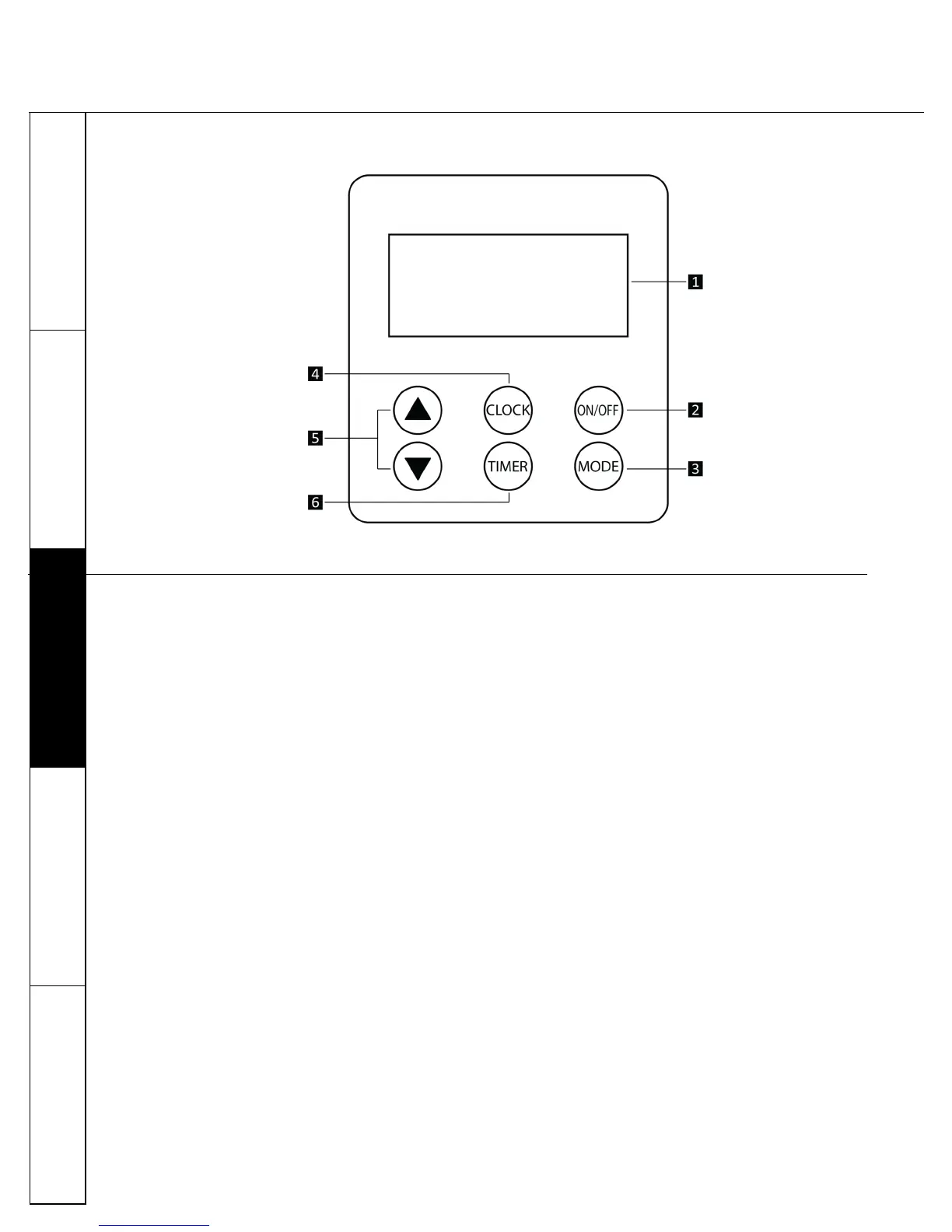
F. CONTROL PANEL
1. DISPLAY
2. ON / OFF
3. MODE: Use this buon to choose any of the three operang modes in the unit
ECON (Heat pump acve)
AUTO (Heat pump and Electric element acve)
HEATER (Electric element acve)
4. CLOCK: Press the CLOCK buon and use ARROW PADS to set the me in 24 hour HH:MM format.
5. ARROW PADS: Use up and down keys to navigate and change sengs.
The ARROW PADS keys can also be used to check temperatures. Press up key to check tank temperature
(upper sensor) and down key to check evaporator coil temperature.
6. TIMER: The mer funcon is acve in ECON MODE ONLY. You may set up to three me periods (P1, P2 and P3) for
the heat pump to operate. Each me period has a user assigned start me and stop me. The heat pump will be on
during the assigned me periods only. Heat pump will turn o when water set temperature is reached, even if the
unit is within an assigned me period (water temperature controls override mer sengs). To assign or change
me periods:
a. Ensure that the clock is set to the right me
b. Press Timer buon. The start me (Hours) for P1 will start ashing – use ARROW PADS to assign Hours for
P1 start me. Press Timer buon again to move to Minutes for P1 start me (EXAMPLE: If you want P1 to
start at 7:15 am, select 07 using arrow pad keys. Press Timer buon and select 15 using arrow pad keys).
c. Press the Timer buon to move to P1 end me and assign values as done in Step b.
d. Press the Timer buon to move to P2 (and P3) me sengs – repeat Steps b and c.
You may choose not to assign values to all me periods. In this case, please choose both start and stop mes for
that period as 00:00
Fig. 5
CONSUMER
SUPPORT
MAINTENANCE
OPERATING
INSTRUCTIONS
INSTALLATION
INSTRUCTIONS
SAFETY
INFORMATION


 To Next Page
 Loading...