The AirTurn BT500|S SERIES and QUAD 500 are Bluetooth controllers designed for various applications, from page-turning to effects management and presentation control. These devices are compatible with a wide range of operating systems and devices, including iPad 3 and later, iPhone 4S and later, most Android devices running Android 4.3 or later with Bluetooth 4/5, and most PCs and Macs equipped with Bluetooth 4.x and HID (keyboard) support. For older PCs, Bluetooth 4.1 and higher USB dongles are recommended, with a WIDI Master USB adapter suggested for MIDI on PC/MAC if only MIDI is needed.
Function Description:
The AirTurn BT500|S SERIES and QUAD 500 controllers operate as three devices in one, utilizing three different protocols: AirDirect, HID (keyboard & mouse), and MIDI. This versatility allows them to connect with various compatible apps, each potentially requiring a different connection method or "MODE." The default setting is MODE 2, which is compatible with the majority of apps, but MODE 1 (AirDirect) is preferred if the app supports it. The devices feature 2, 4, or 6 footswitches, or four silent pedals, depending on the model.
Important Technical Specifications:
- Bluetooth: Bluetooth 5.0 low energy radio.
- Transmit Power: -1 dBm peak.
- TX Peak Current: 18.2 mA.
- Frequency: 2.36GHz to 2.50GHz.
- Approximate Range: 200 feet (61 Meters), subject to orientation and other factors.
- Battery: Lithium-Polymer Battery, providing approximately 200 hours of use on a full charge.
- Charging: Standard 5V USB charger with the provided adaptor cable is recommended. A 5-9V DC power supply with center negative configuration can also be used. Charging from a laptop or computer with a sleep setting is not recommended.
- Operating Temperature: -20°C to +55°C.
- Charging Temperature: 0°C to +45°C. The device includes a temperature sensor that disables charging if temperatures fall outside this range.
- Analog Inputs (BT500S-6 only): Two 1/4" analog jacks for expression or CV pedals, capable of sending MIDI, controlling a mouse cursor, or communicating directly with compatible apps. Most expression pedals work without modification.
Usage Features:
- Power On/Off: Press and hold the Power Button for one second until LEDs flash to turn on. Hold until red and blue LEDs turn off to power off.
- Pairing:
- Open Pairing (Default): Allows connection to up to 8 Bluetooth devices (unlimited in AirDirect MODE 1) without needing to delete previous pairings. Only one device can be connected at a time. If multiple devices have Bluetooth on, turn off Bluetooth on the device not in use.
- Closed Pairing: Locks the AirTurn to a single tablet, phone, or computer. Ideal for ensemble use to prevent accidental connections to other devices.
- Switching Pairing Methods: With the AirTurn powered off, hold the MODE button and then the power button. LEDs will flash twice for open pairing or three times for closed pairing. This can also be changed via the AirTurn Manager App.
- Reset Pairing: To delete all pairings, hold the power button for 8 seconds until LEDs turn off, then blink 3 more times.
- MODES: Seven modes are available, each sending a different signal for each pedal. MODE 2 is the default. MODES 2-7 can be customized using the AirTurn Manager App.
- MODE 1 (AirDirect): For AirDirect specific apps, designed to prevent conflicts with the virtual keyboard. Connection is made through the app.
- MODES 2-6 (Keyboard/Mouse): Standard modes for page-turning and keyboard/mouse functions.
- MODE 7 (MIDI): For sending basic MIDI commands to apps. Requires Bluetooth MIDI support and may need special setup for tablets or computers.
- Changing MODES: Turn on the AirTurn, then press and hold the MODE button. The red LED will flash 1 to 7 times, corresponding to the MODE number. Release the MODE button after the desired number of flashes. Both LEDs will then flash together to confirm the new MODE.
- Virtual Keyboard Control in iOS: In MODES 2-6, the AirTurn acts as a keyboard, disabling the virtual (on-screen) keyboard. To enable the virtual keyboard, place the cursor in a text box and press the Power Button.
- Idle Timeout: The AirTurn conserves power by automatically powering down after two hours of inactivity when powered on and connected. This timer resets with any button press and can be adjusted or disabled via the AirTurn Manager app.
- Analog Input Calibration (BT500S-6): Analog inputs must be calibrated and programmed using the AirTurn Manager App. Calibration involves moving the expression pedal from minimum to maximum.
Maintenance Features:
- Cleaning: Wipe down with a damp cloth and a mild detergent or soap-based cleaner to remove dirt and stains.
- Environmental Care: Avoid getting the AirTurn wet, placing it in direct sunlight for extended periods, or leaving it in a hot vehicle.
- Battery Safety: The BT500 series includes features to maintain battery life, such as stopping power provision when the battery is too low and stopping charging when full. Charging is disabled outside the optimal temperature range (0°C to +45°C).
- Battery Replacement: The battery can be user-replaced with the same model by opening the case, unplugging, and plugging in the new battery.
- Firmware Updates: Firmware can be updated via the AirTurn Manager App. Users will be notified of available updates when the app connects to the device.
- Factory Reset: To reset to factory defaults, hold the first two switches while powering on the device. Both LEDs will flash 3 times, and the AirTurn will power off. A reset option is also available through the AirTurn Manager.
- Recycling: Electronic components and construction comply with RoHS and REACH standards. Packaging is recyclable. Lithium-ion batteries should be disposed of according to local law; AirTurn offers a recycling program for returned batteries and electronics.
Unit Identification:
The Bluetooth name of the device includes the firmware version (e.g., v3.0.0) and the MAC address (e.g., ABCD), which helps in identifying specific units, especially when multiple AirTurn devices are in use. The MAC address is also labeled on the bottom of the AirTurn at the end of the serial number.

 Need help?
 General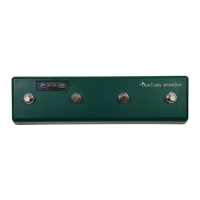

 To Next Page