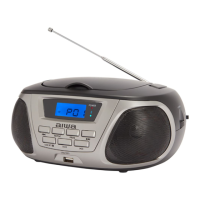
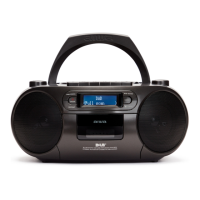
The Aiwa BB-X50 is a portable boombox designed for a versatile audio experience, featuring Bluetooth connectivity, multi-sync mode for connecting multiple speakers, and integrated light modes. It is identified by the item number AI7002-BLK.
Function Description:
The BB-X50 serves as a portable audio system, capable of playing music via Bluetooth, AUX-IN, and offering hands-free calling. Its multi-sync mode allows users to connect multiple BB-X50 speakers for a synchronized audio experience. The device also includes integrated light modes for visual enhancement.
Important Technical Specifications:
- Bluetooth Version: 5.3
- Working Distance: 30 meters
- Multi-Sync Range: 20 meters
- Battery: 3 x 4000mAh (12000mAh Total Capacity)
- Charging Input: DC 5V/2A
- Output Power: 60W
- Sound Output: 120W (peak power)
Usage Features:
Controls and Ports:
The device features a user-friendly interface with clearly labeled controls and ports:
- Power Button: Turns the speaker on/off.
- Bluetooth Button: Activates Bluetooth pairing mode.
- Previous Track Button: Skips to the previous track.
- Play/Pause/Call Button: Plays/pauses music and answers/ends calls.
- Next Track Button: Skips to the next track.
- Light Button: Toggles between 5 light modes or turns lights on/off.
- Ex-Bass Button: Enhances bass output.
- LCD Screen: Displays battery percentage, volume level, and other status indicators.
- Volume Knob: Adjusts the volume clockwise to increase and counterclockwise to decrease.
Ports:
- Type-C Charging Port: For charging the speaker.
- 3.5mm AUX-IN Jack: For wired audio input.
- USB Charging Port (DCOUT): For charging phones/tablets.
Getting Started:
- Charging: Insert one end of the included Type-C charging cable into the speaker's charging port and the other end into a computer's USB port or a suitable USB charging adapter. Tap the power button to view the battery percentage on the LCD screen.
- Power On/Off: Press the power button until the power indicator turns white to power on. Press again until all indicators turn off to power off.
- Music Playback: Tap the Play/Pause button to play or pause music.
- Track Navigation: Press the Next Track button to go to the next track, and the Previous Track button to go to the previous track.
- Volume Adjustment: Turn the volume knob clockwise to increase volume or counterclockwise to decrease volume. The LCD screen will display the current volume level.
Bluetooth Pairing:
- Once the speaker is turned on, it automatically enters pairing mode.
- To pair, enable Bluetooth on your device and select "Aiwa BB-X50" from the list of available devices in your Bluetooth settings.
- The Bluetooth indicator will light solid blue upon successful pairing.
- The speaker automatically reconnects to previously paired devices. To connect a new device, disconnect the existing Bluetooth device first.
- To disconnect Bluetooth, press and hold the Bluetooth button. The indicator will flash blue after successful disconnection.
Connect Multiple Speakers (Multi-Sync Mode):
- To use multi-sync mode, ensure all speakers are turned off and all devices are removed from Bluetooth connections.
- Primary Speaker Setup: Turn on the first speaker (Primary Speaker) and pair it with your Bluetooth device. Press the Bluetooth button to enter multi-sync mode. The Bluetooth indicator will turn solid blue, indicating multi-sync mode.
- Secondary Speaker Setup: Power on the next speaker (Secondary Speaker) and press its Bluetooth button. The indicator will flash blue to signal connection to the Primary Speaker.
- Repeat the Secondary Speaker steps to connect more speakers.
Other Features:
- Hands-Free Calling: When paired with a smartphone, the hands-free call function is available.
- Answer/End Call: Press the Play/Pause button to answer a call. Press it again to end a call.
- Reject Call: Press and hold the Play/Pause button to reject a call.
- Calls are transmitted to the Primary Speaker during multi-sync mode.
- Adjust Light: Press the Light button to toggle between 5 different light modes or to turn the lights on/off.
Safety Precautions:
- Read all instructions before use.
- Do not submerge the speaker in water.
- Clean only with a clean, soft cloth.
- Keep out of reach of children; small pieces can be a choking hazard. Parental supervision is advised.
- Avoid exposure to excessive heat, fire, extreme cold, or hot temperatures to prevent battery damage.
- Do not attempt to repair the product yourself; contact a qualified service center if needed.
- Avoid dropping, crushing, or exposing the product to excessive physical force.
- Do not charge while the product is in contact with water to prevent electric shock.
- Unplug the charging cable when not in use or during thunderstorms.
- This product is not intended for commercial use.
Maintenance Features:
- Cleaning: Use a soft cloth or paper towel to clean the speaker. Do not use harsh chemicals or detergents. Ensure the speaker is dry before charging.
- Storage: When not in use, store the speaker in a cool, dry place.
- Cable Handling: Connect and disconnect cables carefully; do not tug or yank them.
- Disposal: Recycle or dispose of the speaker properly according to local laws and rules. Contact local recycling facilities or the manufacturer for further information.

 Need help?
 General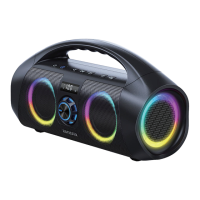

 To Next Page