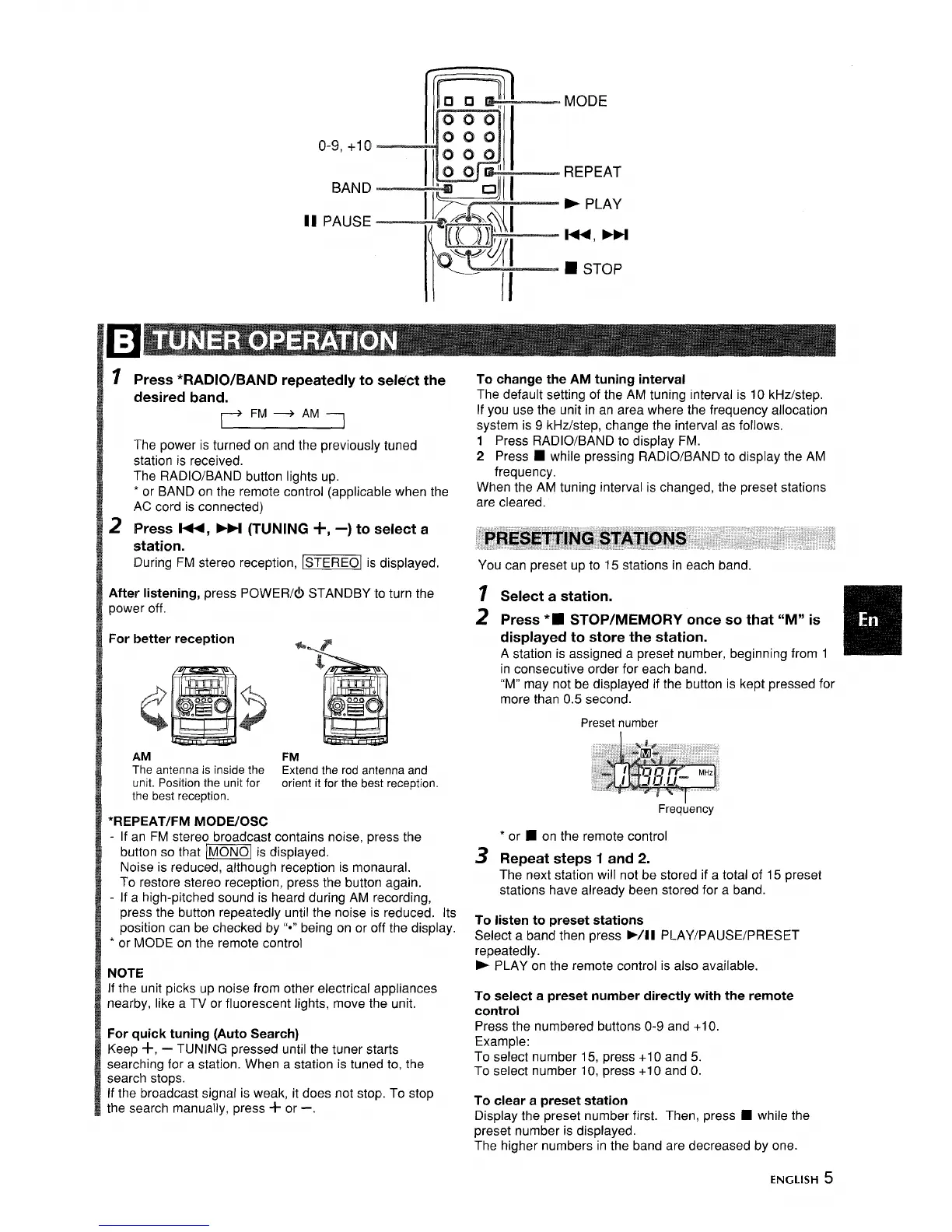
o-9, +1o
BAND
II PAUSE
MODE
REPEAT
> PLAY
w,
➤M
■ STOP
1
2
Press *RADIO/BAND repeatedly to selrSct the
desired band.
FM + AM
The power is turned on and the previously tuned
station is received.
The RADIO/BAND button lights up.
* or BAND on the remote control (applicable when the
AC cord is connected)
Press -,
➤M (TUNING +, –) to select a
station.
During FM stereo reception, _ is displayed.
After listening, press POWER/(!) STANDBY to turn the
power off.
For better reception
*.P
AM
FM
The antenna is inside the Extend the rod anlenna and
unit. Position the unit for orient it for the best reception,
the best reception.
*REPEAT/FM MODE/OSC
- If an FM stereo broadcast contains noise, press the
button so that -] is displayed.
Noise is reduced, although reception is monaural.
To restore stereo reception, press the button again.
- If a high-pitched sound is heard during AM recording,
press the button repeatedly until the noise is reduced, Its
position can be checked by 1’*”being on or off the display.
* or MODE on the remote control
NOTE
If the unit picks up noise from other electrical appliances
nearby, like a TV or fluorescent lights, move the unit.
For quick tuning (Auto Search)
Keep +,
— TUNING pressed until the tuner starts
searching for a station. When a station is tuneci to, the
search stops.
If the broadcast signal is weak, it does not stop. To stop
the search manually, press + or -.
To change the AM tuning interval
The default setting of the AM tuning interval is 10 kHz/step.
If you use the unit in an area where the frequency allocation
system is 9 kHz/step, change the interval as follows.
1 Press RADIO/BAND to display FM.
2 Press
■ while pressing RADIO/BAND to display the AM
frequency.
When the AM tuning interval is changed, the preset stations
are cleared.
You can preset up to 15 stations in each band.
1
2
3
Select a station.
Press’~ STOP/MEMORY once so that “M” is
displayed to store the station.
A station is assigned a preset number, beginning from 1
in consecutive order for each band.
“M” may not be displayed if the button is kept pressed for
more than 0.5 second.
Preset number
Frequency
‘
or ■ on the remote control
Repeat steps 1 and 2.
The next station will not be stored if a total of 15 preset
stations have already been stored for a band.
To listen to preset stations
Select a band then press WII PLAY/PAUSE/PRESET
repeatedly.
- PLAY on the remote control is also available.
To select a preset number directly with the remote
control
Press the numbered buttons O-9 and +1O.
Example:
To select number 15, press +1 O and 5.
To select number 10, press +10 and O.
To clear a preset station
Display the preset number first. Then, press fi while the
preset number is displayed.
The higher numbers in the band are decreased by one.
ENGLISH 5


 To Next Page
 Loading...