SETTING THE SLEEP TIMER
The unit can be turned off automatically at a specified
time.
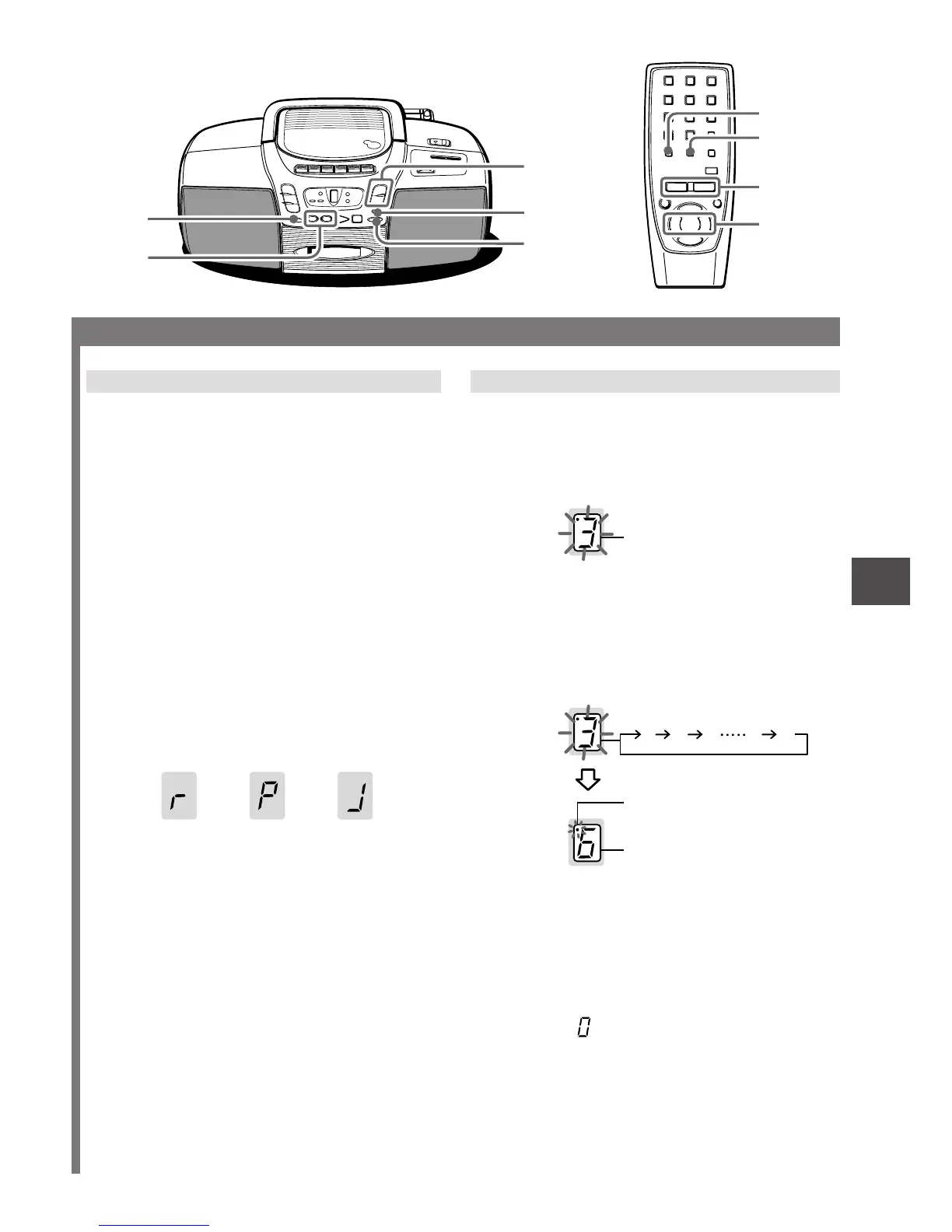
1 Keep OSC/SLEEP pressed until “• 3”
flashes in the display.
2 Within 4 seconds, press r or t to
specify the time until the power is turned
off.
Each time it is pressed, the time changes between
10 and 90 minutes in 10-minute steps.
Example: The unit will turn off after 30 minutes.
To check the time remaining until the power is
turned off
Repeat step 1 shown above. The remaining time is
displayed for 4 seconds.
To cancel the sleep timer
Display the remaining time and press r or t
repeatedly until (off) is displayed.
NOTE
If the unit is turned off during tape playback, x on the
deck will not be released. Press Z to release x.
ENGLISH
7
En
SOUND ADJUSTMENT
Volume or tone adjustment does not affect recording.
VOLUME (VOL)
Press VOLUME N or M. The volume level is
displayed as a number from 0 to 19.
“1” in the display indicates the level 1 and “• 1”
indicates the level 11.
• The volume level is automatically set to 9 if the
power is turned off when the volume level is set to
10 or more. (except when turning the power back
on within 4 seconds)
• Pressing DISPLAY on the remote control displays
the adjusted volume level.
3-MODE EQUALIZER
Press *3-MODE EQUALIZER repeatedly until the
desired mode is displayed.
The equalizer mode changes to ROCK, POP, JAZZ
or no equalization, cyclically.
ROCK - Emphasizes the high and low range of
music.
POP - Emphasizes voice and midrange of music.
JAZZ - Emphasizes the low range of music.
* or EQ on the remote control
QSOUND system
This system provides a rich, three dimensional sound
area for stereo sources.
You can enjoy more enhanced sound.
Press QSOUND and the QSOUND indicator lights up.
• At higher volumes, turning QSOUND on may cause
sound distortion. In this case, make the volume
down.
The dot and number flash.
1 23 90
The volume level or a
CD track number.
While the sleep timer works
the dot keeps flashing.
(off)
ROCK POP JAZZ
GENERAL
QSOUND
r, t
VOLUME
N, M
OSC/SLEEP
3-MODE
EQUALIZER
DISPLAY
EQ
VOL i, k
r, t



 To Next Page