EasyManua.ls Logo

Aiwa CSD-FD94 - Power Supply

Aiwa CSD-FD94
92 pages
Print Icon
To Next Page IconTo Next Page
To Previous Page IconTo Previous Page
Loading...
Power
supply
«STANDBY
~
aioe
OPE/BATT
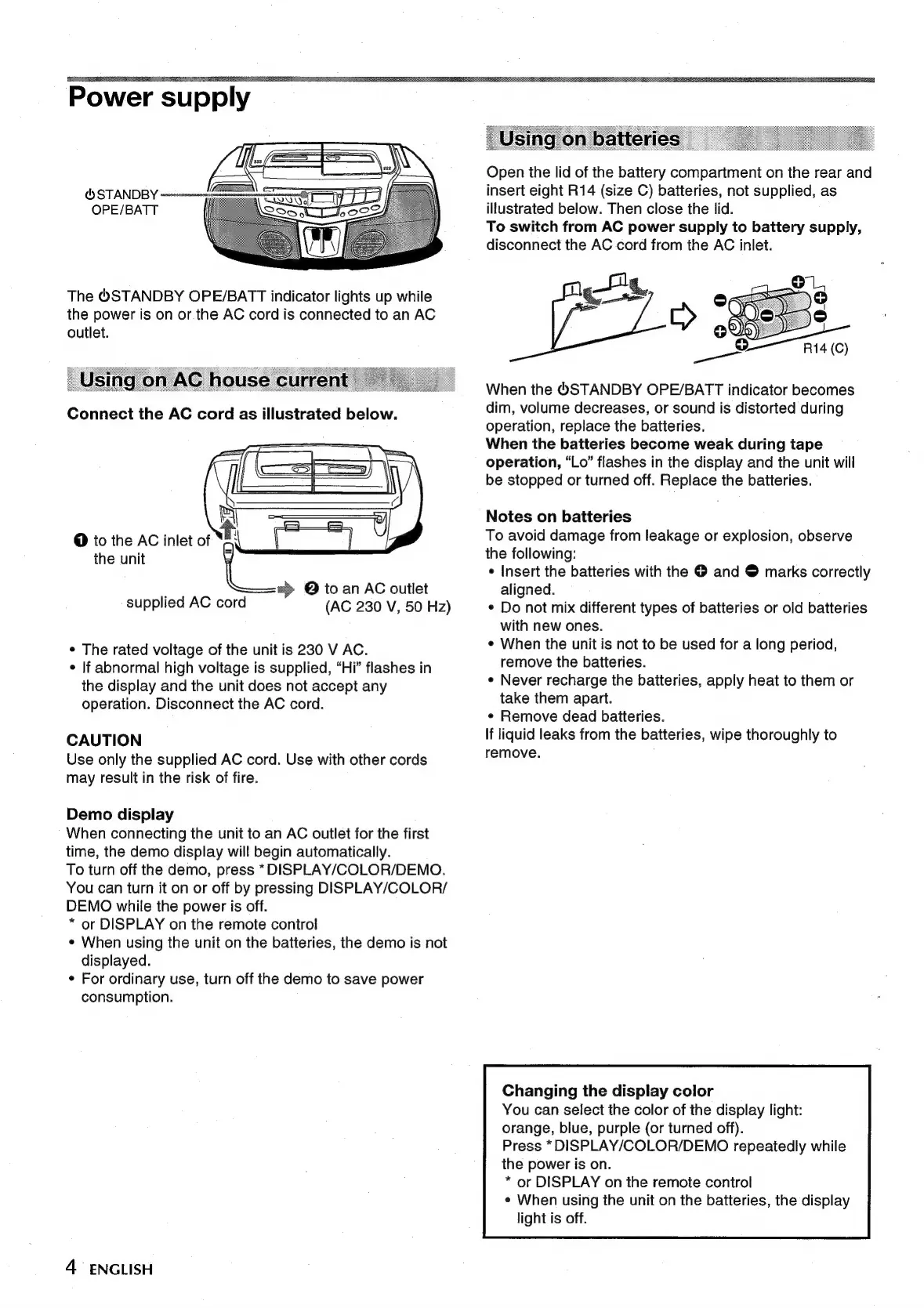
The
®STANDBY
OPE/BATT
indicator
lights
up
while
the
power
is
on
or.the
AC
cord
is
connected
to
an
AC
outlet.
Connect
the
AC
cord
as
illustrated
below.
aPy7
,
s—=
JU
@
to
the
AC
inlet
of
the
unit
=>
©
to
an
AC
outlet
supplied
AC
cord
(AC
230
V,
50
Hz)
¢
The
rated
voltage
of
the
unit
is
230
V
AC.
¢
If
abnormal
high
voltage
is
supplied,
“Hi”
flashes
in
the
display
and
the
unit
does
not
accept
any
operation.
Disconnect
the
AC
cord.
CAUTION
Use
only
the
supplied
AC
cord.
Use
with
other
cords
may
result
in
the
risk
of
fire.
Demo
display
When
connecting
the
unit
to
an
AC
outlet
for
the
first
time,
the
demo
display
will
begin
automatically.
To
turn
off
the
demo,
press
*DISPLAY/COLOR/DEMO.
You
can
turn
it
on
or
off
by
pressing
DISPLAY/COLOR/
DEMO
while
the
power
is
off.
*
or
DISPLAY
on
the
remote
control
¢
When
using
the
unit
on
the
batteries,
the
demo
is
not
displayed.
¢
For
ordinary
use,
turn
off
the
demo
to
save
power
consumption.
4
ENGLISH
Open
the
lid
of
the
battery
compartment
on
the
rear
and
insert
eight
R14
(size
C)
batteries,
not
supplied,
as
illustrated
below.
Then
close
the
lid.
To
switch
from
AC
power
supply
to
battery
supply,
disconnect
the
AC
cord
from
the
AC
inlet.
it
When
the
©STANDBY
OPE/BATT
indicator
becomes
dim,
volume
decreases,
or
sound
is
distorted
during
operation,
replace
the
batteries.
When
the
baiteries
become
weak
during
tape
operation,
“Lo”
flashes
in
the
display
and
the
unit
will
be
stopped
or
turned
off.
Replace
the
batteries.
Notes
on
batteries
To
avoid
damage
from
leakage
or
explosion,
observe
the
following:
*
Insert
the
batteries
with
the
©
and
@
marks
correctly
aligned.
¢
Do
not
mix
different
types
of
batteries
or
old
batteries
with
new
ones.
¢
When
the
unit
is
not
to
be
used
for
a
long
period,
remove
the
batteries.
¢
Never
recharge
the
batteries,
apply
heat
to
them
or
take
them
apart.
¢
Remove
dead
batteries.
If
liquid
leaks
from
the
batteries,
wipe
thoroughly
to
remove.
Changing
the
display
color
You
can
select
the
color
of
the
display
light:
orange,
blue,
purple
(or
turned
off).
Press
*DISPLAY/COLOR/DEMO
repeatedly
while
the
power
is
on.
*
or
DISPLAY
on
the
remote
control
¢
When
using
the
unit
on
the
batteries,
the
display
light
is
off.

Related product manuals