Need help?
Do you have a question about the Aiwa XP-R210 and is the answer not in the manual?
Warning against exposing the appliance to rain or moisture to prevent fire or electric shock.
Identifies the player as a Class 1 Laser Product and warns about laser radiation exposure.
Provides information on recycling rechargeable batteries and proper disposal methods.
Guidelines for optimal performance by avoiding extreme conditions like heat, cold, dust, humidity, or vibration.
Instructions on avoiding laser hazards, foreign objects, shocks, and proper volume control for safety.
Advice on safe headphone use, including moderate volumes, avoiding driving/cycling, and proper wearing.
Explains condensation issues and how to resolve them by allowing the unit to adjust to temperature changes.
Step-by-step guide for charging batteries, including indicators and completion signals.
Details on when to recharge, indicators, stopping charging, and performing force charging.
Important notes regarding AC adaptor use, charging limits, battery life, and recharge cycles.
How to insert dry cell batteries and important safety precautions for their use.
Provides estimated battery life for alkaline batteries based on the E A S S switch setting.
How to connect the AC adaptor and what the indicators signify during AC operation.
Explains how to use the HOLD switch to prevent accidental button presses and how 'HOLd' is displayed.
Instructions for turning the unit on, off, and entering standby mode, including auto power-off.
How to adjust volume and use the DSL (Deep Sound) function for bass enhancement.
How to activate and cancel the beep sound for operation feedback.
Step-by-step guide for properly inserting and removing discs from the player.
Information on potential compatibility issues with CD-R/RW discs and label application.
Connecting headphones and the initial steps for playback: Release HOLD, place disc, press PLAY/PAUSE.
How to stop, pause, search for tracks, and locate specific passages during playback.
How to cycle through display modes for track number, elapsed time, and remaining time.
Notes on when track time display may not be shown, such as with over 32 programmed tracks or long total times.
Details the Electronic Anti-Shock System for reducing skips, its memory settings (48s, 12s), and cancellation.
How to use the resume function, its automatic repeat, and important notes on accuracy and cancellation.
How to activate and cancel random play mode for playing tracks in a non-sequential order.
Instructions on how to select one-track repeat or all-track repeat during playback, and random play limits.
Step-by-step guide to selecting and programming up to 24 tracks for custom playback order.
Instructions for stopping program play, adding tracks, erasing programs, and checking programmed tracks.
Important notes about program erasure, track limits, and the possibility of repeat/random play during programming.
How to select AM/FM bands and tune into stations using the TUNING buttons.
Techniques for quick tuning, optimizing FM/AM reception, and switching FM to monaural mode.
Instructions for adjusting the AM tuning step (9kHz/10kHz) and its effect on preset stations.
Notes regarding disc compartment use during radio reception and automatic power-off timing.
Step-by-step guide to preset up to 30 AM/FM stations by selecting and saving them.
How to select saved preset stations and overwrite existing presets with new stations.
Methods for erasing individual preset stations or clearing all saved presets.
Specifies the connection cord and how to connect the player's output to an external unit's input.
Critical advice on turning off units before connection, avoiding PHONO inputs, and adjusting volume/DSL.
Detailed steps for cleaning the optical lens using a blower/brush and cleaning solution to resolve playback issues.
Important cautions regarding cleaning solution amount and pressure applied to the lens to prevent damage.
Instructions for wiping discs clean before playing and storing them properly after use.
Lists technical details like tracking system, laser type, D/A conversion, frequency response, and output.
Details power supply options, maximum dimensions, and weight of the unit.
Lists the accessories included with the player and specifications for supplied/recommended headphones.
Specifics on the AC adaptor model and supplied headphones, including impedance and sensitivity.
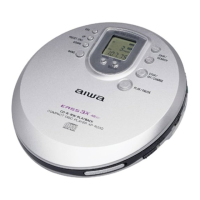
The AIWA XP-R210 is a compact disc player with integrated radio reception capabilities, designed for portable use. It offers various playback modes, sound adjustments, and power options, making it a versatile personal audio device.
The primary function of the XP-R210 is to play compact discs (CDs). It is classified as a CLASS 1 LASER product, indicating safe laser operation under normal use. The device supports standard CD playback, allowing users to listen to their favorite music on the go. In addition to CD playback, the XP-R210 features an integrated AM/FM radio tuner, enabling users to listen to broadcast stations.
The player incorporates an E•A•S•S PLUS (Electronic Anti-Shock System), which is designed to reduce skipping or muting of the sound when the unit is subjected to shocks. This system stores a certain amount of playback sound in its memory—either 48 seconds or 12 seconds, depending on the user's setting—to ensure continuous audio even during minor impacts or vibrations. While this feature enhances portability, continuous severe shocks may still cause interruptions. The quality of the sound is noted to be better when the E•A•S•S switch is set to 12 seconds or OFF, compared to the 48-second setting.
The XP-R210 also includes a Resume function, which allows playback to restart from the point where it was previously stopped. When this function is active, all-track repeat is automatically selected. This feature is convenient for users who frequently pause their listening sessions and wish to pick up exactly where they left off. However, the resume function may not operate if playback was stopped within the last 30 seconds of the final track, or if the disc compartment is opened.
For personalized listening, the device offers Random play, which shuffles the tracks on a disc and plays them in a random order. Additionally, Repeat play allows users to repeat a single track or all tracks on the disc.
A Signal sound function provides audible feedback (beeps) when operation buttons are pressed, confirming user input. This function is not activated by default and can be toggled on or off by the user.
Power Options: The XP-R210 can be powered in several ways:
Disc Insertion and Removal: To insert a disc, users slide the OPEN switch, place the disc in the center with the label side facing up, and then close the compartment. Discs are removed by holding the edge and gently pressing the pivot. It's important to note that the unit may not play certain CD-R/RW discs due to recording platform differences, and attaching labels or seals to discs can cause malfunctions.
Sound Adjustment: The device features a VOL (volume) control for adjusting the listening level. A DSL (Dynamic Super Linear Bass) function is available to enhance bass output. Pressing the DSL button repeatedly cycles through different bass emphasis levels: DSL (emphasized bass), DSLO (strongly emphasized bass), and normal sound.
HOLD Switch: A HOLD switch is provided to prevent accidental button presses. When set to the HOLD position, all buttons are deactivated, and "HOLd" flashes on the display if a button is pressed. This is particularly useful during portable use to avoid unintended operations.
Automatic Power Off (Auto Power Off Function): To conserve power, the unit automatically turns off if no operations are performed within 30 seconds after the last operation ends. Users can also manually turn off the power by pressing the STOP/OFF/CHARGE button.
Standby Mode: After an operation finishes, the unit enters standby mode until the auto power off function fully turns it off. To enter standby mode, users can start playback and then press the STOP/OFF/CHARGE button.
Radio Reception:
Lens Cleaning: If the pickup lens becomes dirty, which can cause skipping or playback issues, it needs to be cleaned. For dust or dry particles, a camera lens blower/brush should be used first to loosen and gently brush the lens, followed by another blow. For fingerprints, a cotton swab dipped in lens cleaning solution should be used, wiping gently from the center to the edge. Caution is advised to avoid excessive solution or pressing too hard, which could damage the lens.
Disc Cleaning: Discs should be wiped from the center outward with a cleaning cloth before playing and stored in their cases after use to prevent damage and maintain playback quality.
Battery Care: To ensure longevity and safe operation of dry cell batteries, users are advised to:
For rechargeable batteries, it is recommended to:
 Audio Specifications
| tracking system | 3-beam laser |
|---|---|
| laser pickup | semiconductor laser |
| D/A conversion | 4-times oversampling digital filter + 1-bit DAC |
| frequency response | 20 – 20, 000 Hz (47 k ohms) |
| output | PHONES/LINE OUT jack (stereo mini-jack) |
| frequency range AM | 530/531 kHz – 1, 710/1, 602 kHz (10 kHz/9 kHz steps) |
| frequency range FM | 87.5 – 108 MHz |
| maximum output | 12 mW + 12 mW (16 ohms at 1 kHz) |
| output voltage | 500 mV (47 k ohms at 1 kHz) |
 Power
Power| power supply | DC 3 V using two size AA (LR6) alkaline batteries |
|---|---|
| rechargeable battery power supply | DC 2.4 V using two commercially available (Ni-Cd 1.2 V 700 mAh) rechargeable batteries |
| AC power supply | AC house current using the supplied AC adaptor |
| AC adaptor input | AC 120 V, 60 Hz |
 Weight and Dimensions
| maximum outside dimensions | 128 (W) × 31.2 (H) × 129.5 (D) mm (excluding projecting parts and controls) |
|---|---|
| dimensions in inches | 5 [1]/8 × 1 [1]/4 × 5 [1]/8 in. |
| weight | Approx. 225 g (7.9 oz.) excluding batteries |


 To Next Page