HD10A-Plus v1.0r1 www.aja.com
6
User Controls
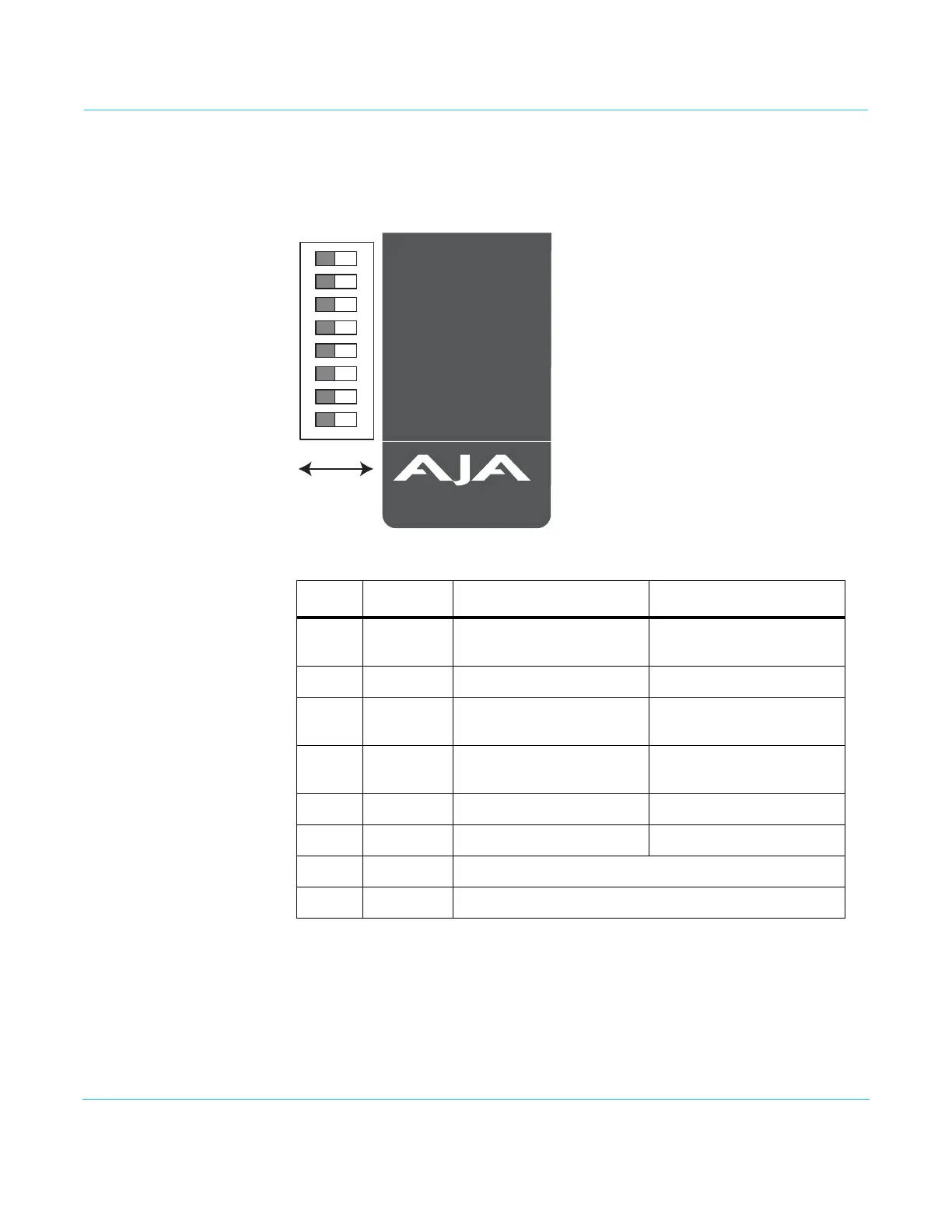
DIP Switches The user interface for the HD10A-Plus is an 8-switch DIP accessible through a cut-out in
the bottom of the unit. Use the DIP switches to configure the unit.
Figure 3. HD10A-Plus DIP Switches:
Table 1. HD10A-Plus DIP Switch Settings
Switch FUNCTION LEFT RIGHT
1 SD Video Selects Component input Selects Composite input
(use G/Y connector)
2 S-Video Selects SD Composite input Selects SD S-Video input
3 Pedestal Selects component SD Input
with pedestal
Selects component SD input
with no pedestal
4 Format Selects YPbPr component
input
Selects RGB component
input
5 NTSC-J Selects OFF Selects ON
6 Sync Selects Internal sync Selects External RGB sync
7 AUX 1 (not used)
8 AUX 2 (not used)
1 2 3 4 5 6 7 8
Made in USA
www.aja.com
COMP
OFF
ON
YPbPr
OFF
INT
OFF
OFF
SD VIDEO
S VIDEO
PEDESTAL
FORMAT
NTSC-J
SYNC
AUX1
AUX2
CMPST
ON
OFF
RGB
ON
EXT
ON
ON



 To Next Page