HD10A-Plus v1.0r1 www.aja.com
7
DIP Switch Settings
Summary
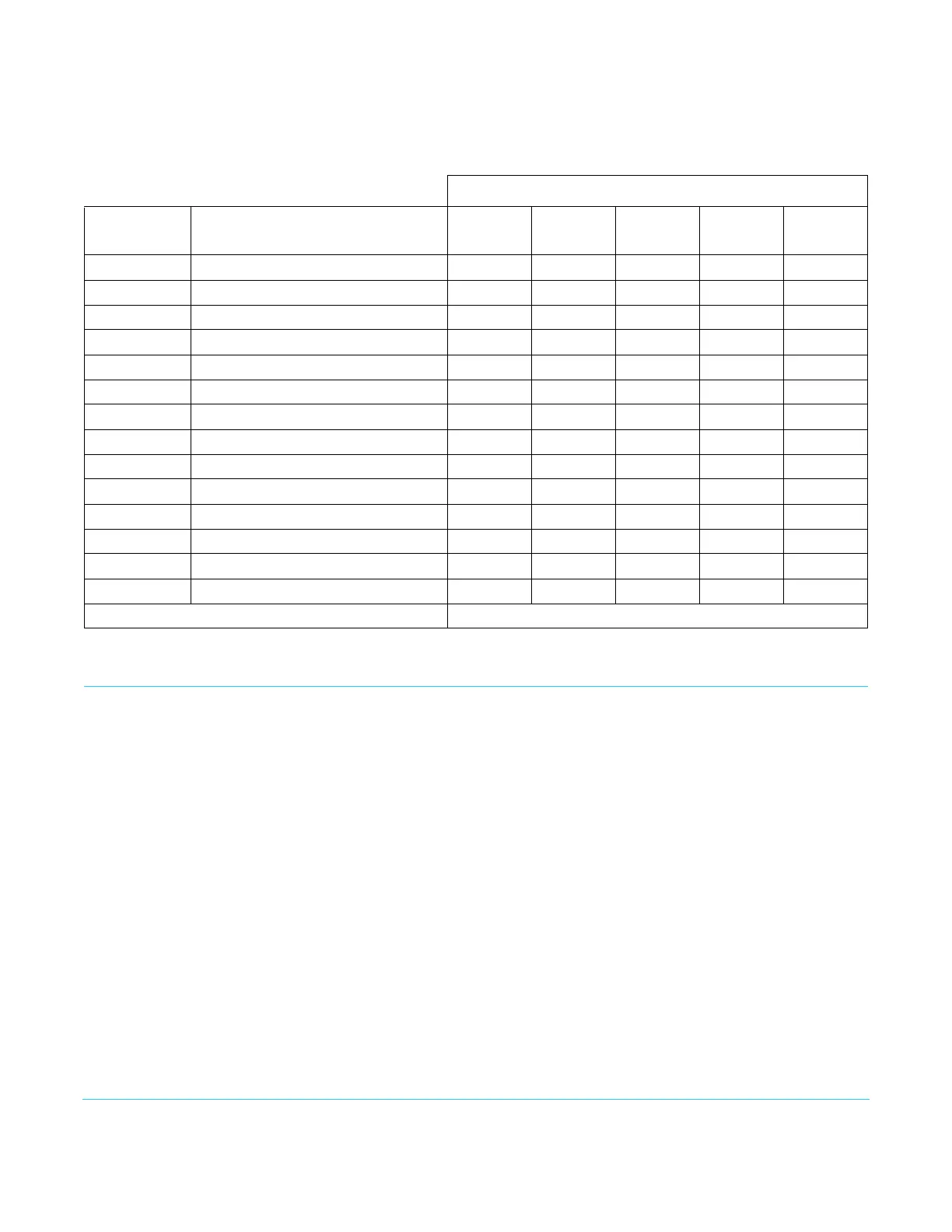
Analog video input formats and the DIP switch settings for them are shown in Table 2.
Installation
Typically, HD10A-Plus installation consists of the following:
1. Configure the DIP switch for the desired equipment configuration and video formats.
Power to the converter may be on or off when this is done (the converter will respond
to DIP switch changes at the time they are made, so power cycling is not necessary)
2. Ensure video equipment is properly connected to the converter. Check all converter
BNC connections.
3. Ensure the converter has a proper power supply source: +5 to +20VDC power. The
AJA power supply model DWP is included.
Table 2. Analog Input Format DIP Switch Settings
DIP Switch Settings
Input Std Input Analog Format
1
SD Video
2
S-Video
3
Pedestal
4
Format
5
NTSC-J
525i59.94 Composite NTSC Right Left X X Left
525i59.94 NTSC S-Video Right Right X X Left
525i59.94 Composite NTSC-J Right Left X X Right
525i59.94 NTSC-J S-Video Right Right X X Right
525i59.94 Component YPbPr SMPTE/EBU-N10 Left X Right Left Left
525i59.94 Component YPbPr Betacam Left X Left Left Left
525i59.94 Component YPbPr Betacam-J Left X X Left Right
625i50 Composite PAL + S-Video Right Left X X X
625i50 PAL S-Video Right Right X X X
625i50 Component YPbPr SMPTE/EBU-N10 Left X X Left X
720p * Component YPbPr SMPTE/EBU-N10 X X X Left X
720p * Component RGB X X X Right X
1080i/psf * Component YPbPr SMPTE/EBU-N10 X X X Left X
1080i/psf * Component RGB X X X Right X
* = all supported frame rates Note: X = don't care



 To Next Page