Ki Pro GO2 File Based Recorder/Player v5.0 7 www.aja.com
Supported USB Media
The USB media you use should be high quality, and have a speed rating
appropriate for your recording and playback requirements. AJA has tested
selected USB media, and the current list of these products is available at:
https://www.aja.com/products/ki-pro-go#support
SMB Support
Network Attached Storage (NAS) using SMB (Server Message Block) protocol is
available for both recording and playback, supporting SMB versions 3.1.1, 3.0.2,
3.0, 2.1, or 2.0.
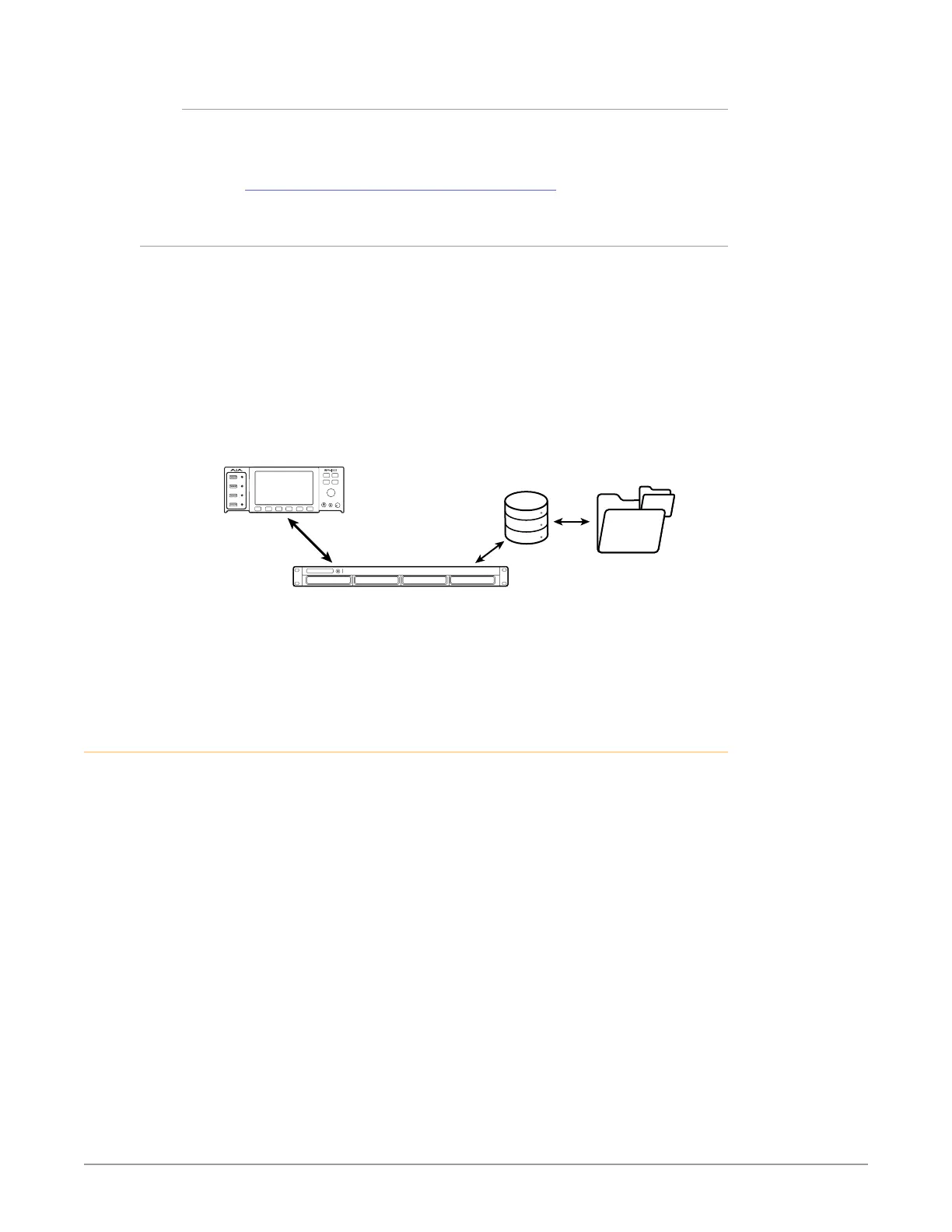
Ki Pro GO2 is able to record to a storage location on a network, and playback
from that location, using SMB when it is connected to an SMB Server via GigE.
The storage system (the SMB Server) will have a number of volumes on it, each
of which contain a number of folders. Ki Pro GO2 records into a folder (called
the Network Record Folder) located inside a Shared Folder located on one those
volumes (see Figure 1).
Figure 1. SMB Network Recording
Storage
Volumes
SMB Server
GigE
Network
Connection
Shared
Folder
Network
Record
Folder
Before you can use an SMB Server for recording with Ki Pro GO2, you must tell
the Ki Pro GO2 the path to the shared folder, and you can also define a path to a
sub-folder in that Shared Folder into which files will be record or played back. See
"32.5 SMB Server and Share" on page 40 for more information.
H.264 File Compatibility
Ki Pro GO2 is capable of playing back H.264 files created by common 3rd party
applications. This capability has been tested with the following applications:
• DaVinci Resolve
• Final Cut Pro X
• Avid Media Composer
• Adobe Premiere
• VLC (Windows)
• VLC (Macintosh) - The VLC file extension will need to be changed from “MV4”
to “mp4.
Other applications may produce files that can also be played back by Ki Pro GO2,
but AJA has only tested this capability with the above applications. Playback of
media files created by other applications is not guaranteed.



 To Next Page